Back to All Prompts
ChatGPT • 2:3
Explore Clothes Details — ChatGPT AI Photography Prompt Recipe on Faymas
Product & Brand by Alex Rivera

Explore Clothes Details

Exact Prompt Recipe Scroll to read more
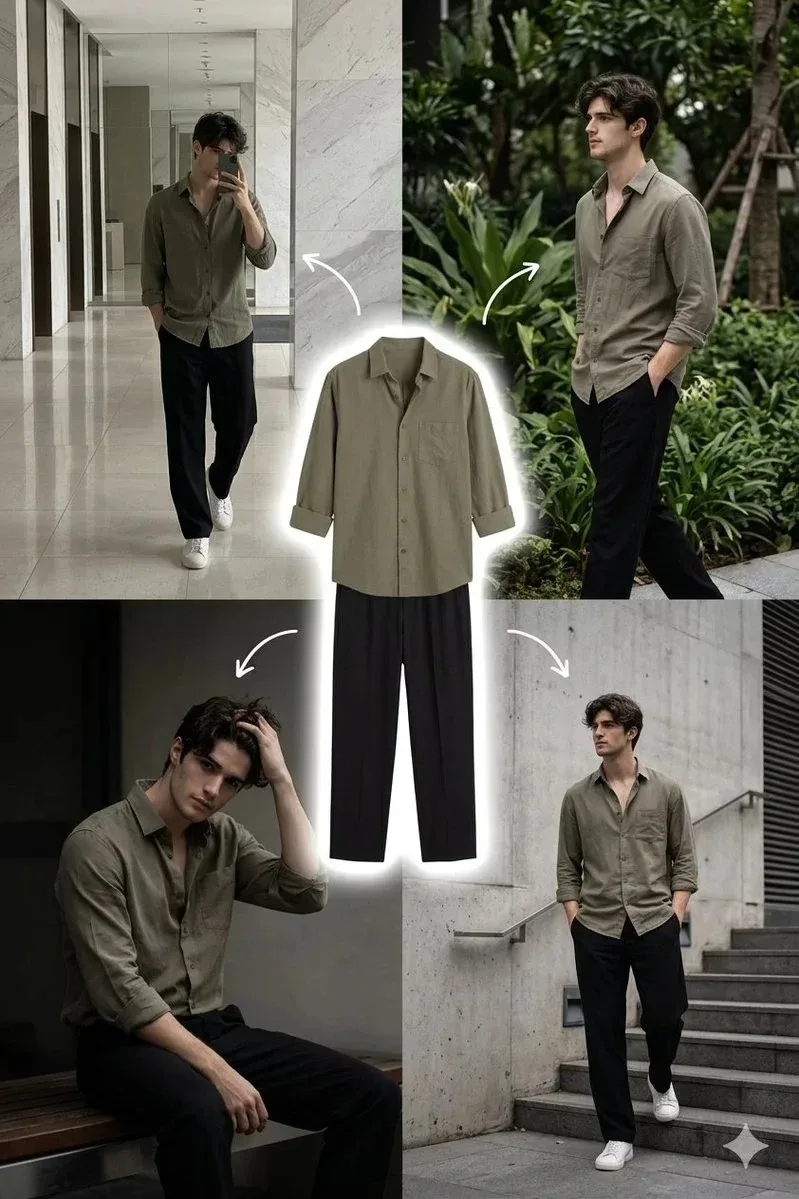
A stylish young man with medium-length wavy dark hair and a clean face, wearing a muted olive green button-up shirt with sleeves slightly rolled up, paired with loose fit black straight pants and white sneakers. The outfit looks minimal, modern, and aesthetic. Create a fashion collage layout with 5 sections: Center: a clean cutout of the outfit (olive shirt + black pants) placed vertically, slightly floating, with a soft white outline glow around it. Around the center: four different lifestyle shots of the same man wearing the outfit. Top left: indoor mirror selfie in a modern lobby with marble walls and shiny floor, holding phone covering face, relaxed walking pose. Top right: outdoor greenery setting with plants and trees, walking pose with hands in pockets, looking sideways. Bottom left: sitting pose on a bench or ledge, slightly leaning forward, one hand in hair, moody lighting. Bottom right: urban street or stairs background with concrete textures, walking casually with hands in pockets. Add minimal white curved arrows pointing from each lifestyle image toward the center outfit. Lighting: soft natural light, slightly warm tone, cinematic shadows, Instagram aesthetic. Color palette: neutral tones, olive green, black, white, soft greys. Style: clean, minimal, high-end fashion lookbook, Pinterest / Instagram aesthetic. Camera: 35mm lens, shallow depth of field, sharp subject focus. Quality: ultra realistic, high resolution, 4K, detailed fabric texture.
Scroll for more
App: ChatGPT Ratio: 2:3
Photo Reproduction Guide

How to Recreate This Photo in ChatGPT

Follow this quick 4-step workflow to generate an identical visual style using the exact parameters tested for Explore Clothes Details.

1

Copy the Recipe

Click the Copy Full Prompt button above. All key descriptors, lighting commands, and lens tags are copied directly to your clipboard.

2

Open ChatGPT

Open your ChatGPT app or web interface (e.g. ChatGPT chat, Bing Image Creator prompt bar, or Midjourney Discord).

3

Set 2:3 Ratio

Set your canvas size to 2:3. This gives you the natural composition shown above.

4

Customize Subject

Want your own face or a different subject? Simply change the character description or hair/clothing while keeping the lighting and camera tokens intact!

Pro Tip: To maintain this exact lighting in ChatGPT, keep the camera, aperture, and lighting keywords unmodified.
✓