Back to All Prompts
ChatGPT • 9:16
Kuldeep Meena โ€” ChatGPT AI Photography Prompt Recipe on Faymas
Product & Brand by Alex Rivera

Kuldeep Meena

Exact Prompt Recipe Scroll to read more
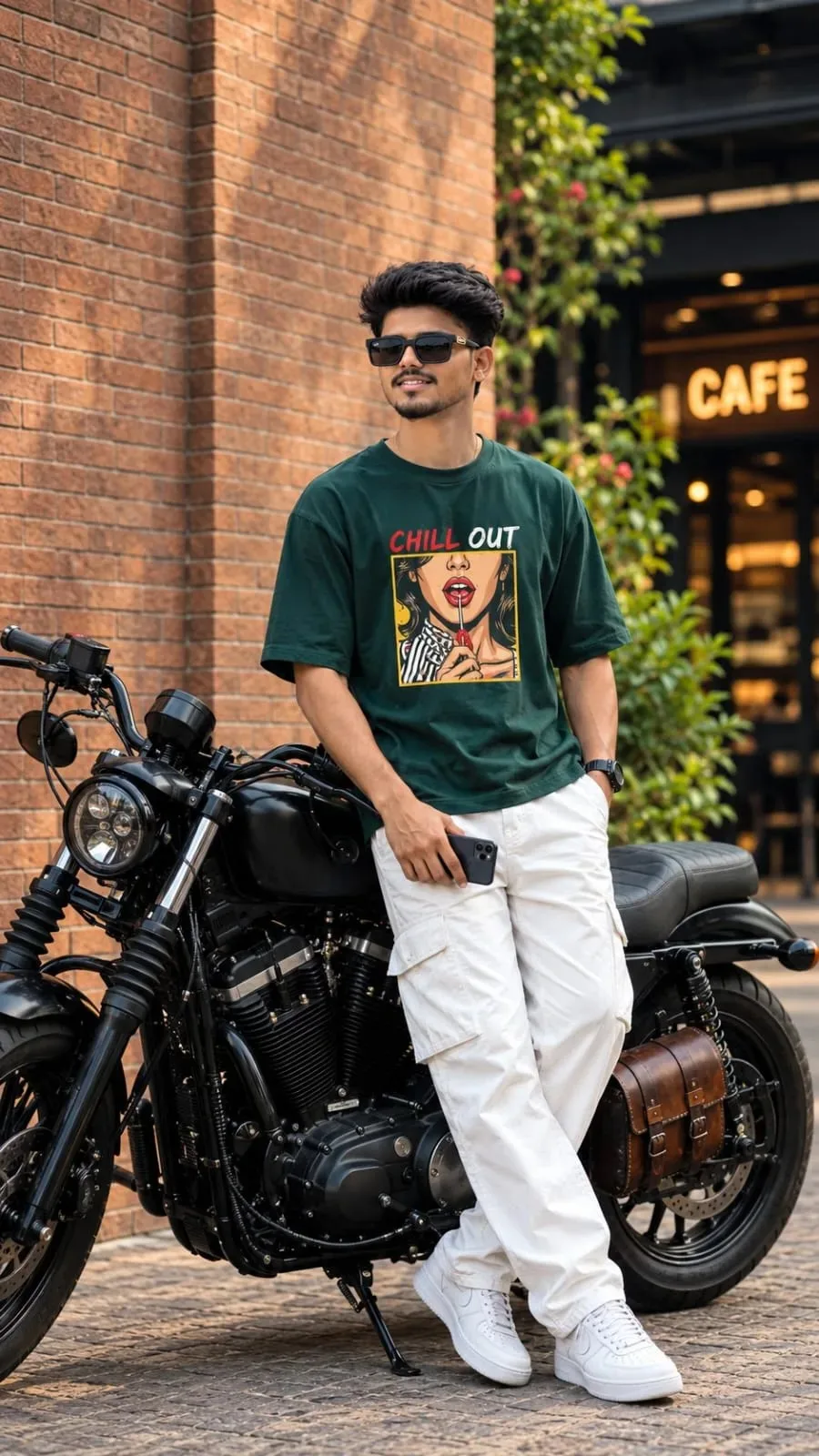
๐๐‘๐Ž๐Œ๐๐“ ๐Ÿ˜Ž > Create an ultra-realistic 8K UHD full-body street-style portrait using the uploaded reference photo. A stylish young Indian man with neatly styled black hair, a well-groomed beard, and black rectangular sunglasses, casually leaning against a premium black cruiser motorcycle. He is wearing an oversized dark forest-green T-shirt with a colorful graphic print and the text โ€œCHILL OUT,โ€ white cargo pants, clean white sneakers, and a black wristwatch. He holds a smartphone in one hand, with one hand resting in his pocket and his legs casually crossed. Background: A beautiful urban street with a warm reddish-brown brick wall, a modern cafรฉ entrance, subtle green plants, and a textured stone pavement. Keep the cafรฉ background softly blurred with natural depth of field. Lighting & Photography: Cinematic natural daylight, warm tones, realistic skin texture, sharp facial details, rich dark colors, professional DSLR photography, 85mm portrait lens, soft shadows, premium street-fashion editorial aesthetic, realistic motorcycle details, balanced composition, crisp focus, HDR, 8K UHD quality, vertical 9:16 aspect ratio. Important: Preserve the original face, facial features, hairstyle, beard, and natural skin tone from the uploaded reference photo. Keep the outfit, motorcycle, pose, and brick-wall background consistent with the reference. No face distortion, no extra fingers, no unnatural body proportions, no blurry subject, no watermark.
Scroll for more
App: ChatGPT Ratio: 9:16
Photo Reproduction Guide

How to Recreate This Photo in ChatGPT

Follow this quick 4-step workflow to generate an identical visual style using the exact parameters tested for Kuldeep Meena.

1

Copy the Recipe

Click the Copy Full Prompt button above. All key descriptors, lighting commands, and lens tags are copied directly to your clipboard.

2

Open ChatGPT

Open your ChatGPT app or web interface (e.g. ChatGPT chat, Bing Image Creator prompt bar, or Midjourney Discord).

3

Set 9:16 Ratio

Set your canvas size to 9:16. This gives you the natural composition shown above.

4

Customize Subject

Want your own face or a different subject? Simply change the character description or hair/clothing while keeping the lighting and camera tokens intact!

Pro Tip: To maintain this exact lighting in ChatGPT, keep the camera, aperture, and lighting keywords unmodified.
โœ“