Back to All Prompts
ChatGPT • 4:5
Turn Your Photos into "Yourself on the Wall — ChatGPT AI Photography Prompt Recipe on Faymas
Product & Brand by Alex Rivera

Turn Your Photos into "Yourself on the Wall

Exact Prompt Recipe Scroll to read more
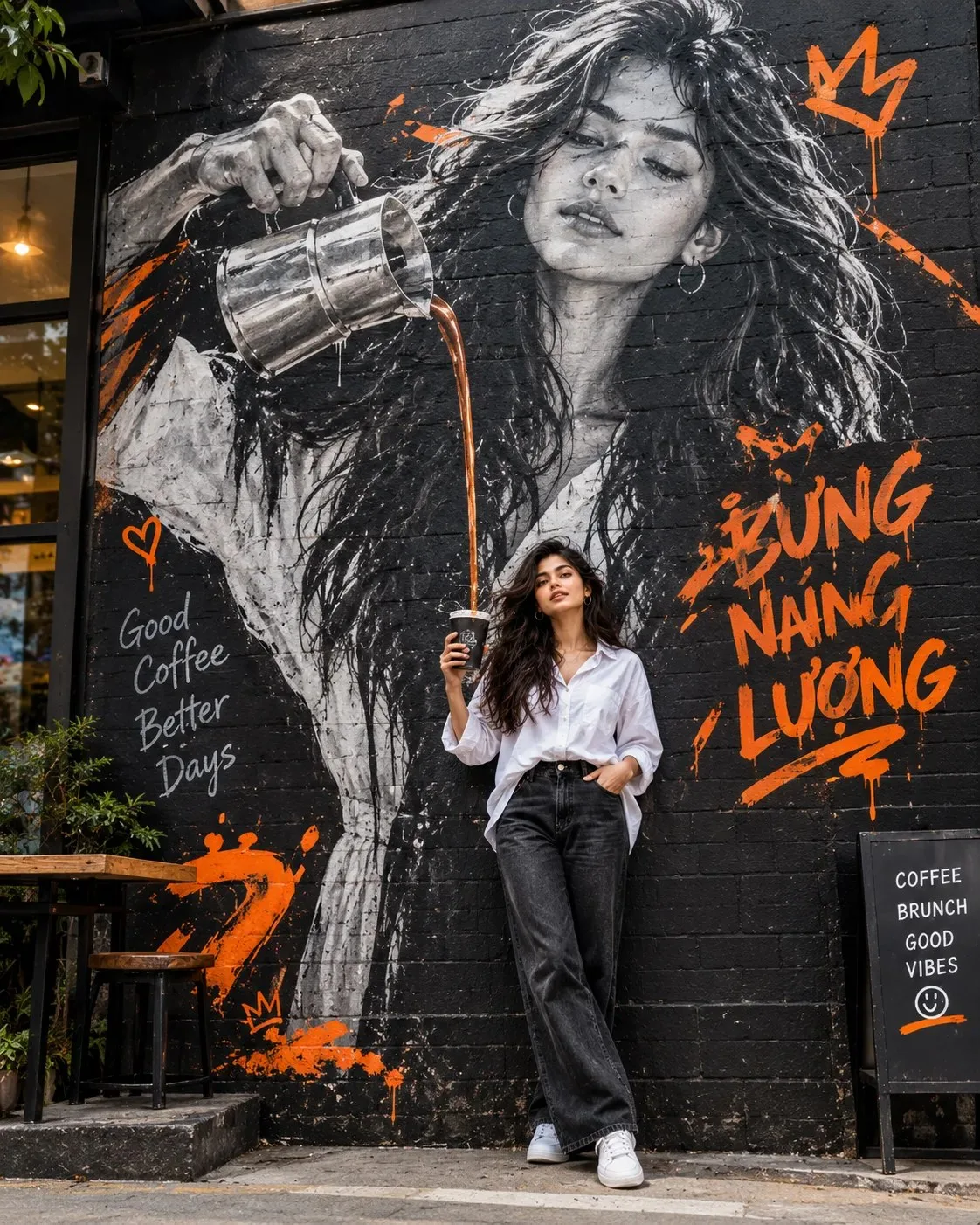
Turn Your Photos into "Yourself on the Wall" Literally "painting" yourself onto a street graffiti wall and snapping a pic with your real-life self! 📸 Grab the prompts below 👇 Use the person in the uploaded image as the main character. Keep the facial features, structure, age, skin tone, and natural expression exactly as they are. Don't change who they are or make them look fake/plastic. Create a set of 4:5 vertical street-style editorial shots. The vibe is a trendy urban alley cafe with a huge black brick wall background. On that wall, create a massive B&W realistic mural of the same person from the ref photo, pouring coffee down from a metal pot. ☕️ The real person stands right under the mural holding a cup, perfectly lined up with the stream of coffee coming down. It creates such a fun, artistic, and interactive visual effect—totally viral material! ✨ For the female subject: Wearing an oversized white shirt (loose fit, super chill and modern), naturally tucked into jeans or dark trousers, paired with clean sneakers. No stiff corporate looks or tight clothes, please! 👟 The mural needs that realistic street art aesthetic. Mostly black and white but with bold orange accents! Think expressive brushstrokes, paint drips, and short graffiti text like "BỪNG NĂNG LƯỢNG". Lighting should be neutral daylight with natural skin tones (no weird yellow cast). Camera angle slightly low, editorial style, showing full body. Pose should be relaxed and natural—no chin-on-hand poses! 🙅‍♀️ Hyper-realistic photography style, cinematic depth of field, realistic hands, accurate coffee flow, natural proportions, real skin texture... basically high detail, 8K quality. Just keep the core concept fresh and visually impactful: real you interacting with a giant mural! 🎨
Scroll for more
App: ChatGPT Ratio: 4:5
Photo Reproduction Guide

How to Recreate This Photo in ChatGPT

Follow this quick 4-step workflow to generate an identical visual style using the exact parameters tested for Turn Your Photos into "Yourself on the Wall.

1

Copy the Recipe

Click the Copy Full Prompt button above. All key descriptors, lighting commands, and lens tags are copied directly to your clipboard.

2

Open ChatGPT

Open your ChatGPT app or web interface (e.g. ChatGPT chat, Bing Image Creator prompt bar, or Midjourney Discord).

3

Set 4:5 Ratio

Set your canvas size to 4:5. This gives you the natural composition shown above.

4

Customize Subject

Want your own face or a different subject? Simply change the character description or hair/clothing while keeping the lighting and camera tokens intact!

Pro Tip: To maintain this exact lighting in ChatGPT, keep the camera, aperture, and lighting keywords unmodified.
✓