Back to All Prompts
ChatGPT • 9:16
The Gentleman in Black – Cinematic Bearded Portrait — ChatGPT AI Photography Prompt Recipe on Faymas
Photography by Alex Rivera

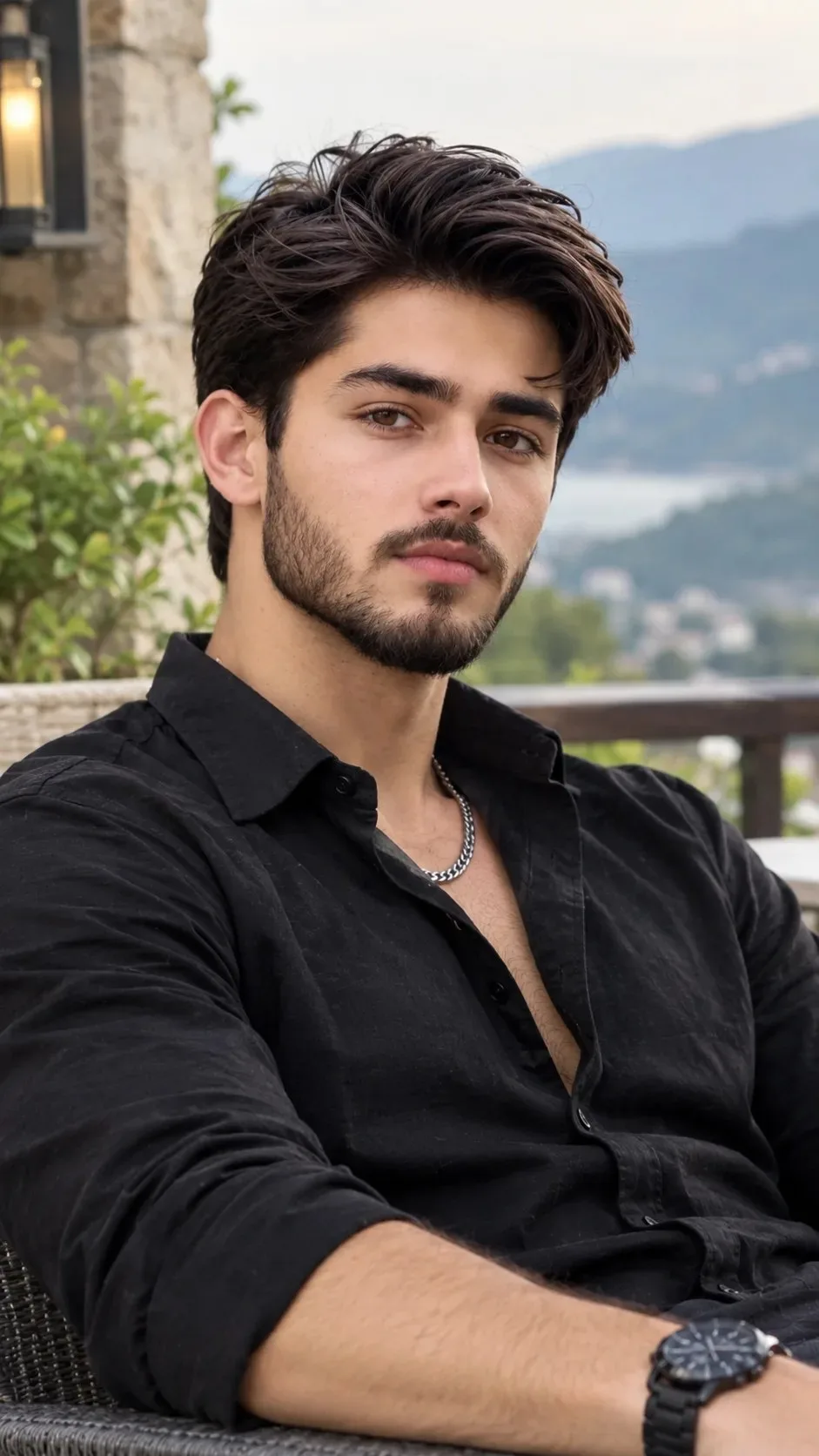
The Gentleman in Black – Cinematic Bearded Portrait

Exact Prompt Recipe Scroll to read more
Create an ultra-realistic, photorealistic portrait of a handsome young adult man with thick, voluminous dark brown hair styled in a textured, swept-back look. He has expressive dark brown eyes, naturally thick eyebrows, a well-defined jawline, a straight nose, and a neatly trimmed full beard with a connected mustache. His skin has a natural, warm complexion with realistic pores and subtle facial details. He is wearing a premium black button-down shirt with the top buttons casually undone, revealing a subtle silver chain necklace. The sleeves are rolled up to his forearms, giving him a relaxed yet masculine appearance. A stylish black wristwatch completes his sophisticated outfit. The man is seated comfortably in a dark woven outdoor chair, leaning back slightly with one arm resting naturally. His body is angled slightly toward the camera, and he looks directly into the lens with a calm, confident, and mysterious expression. The background features a luxurious stone terrace with rustic stone walls, a warm glowing wall lantern, lush green plants, and a beautiful distant mountain valley with a lake partially visible through the soft atmospheric haze. The background is naturally blurred, creating a cinematic depth-of-field effect. Use soft natural daylight, balanced highlights and shadows, realistic skin texture, detailed beard strands, sharp focus on the face, professional DSLR photography, an 85mm portrait lens, f/1.8 aperture, creamy bokeh, rich black tones, natural color grading, and premium editorial fashion photography. Composition: Vertical 9:16 portrait, medium close-up to three-quarter framing, realistic body proportions, natural pose, high-resolution details, and a sophisticated masculine aesthetic. Important: Preserve facial symmetry and realistic anatomy. Avoid artificial skin smoothing, excessive sharpening, distorted hands, unrealistic facial features, cartoon effects, and oversaturated colors. The final result should look like a genuine professional outdoor fashion photograph.
Scroll for more
App: ChatGPT Ratio: 9:16

Suggested Prompts

More in Photography →
Photo Reproduction Guide

How to Recreate This Photo in ChatGPT

Follow this quick 4-step workflow to generate an identical visual style using the exact parameters tested for The Gentleman in Black – Cinematic Bearded Portrait.

1

Copy the Recipe

Click the Copy Full Prompt button above. All key descriptors, lighting commands, and lens tags are copied directly to your clipboard.

2

Open ChatGPT

Open your ChatGPT app or web interface (e.g. ChatGPT chat, Bing Image Creator prompt bar, or Midjourney Discord).

3

Set 9:16 Ratio

Set your canvas size to 9:16. This gives you the natural composition shown above.

4

Customize Subject

Want your own face or a different subject? Simply change the character description or hair/clothing while keeping the lighting and camera tokens intact!

Pro Tip: To maintain this exact lighting in ChatGPT, keep the camera, aperture, and lighting keywords unmodified.
✓