Back to All Prompts
ChatGPT • 2:3
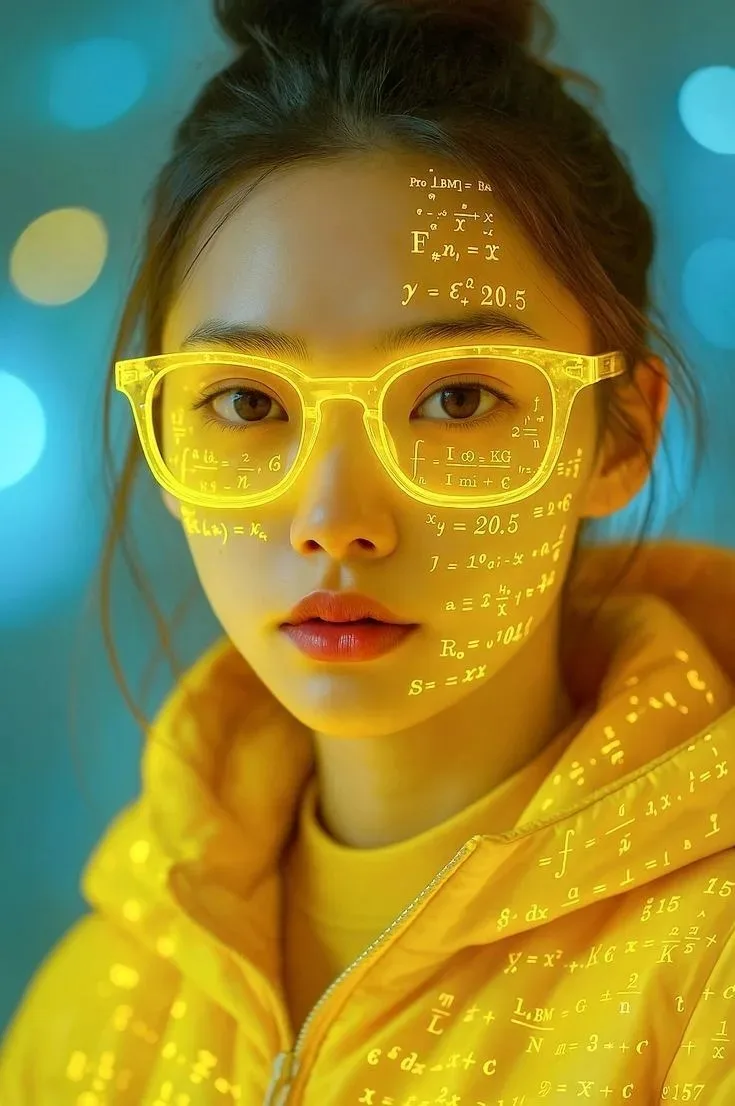
The Genius Code – Futuristic Science Portrait — ChatGPT AI Photography Prompt Recipe on Faymas
Logo & Identity by Alex Rivera

The Genius Code – Futuristic Science Portrait

Exact Prompt Recipe Scroll to read more
Create a photorealistic vertical 9:16 futuristic science-themed portrait inspired by the uploaded reference image. Feature a young woman in a close-up composition, facing the camera with a calm, intelligent, confident expression. She has her dark hair tied into a slightly messy high bun with a few loose strands framing her face. She wears bright translucent neon-yellow glasses and a matching futuristic yellow technical jacket with a high collar. Project glowing mathematical equations, physics formulas, scientific symbols, numbers, and geometric calculations across her forehead, cheeks, glasses lenses, neck, and jacket. The formulas should look like realistic golden-yellow holographic light projections, naturally following the contours of her face and clothing. Use a teal/cyan futuristic background with soft circular bokeh lights in blue and yellow. Strong warm yellow light from the projected formulas should illuminate her face, glasses, and jacket, creating a striking contrast between cyan ambient lighting and golden-yellow projection light. Ultra-realistic skin texture, realistic eyes, detailed hair strands, accurate facial anatomy, realistic translucent glasses, glowing reflections, cinematic depth of field, soft bokeh, high-detail fabric texture, futuristic editorial photography, premium color grading, sharp facial focus, subtle film grain. No cartoon, no illustration, no plastic skin, no distorted facial features, no extra eyes, no extra fingers, no watermark.
Scroll for more
App: ChatGPT Ratio: 2:3
Photo Reproduction Guide

How to Recreate This Photo in ChatGPT

Follow this quick 4-step workflow to generate an identical visual style using the exact parameters tested for The Genius Code – Futuristic Science Portrait.

1

Copy the Recipe

Click the Copy Full Prompt button above. All key descriptors, lighting commands, and lens tags are copied directly to your clipboard.

2

Open ChatGPT

Open your ChatGPT app or web interface (e.g. ChatGPT chat, Bing Image Creator prompt bar, or Midjourney Discord).

3

Set 2:3 Ratio

Set your canvas size to 2:3. This gives you the natural composition shown above.

4

Customize Subject

Want your own face or a different subject? Simply change the character description or hair/clothing while keeping the lighting and camera tokens intact!

Pro Tip: To maintain this exact lighting in ChatGPT, keep the camera, aperture, and lighting keywords unmodified.
✓