Back to All Prompts
ChatGPT • 9:16
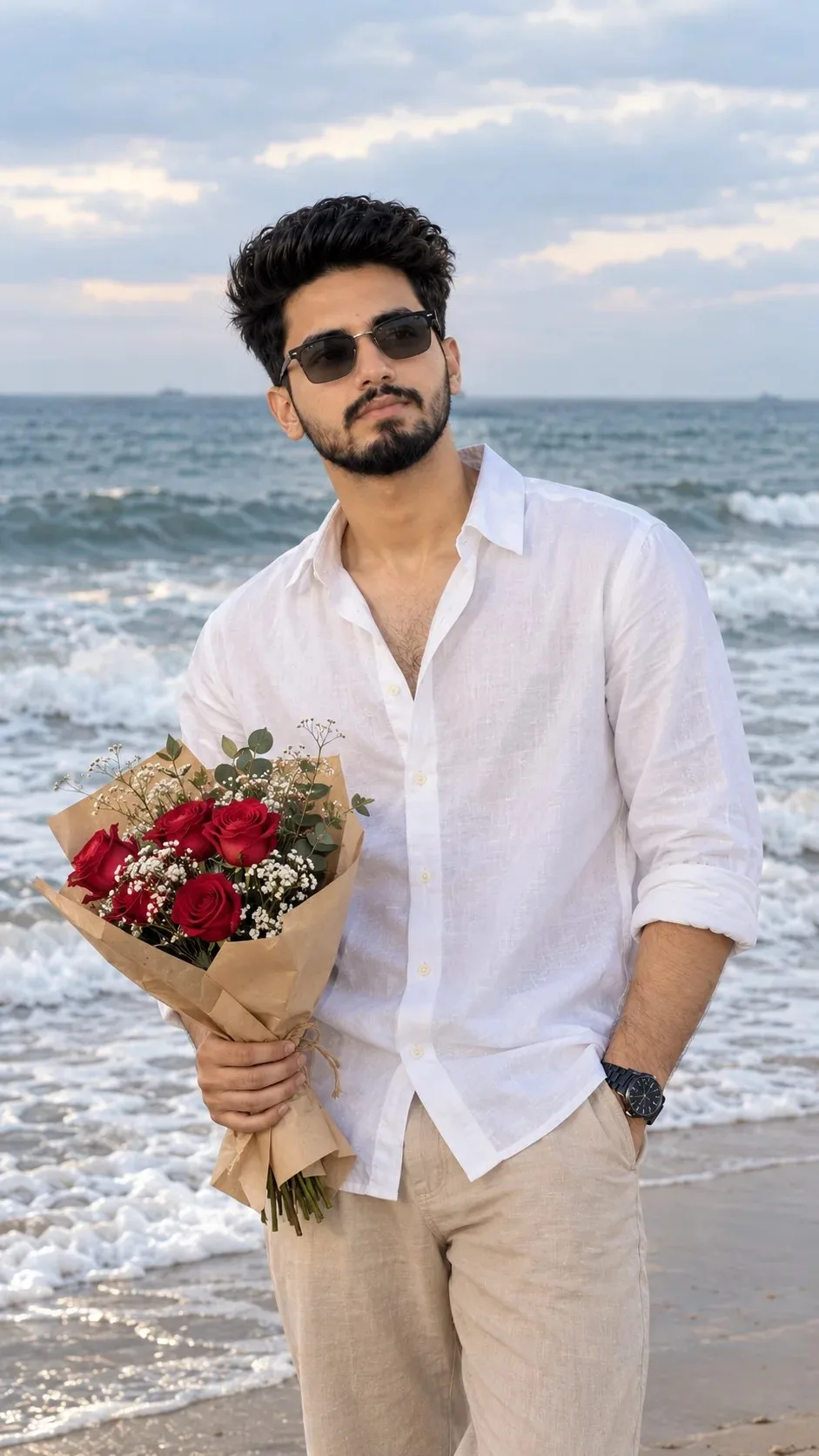
Romantic Beach Portrait with Flowers | Ultra Realistic AI Photo — ChatGPT AI Photography Prompt Recipe on Faymas
Social Media by Alex Rivera

Romantic Beach Portrait with Flowers | Ultra Realistic AI Photo

Exact Prompt Recipe Scroll to read more
Create an ultra-realistic 8K portrait of the exact man from the uploaded reference image, preserving his original facial identity, facial features, natural skin tone, hairstyle, and facial proportions without altering his appearance. Capture a natural, candid moment on a beach, with the man standing near the shoreline as gentle ocean waves roll behind him. He is wearing a relaxed white linen button-down shirt with the top buttons undone and sleeves rolled up to his forearms, paired with beige trousers and a black wristwatch. He holds a small bouquet of fresh red roses, delicate white baby's breath flowers, and green foliage wrapped in natural brown kraft paper in one hand, while his other hand rests casually inside his trouser pocket. His body is angled slightly toward the camera, with his head turned gently to the side as he gazes into the distance with a subtle, natural smile. His dark, naturally tousled hair moves slightly in the sea breeze, creating a realistic and effortless appearance. The background features a vast ocean with soft waves, white sea foam washing onto the sandy shoreline, and a cloudy pale-blue sky blending naturally into the horizon. Use soft, diffused natural daylight, realistic skin texture, accurate fabric details, gentle shadows, and authentic ocean colors. Photograph the scene with a professional full-frame DSLR camera and an 85mm portrait lens, using a natural depth of field, crisp facial details, balanced exposure, and subtle background separation. Compose the image in a vertical 9:16 aspect ratio, framing the man from approximately mid-thigh upward while keeping the bouquet clearly visible. The final image should look like a genuine professional beach photoshoot, with natural colors, lifelike details, realistic lighting, and an effortlessly romantic atmosphere. Preserve the exact face from the reference image. No artificial skin smoothing, exaggerated expressions, excessive color grading, distorted hands, extra fingers, text, or watermark.
Scroll for more
App: ChatGPT Ratio: 9:16

Suggested Prompts

More in Social Media →
Photo Reproduction Guide

How to Recreate This Photo in ChatGPT

Follow this quick 4-step workflow to generate an identical visual style using the exact parameters tested for Romantic Beach Portrait with Flowers | Ultra Realistic AI Photo.

1

Copy the Recipe

Click the Copy Full Prompt button above. All key descriptors, lighting commands, and lens tags are copied directly to your clipboard.

2

Open ChatGPT

Open your ChatGPT app or web interface (e.g. ChatGPT chat, Bing Image Creator prompt bar, or Midjourney Discord).

3

Set 9:16 Ratio

Set your canvas size to 9:16. This gives you the natural composition shown above.

4

Customize Subject

Want your own face or a different subject? Simply change the character description or hair/clothing while keeping the lighting and camera tokens intact!

Pro Tip: To maintain this exact lighting in ChatGPT, keep the camera, aperture, and lighting keywords unmodified.
✓