Back to All Prompts
ChatGPT • 9:16
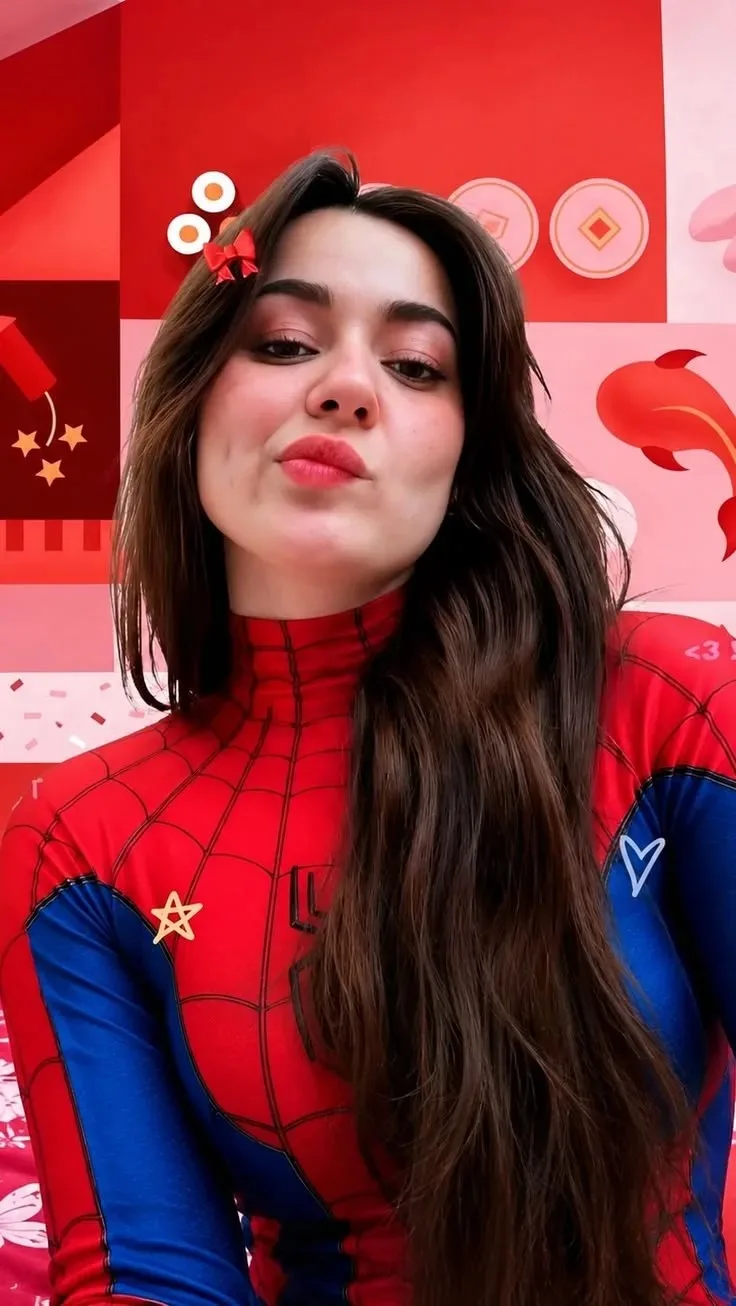
Red & Blue Spider-Girl Selfie — ChatGPT AI Photography Prompt Recipe on Faymas
Illustration & 3D by Alex Rivera

Red & Blue Spider-Girl Selfie

Exact Prompt Recipe Scroll to read more
Create an ultra-realistic vertical portrait selfie of a young woman wearing a stylish red-and-blue Spider-Man-inspired bodysuit with a black web pattern. She has long, thick, naturally wavy dark-brown hair flowing over her shoulders and down her torso, with a small red bow hair clip on the left side. She is positioned very close to the camera in a playful low-angle selfie, looking directly into the lens with a cute pout / kiss-face expression, slightly raised chin, relaxed eyes, and natural facial features. Preserve realistic facial proportions, natural skin texture, subtle cheek dimples, detailed eyes, lips, eyebrows, and authentic hair strands. The background is a vibrant red and pink themed decorative room, featuring geometric panels, festive symbols, small heart and star decorations, and soft colorful accents. Keep the background slightly softer than the subject while maintaining recognizable details. Photography: ultra-photorealistic smartphone selfie photography, close-up framing, slightly low camera angle, natural indoor lighting, realistic skin pores and texture, detailed hair strands, authentic fabric texture, subtle depth of field, balanced exposure, cinematic color grading, sharp facial details, realistic proportions, high dynamic range, 8K UHD, vertical 9:16 composition.
Scroll for more
App: ChatGPT Ratio: 9:16
Photo Reproduction Guide

How to Recreate This Photo in ChatGPT

Follow this quick 4-step workflow to generate an identical visual style using the exact parameters tested for Red & Blue Spider-Girl Selfie.

1

Copy the Recipe

Click the Copy Full Prompt button above. All key descriptors, lighting commands, and lens tags are copied directly to your clipboard.

2

Open ChatGPT

Open your ChatGPT app or web interface (e.g. ChatGPT chat, Bing Image Creator prompt bar, or Midjourney Discord).

3

Set 9:16 Ratio

Set your canvas size to 9:16. This gives you the natural composition shown above.

4

Customize Subject

Want your own face or a different subject? Simply change the character description or hair/clothing while keeping the lighting and camera tokens intact!

Pro Tip: To maintain this exact lighting in ChatGPT, keep the camera, aperture, and lighting keywords unmodified.
✓