Back to All Prompts
ChatGPT • 2:3
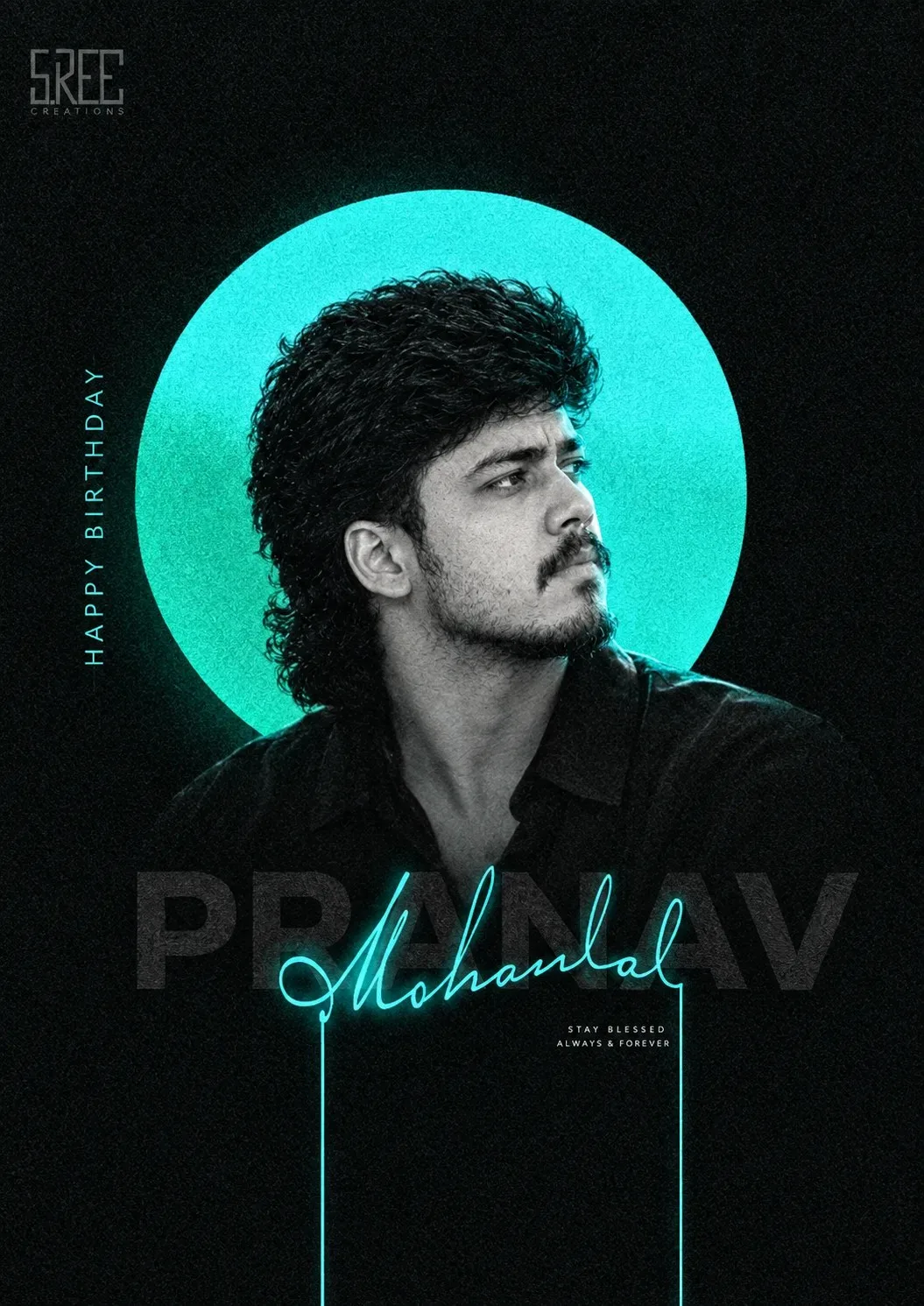
PRANAV — Stay Blessed, Always & Forever — ChatGPT AI Photography Prompt Recipe on Faymas
Logo & Identity by Alex Rivera

PRANAV — Stay Blessed, Always & Forever

Exact Prompt Recipe Scroll to read more
Create a premium minimalist cinematic birthday portrait poster in a dark, modern editorial style. Feature a young South Indian man in a black shirt, shown from the chest up in a three-quarter side profile, looking confidently toward the upper right. Use a monochrome black-and-white photographic treatment for the subject, with highly detailed natural facial texture, wavy dark hair, subtle beard and mustache, and dramatic studio lighting. Place a large glowing cyan/teal circular halo directly behind his head, creating a striking neon silhouette against a completely black textured background. Add subtle film grain, fine noise, soft cyan glow, and understated cinematic contrast. Typography should be a major part of the design. Behind the signature, place enormous dark-gray bold uppercase text: “PRANAV” Overlay the name with an elegant handwritten neon-cyan signature script reading “Mohanlal”. On the left side, vertically arrange spaced-out cyan letters: “HAPPY BIRTHDAY” Add a small refined message beneath the signature: “STAY BLESSED ALWAYS & FOREVER” Place a subtle professional production/logo mark in the upper-left corner. Keep the layout spacious, sophisticated, and premium. Use black, charcoal gray, white, and electric cyan as the dominant palette. The final result should resemble a high-end Indian celebrity birthday poster / fashion editorial campaign, with sharp typography, realistic portrait photography, neon accents, elegant negative space, subtle grain, and a luxurious contemporary aesthetic. Vertical 2:3 composition, ultra-detailed, professional graphic design, photorealistic.
Scroll for more
App: ChatGPT Ratio: 2:3
Photo Reproduction Guide

How to Recreate This Photo in ChatGPT

Follow this quick 4-step workflow to generate an identical visual style using the exact parameters tested for PRANAV — Stay Blessed, Always & Forever.

1

Copy the Recipe

Click the Copy Full Prompt button above. All key descriptors, lighting commands, and lens tags are copied directly to your clipboard.

2

Open ChatGPT

Open your ChatGPT app or web interface (e.g. ChatGPT chat, Bing Image Creator prompt bar, or Midjourney Discord).

3

Set 2:3 Ratio

Set your canvas size to 2:3. This gives you the natural composition shown above.

4

Customize Subject

Want your own face or a different subject? Simply change the character description or hair/clothing while keeping the lighting and camera tokens intact!


Pro Tip: To maintain this exact lighting in ChatGPT, keep the camera, aperture, and lighting keywords unmodified.
✓