Back to All Prompts
ChatGPT • 9:16
Modern Monochrome Street Style ✨ — ChatGPT AI Photography Prompt Recipe on Faymas
Presentation by Alex Rivera

Modern Monochrome Street Style ✨

Exact Prompt Recipe Scroll to read more
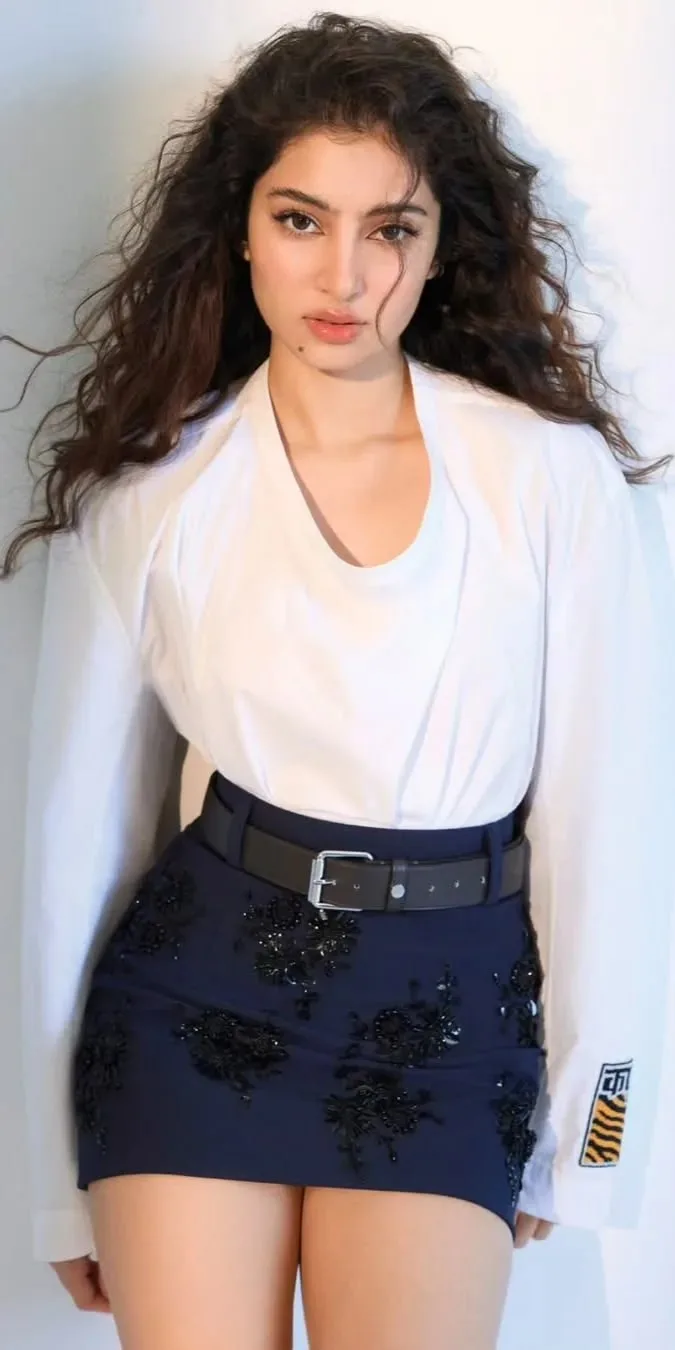
A photorealistic young woman with long, naturally voluminous wavy dark hair, standing confidently and looking directly into the camera. She wears a clean oversized white long-sleeve top layered over a fitted white inner shirt, paired with a high-waisted dark navy mini skirt featuring subtle black floral embroidery and a wide black leather belt with a silver rectangular buckle. Minimal accessories, natural makeup, soft defined eyes, glossy neutral lips, and a relaxed expression. Bright minimalist white studio background with soft diffused lighting, gentle shadows, realistic skin texture, detailed fabric and embroidery, natural hair strands, editorial fashion photography, clean modern aesthetic, sharp focus, vertical portrait composition, high-end magazine look, 4K photorealism.
Scroll for more
App: ChatGPT Ratio: 9:16

Suggested Prompts

More in Presentation →
Photo Reproduction Guide

How to Recreate This Photo in ChatGPT

Follow this quick 4-step workflow to generate an identical visual style using the exact parameters tested for Modern Monochrome Street Style ✨.

1

Copy the Recipe

Click the Copy Full Prompt button above. All key descriptors, lighting commands, and lens tags are copied directly to your clipboard.

2

Open ChatGPT

Open your ChatGPT app or web interface (e.g. ChatGPT chat, Bing Image Creator prompt bar, or Midjourney Discord).

3

Set 9:16 Ratio

Set your canvas size to 9:16. This gives you the natural composition shown above.

4

Customize Subject

Want your own face or a different subject? Simply change the character description or hair/clothing while keeping the lighting and camera tokens intact!

Pro Tip: To maintain this exact lighting in ChatGPT, keep the camera, aperture, and lighting keywords unmodified.
✓