Back to All Prompts
ChatGPT • 4:5
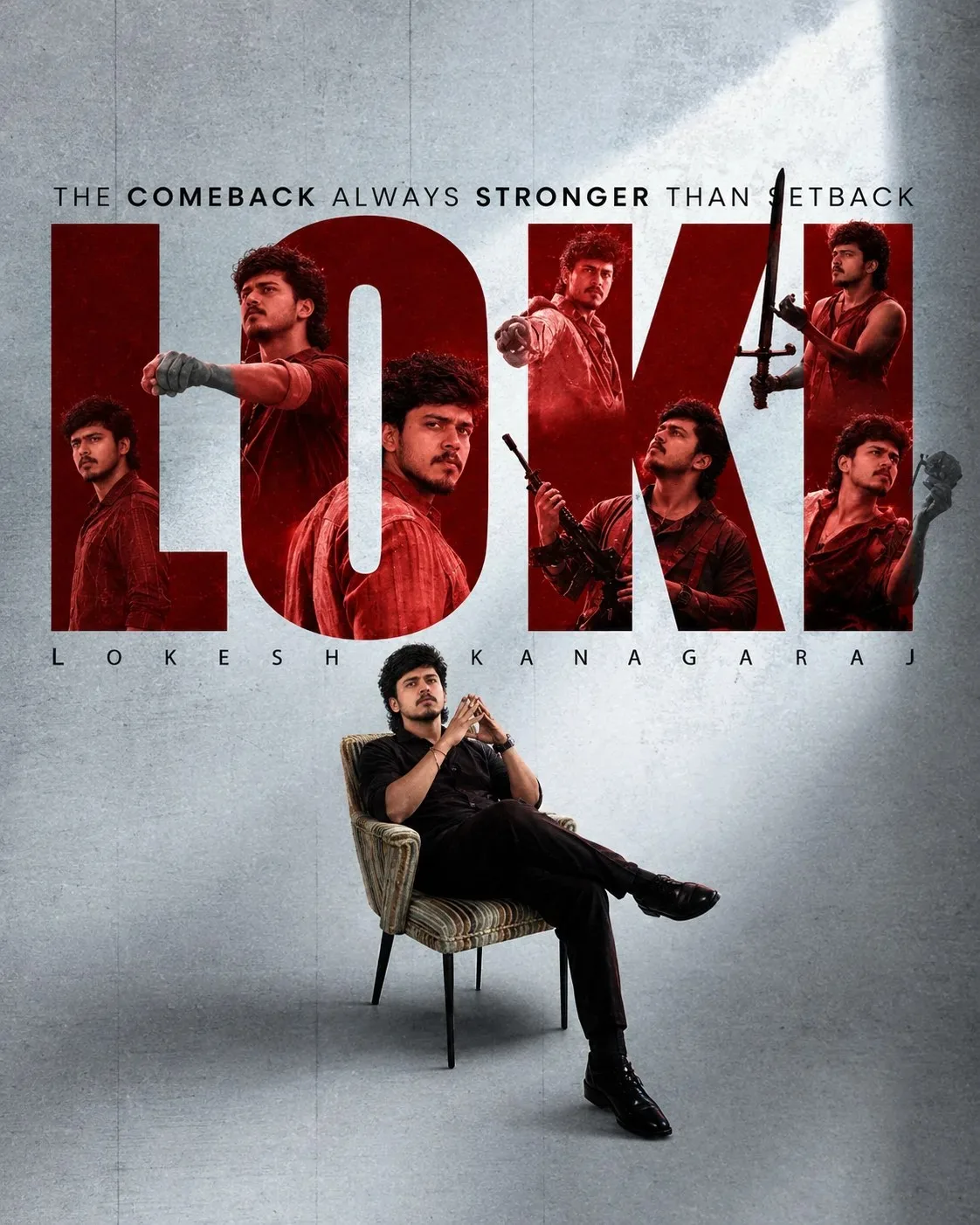
LOKI — The Comeback Is Always Stronger Than the Setback — ChatGPT AI Photography Prompt Recipe on Faymas
Presentation by Alex Rivera

LOKI — The Comeback Is Always Stronger Than the Setback

Exact Prompt Recipe Scroll to read more
Create a cinematic, high-end Indian action movie poster inspired by a powerful comeback theme. Use the uploaded image as the main visual reference. Feature a young Indian man seated confidently in a vintage textured armchair, wearing an all-black outfit with black boots, legs crossed, hands held thoughtfully near his face, with a calm, intense, fearless expression. Behind him, create a dramatic oversized “LOKI” typography composition in deep crimson red, with multiple cinematic action portraits of the same character integrated inside and around the letters—different powerful poses including standing, pointing forward, holding a weapon, and intense heroic expressions. Use a dark red monochromatic cinematic treatment for the action portraits. Background: textured cool-gray concrete wall, subtle vertical panel lines, soft atmospheric lighting, realistic shadows, premium editorial composition. Add the tagline at the top: “THE COMEBACK ALWAYS STRONGER THAN SETBACK” Add “LOKESH KANAGARAJ” beneath the main title in widely spaced uppercase typography. Style: ultra-realistic, cinematic Indian action poster, dramatic red-and-gray color palette, high contrast, realistic skin and fabric textures, professional movie-poster composition, sharp details, subtle film grain, studio-quality lighting, 8K, premium theatrical poster aesthetic, vertical 4:5. I can also make this prompt more Leonardo/Flux/Midjourney-ready while keeping the same composition
Scroll for more
App: ChatGPT Ratio: 4:5

Suggested Prompts

More in Presentation →
Photo Reproduction Guide

How to Recreate This Photo in ChatGPT

Follow this quick 4-step workflow to generate an identical visual style using the exact parameters tested for LOKI — The Comeback Is Always Stronger Than the Setback.

1

Copy the Recipe

Click the Copy Full Prompt button above. All key descriptors, lighting commands, and lens tags are copied directly to your clipboard.

2

Open ChatGPT

Open your ChatGPT app or web interface (e.g. ChatGPT chat, Bing Image Creator prompt bar, or Midjourney Discord).

3

Set 4:5 Ratio

Set your canvas size to 4:5. This gives you the natural composition shown above.

4

Customize Subject

Want your own face or a different subject? Simply change the character description or hair/clothing while keeping the lighting and camera tokens intact!

Pro Tip: To maintain this exact lighting in ChatGPT, keep the camera, aperture, and lighting keywords unmodified.
✓