Back to All Prompts
Gemini • 9:16
Kuldeep Meena — Gemini AI Photography Prompt Recipe on Faymas
Wallpapers by Alex Rivera

Kuldeep Meena

Exact Prompt Recipe Scroll to read more
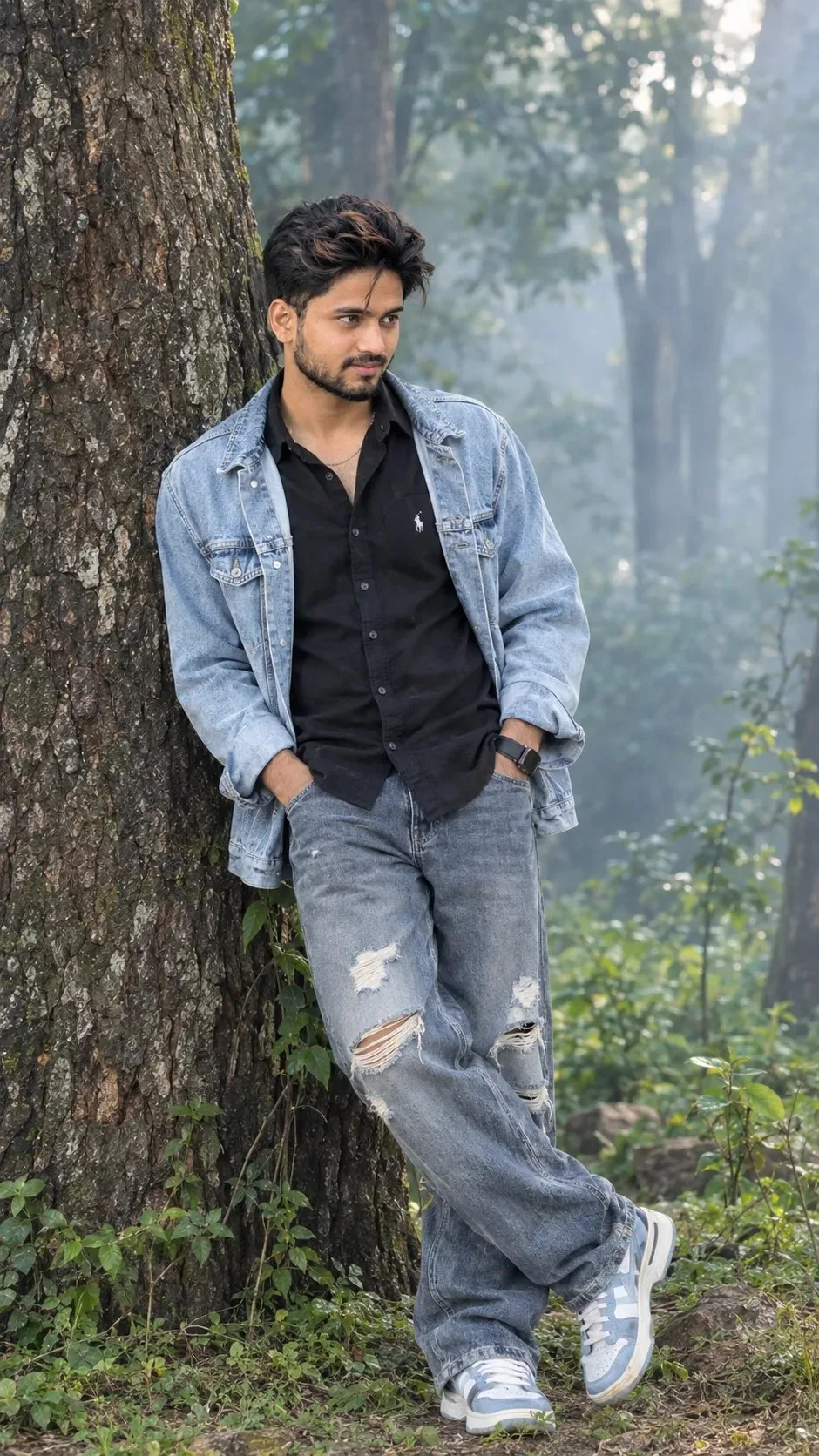
Create a highly photorealistic, cinematic full-body portrait of a stylish young South Asian man (early 20s) leaning casually against a large, textured tree trunk in a peaceful, misty forest. Facial Features: Thick, dark, voluminous wavy hair styled naturally with a slightly messy fringe, a defined jawline, dark eyes, a light mustache, and subtle stubble. He has a calm, confident expression and is gazing thoughtfully toward the right side of the frame. Outfit: An oversized, light-blue washed denim jacket worn open over a black button-up shirt with a small white chest logo. He wears loose-fitting, faded blue-grey ripped jeans with distressed holes at the knees and thighs, along with chunky white and pale-blue sneakers. Pose: He leans his back and shoulder against the tree, with both hands tucked casually into his front pockets. His legs are crossed naturally at the ankles, creating a relaxed, effortless streetwear pose. Environment: A lush green forest with tall trees, soft mist, and dense foliage. A large, rough-barked tree fills the left side of the frame. The background features dreamy blue-grey atmospheric fog, softly blurred trees, and patches of sunlight filtering through the leaves. Lighting & Camera: Soft, diffused natural daylight, cinematic cool tones, subtle highlights, realistic skin texture, detailed denim fabric, shallow depth of field, creamy bokeh, shot on an 85mm portrait lens, professional fashion photography, ultra-detailed, 8K quality, vertical 9:16 composition. Style: Photorealistic, moody, aesthetic streetwear photography, natural colors, realistic proportions, masterpiece quality.
Scroll for more
App: Gemini Ratio: 9:16

Suggested Prompts

More in Wallpapers →
Photo Reproduction Guide

How to Recreate This Photo in Gemini

Follow this quick 4-step workflow to generate an identical visual style using the exact parameters tested for Kuldeep Meena.

1

Copy the Recipe

Click the Copy Full Prompt button above. All key descriptors, lighting commands, and lens tags are copied directly to your clipboard.

2

Open Gemini

Open your Gemini app or web interface (e.g. ChatGPT chat, Bing Image Creator prompt bar, or Midjourney Discord).

3

Set 9:16 Ratio

Set your canvas size to 9:16. This gives you the natural composition shown above.

4

Customize Subject

Want your own face or a different subject? Simply change the character description or hair/clothing while keeping the lighting and camera tokens intact!

Pro Tip: To maintain this exact lighting in Gemini, keep the camera, aperture, and lighting keywords unmodified.
✓