Back to All Prompts
Gemini • 4:5
Kuldeep Meena — Gemini AI Photography Prompt Recipe on Faymas
Wallpapers by Alex Rivera

Kuldeep Meena

Exact Prompt Recipe Scroll to read more
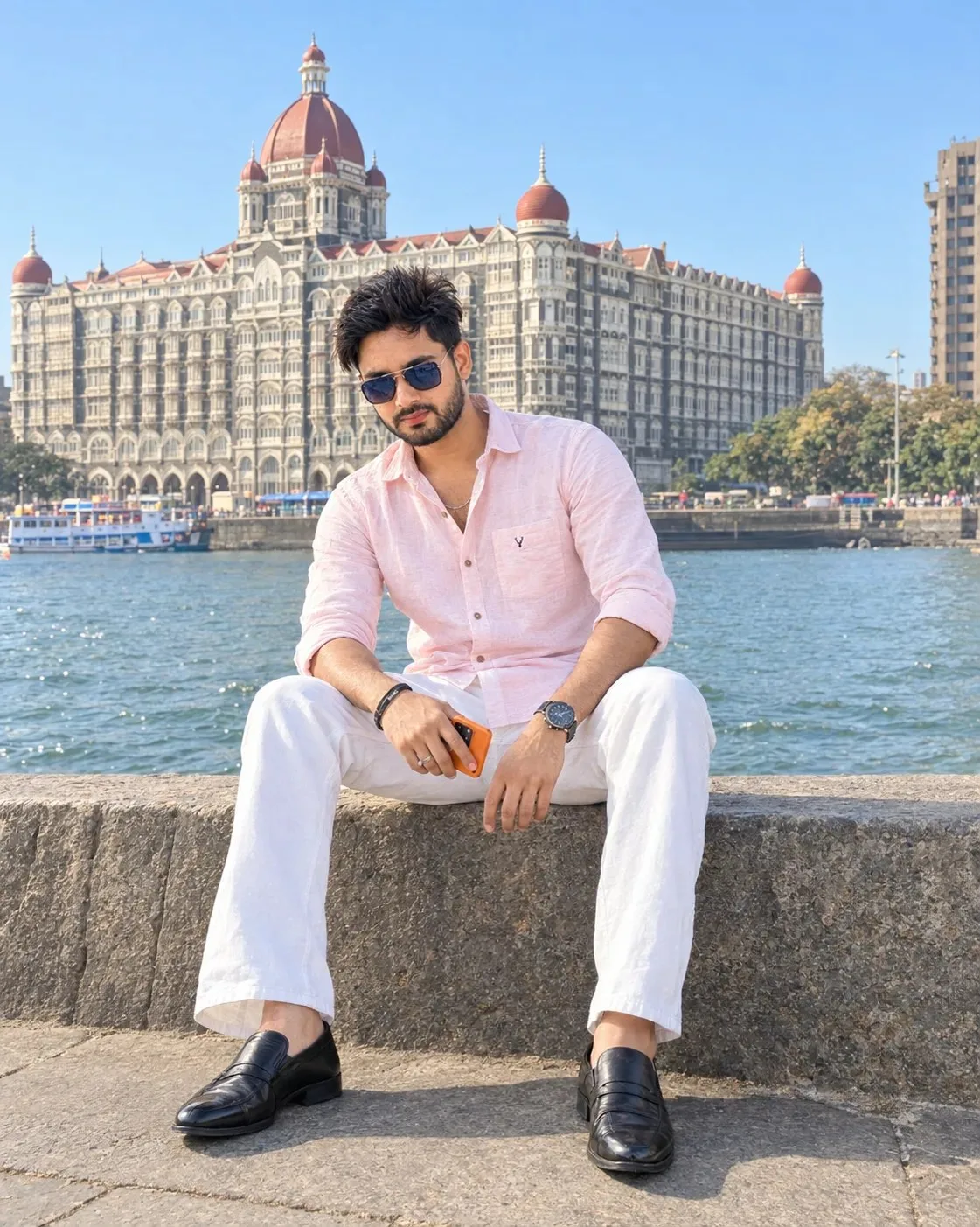
Use the uploaded image as the PRIMARY VISUAL REFERENCE. Recreate the same photorealistic travel portrait, preserving the subject's facial identity, facial structure, hairstyle, body proportions, seated pose, camera angle, framing, composition, clothing, accessories, environment, lighting, colours and overall mood. Show the young man sitting casually on the wide stone waterfront promenade, with the iconic Taj Mahal Palace hotel clearly visible behind him across the waterfront. Keep him wearing a light pink button-up shirt, white trousers and polished black formal shoes, with dark sunglasses, a wristwatch, bracelets and an orange smartphone naturally held in one hand. Preserve his relaxed seated posture with both legs apart and hands resting naturally. Keep the bright clear blue sky, sunlit heritage architecture, waterfront and realistic urban travel atmosphere. The character must look directly into the camera, regardless of whether the uploaded reference shows him looking left, right, sideways or elsewhere. Maintain a relaxed, confident and natural expression. Use realistic skin texture, authentic architectural details, natural fabric textures, strong but believable midday sunlight and soft background depth. Photorealistic professional travel photography. 1122 × 1402 px, vertical. Negative Prompt Face distortion, wrong identity, pasted face, altered facial structure, altered hairstyle, looking away from camera, side gaze, closed eyes, bad anatomy, distorted hands, extra fingers, warped clothing, distorted hotel architecture, incorrect building proportions, unrealistic waterfront, artificial skin, excessive saturation, CGI look, plastic texture, excessive sharpening, blur, unnatural shadows, overexposure, underexposure, AI artifacts.
Scroll for more
App: Gemini Ratio: 4:5

Suggested Prompts

More in Wallpapers →
Photo Reproduction Guide

How to Recreate This Photo in Gemini

Follow this quick 4-step workflow to generate an identical visual style using the exact parameters tested for Kuldeep Meena.

1

Copy the Recipe

Click the Copy Full Prompt button above. All key descriptors, lighting commands, and lens tags are copied directly to your clipboard.

2

Open Gemini

Open your Gemini app or web interface (e.g. ChatGPT chat, Bing Image Creator prompt bar, or Midjourney Discord).

3

Set 4:5 Ratio

Set your canvas size to 4:5. This gives you the natural composition shown above.

4

Customize Subject

Want your own face or a different subject? Simply change the character description or hair/clothing while keeping the lighting and camera tokens intact!

Pro Tip: To maintain this exact lighting in Gemini, keep the camera, aperture, and lighting keywords unmodified.
✓