Back to All Prompts
ChatGPT • 3:4
Indian Couple Social Media Post AI Prompt with Followers Sticker — ChatGPT AI Photography Prompt Recipe on Faymas
Social Media by Alex Rivera

Indian Couple Social Media Post AI Prompt with Followers Sticker

Exact Prompt Recipe Scroll to read more
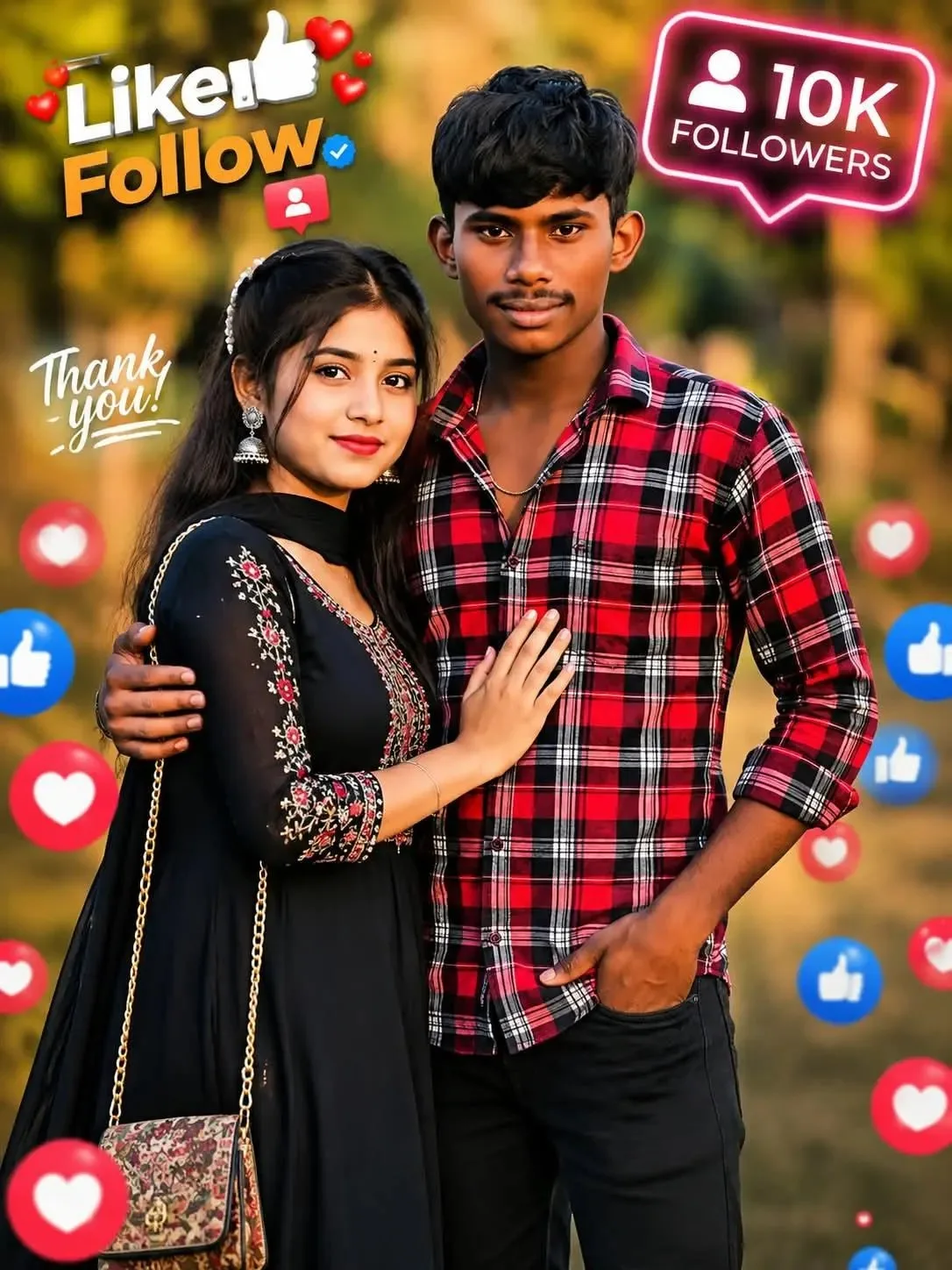
Detailed photographic portrait of a young Indian couple, a man and a woman, standing close together outdoors in a park during the warm, golden hour light, with soft, blurred (bokeh) tree foliage and sunlight filtering through in the background. The man, on the right, with dark, styled hair and a mustache, wears a red, black, and white plaid flannel shirt over a dark tee, with black jeans, his left hand in his pocket and his right arm around the woman's waist, smiling at the camera. The woman, on the left, has long, dark hair with a pearl headband, wearing a black anarkali dress with detailed red and gold floral embroidery, silver drop earrings, smiling and looking at the camera, with her left hand resting on the man's chest. At her side hangs a small gold-chain purse with a patterned fabric. The framing is a medium three-quarter portrait shot. Integrated into the image are various floating social media elements and text stickers. In the top-left corner, stylized orange and white text reads "Like Follow" surrounded by red and blue hearts and thumbs-up icons, with a smaller "Thank you!" text sticker below it. In the top-right corner, a purple glowing icon with text below it in a box reads "10K FOLLOWERS". The scene is dotted with floating, varying sized red heart and blue thumbs-up icons, both sharp and soft, integrated into the composition and bokeh.
Scroll for more
App: ChatGPT Ratio: 3:4

Suggested Prompts

More in Social Media →
Photo Reproduction Guide

How to Recreate This Photo in ChatGPT

Follow this quick 4-step workflow to generate an identical visual style using the exact parameters tested for Indian Couple Social Media Post AI Prompt with Followers Sticker.

1

Copy the Recipe

Click the Copy Full Prompt button above. All key descriptors, lighting commands, and lens tags are copied directly to your clipboard.

2

Open ChatGPT

Open your ChatGPT app or web interface (e.g. ChatGPT chat, Bing Image Creator prompt bar, or Midjourney Discord).

3

Set 3:4 Ratio

Set your canvas size to 3:4. This gives you the natural composition shown above.

4

Customize Subject

Want your own face or a different subject? Simply change the character description or hair/clothing while keeping the lighting and camera tokens intact!

Pro Tip: To maintain this exact lighting in ChatGPT, keep the camera, aperture, and lighting keywords unmodified.
✓