Back to All Prompts
ChatGPT • 2:3
Classic Gentleman — Intellectual Authority — ChatGPT AI Photography Prompt Recipe on Faymas
Illustration & 3D by Alex Rivera

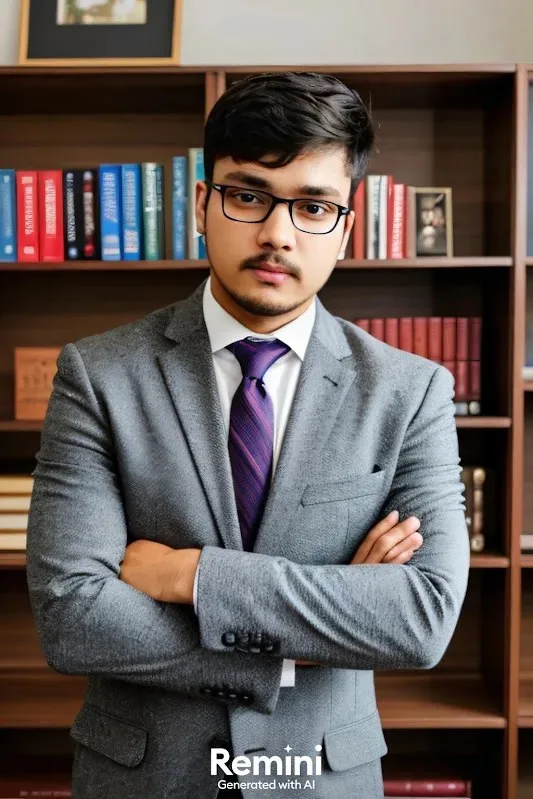
Classic Gentleman — Intellectual Authority

Exact Prompt Recipe Scroll to read more
Use the uploaded image as the ONLY identity reference for the main character. Create an ultra-realistic, premium professional portrait of the same young South Asian man. Preserve his identity with maximum accuracy — same face shape, facial structure, eyes, eyebrows, nose, lips, jawline, hairstyle, moustache, facial hair, skin tone, and natural body proportions. Do not redesign, beautify, age, slim, reshape, or replace his identity. He is wearing a well-tailored light gray three-piece style formal suit, crisp white dress shirt, and a sophisticated dark purple striped tie. His arms are naturally crossed across his chest, creating a confident and professional posture. Keep the black rectangular eyeglasses exactly consistent with the reference. Setting: elegant private library or executive study, with a large wooden bookshelf filled with neatly arranged colorful books behind him. Warm, refined interior atmosphere with realistic wood textures. Photography: professional DSLR portrait, 85mm lens, realistic depth of field, sharp facial details, natural skin texture, realistic hair strands, detailed suit fabric, soft warm indoor lighting, subtle shadows, premium editorial photography, cinematic but natural color grading, highly detailed 4K photorealism. Composition: vertical 4:5, medium shot from approximately waist/chest level, centered subject, natural proportions, realistic perspective.
Scroll for more
Negative Prompt (Avoid)
cartoon, anime, illustration, CGI, 3D render, plastic skin, excessive beauty retouching, altered face, different person, distorted facial features, oversized body, unrealistic muscles, blurry face, extra fingers, deformed hands, artificial lighting, excessive bokeh, text, watermark, logo.
App: ChatGPT Ratio: 2:3
Photo Reproduction Guide

How to Recreate This Photo in ChatGPT

Follow this quick 4-step workflow to generate an identical visual style using the exact parameters tested for Classic Gentleman — Intellectual Authority.

1

Copy the Recipe

Click the Copy Full Prompt button above. All key descriptors, lighting commands, and lens tags are copied directly to your clipboard.

2

Open ChatGPT

Open your ChatGPT app or web interface (e.g. ChatGPT chat, Bing Image Creator prompt bar, or Midjourney Discord).

3

Set 2:3 Ratio

Set your canvas size to 2:3. This gives you the natural composition shown above.

4

Customize Subject

Want your own face or a different subject? Simply change the character description or hair/clothing while keeping the lighting and camera tokens intact!

Pro Tip: To maintain this exact lighting in ChatGPT, keep the camera, aperture, and lighting keywords unmodified.
✓