Back to All Prompts
ChatGPT • 9:16
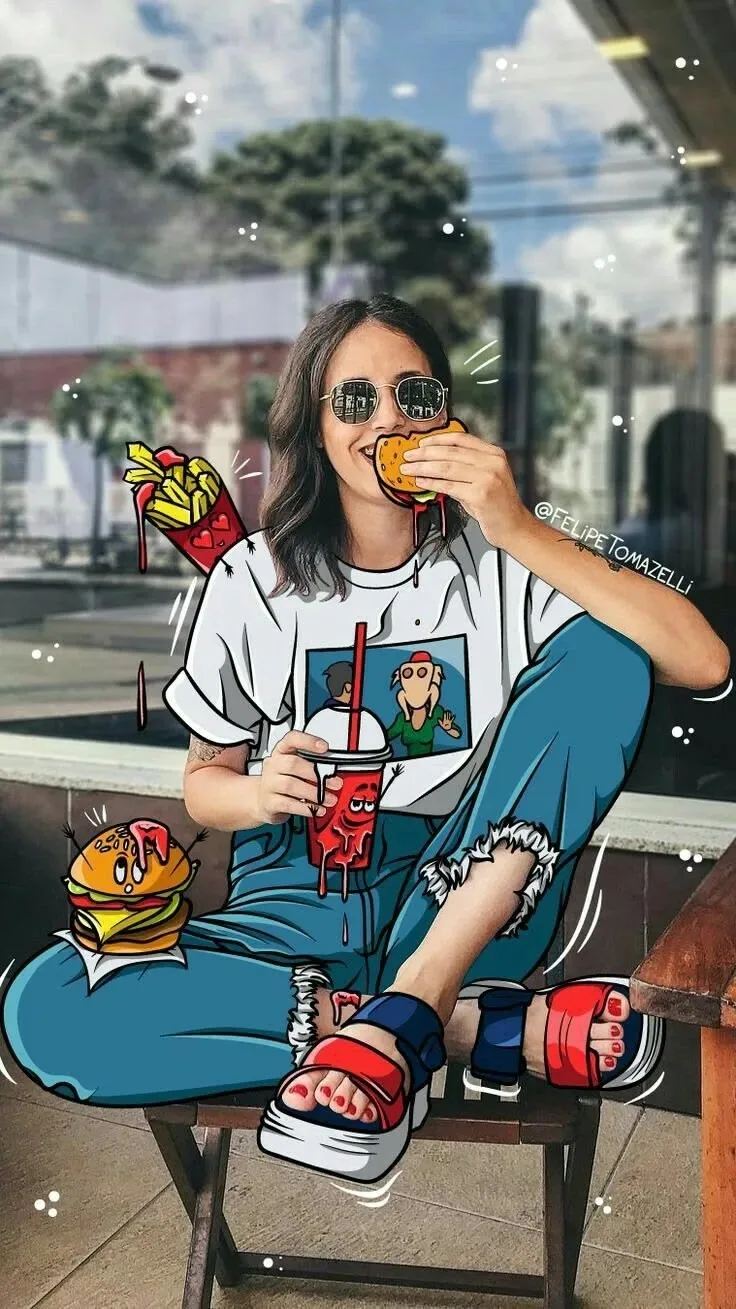
Cartoon Foodie Girl – Real Life Meets Doodle Art 🍔🥤✨ — ChatGPT AI Photography Prompt Recipe on Faymas
Food & Drink by Alex Rivera

Cartoon Foodie Girl – Real Life Meets Doodle Art 🍔🥤✨

Exact Prompt Recipe Scroll to read more
Create a highly realistic yet playful mixed-media portrait of a young woman sitting casually on a wooden bench outside a modern café or urban food spot. She is wearing a white graphic T-shirt, loose blue denim overalls/jeans, round reflective sunglasses, and stylish red-and-blue platform sandals. She is sitting in a relaxed cross-legged pose, holding a burger near her mouth with one hand and a cold drink with a straw in the other, enjoying a fun street-food moment with a cheerful expression. Transform parts of the scene into vibrant hand-drawn cartoon illustrations while keeping the woman's face, hands, and realistic skin naturally integrated. Add illustrated burgers, fries, dripping sauce, drink graphics, playful motion lines, sparkles, and doodle effects around her clothing and food. Use bold black comic outlines, bright colors, hand-drawn details, and dripping red sauce effects. Keep the background photorealistic, showing a modern outdoor café environment with glass windows, trees, pavement, and soft daylight. Create a seamless real photography + colorful cartoon doodle fusion. Cinematic daylight, realistic skin texture, detailed clothing, vibrant illustrated elements, creative food-art aesthetic, playful composition, shallow depth of field, high detail, Instagram/Pinterest viral creative style, vertical 9:16 format.
Scroll for more
App: ChatGPT Ratio: 9:16

Suggested Prompts

More in Food & Drink →
Photo Reproduction Guide

How to Recreate This Photo in ChatGPT

Follow this quick 4-step workflow to generate an identical visual style using the exact parameters tested for Cartoon Foodie Girl – Real Life Meets Doodle Art 🍔🥤✨.

1

Copy the Recipe

Click the Copy Full Prompt button above. All key descriptors, lighting commands, and lens tags are copied directly to your clipboard.

2

Open ChatGPT

Open your ChatGPT app or web interface (e.g. ChatGPT chat, Bing Image Creator prompt bar, or Midjourney Discord).

3

Set 9:16 Ratio

Set your canvas size to 9:16. This gives you the natural composition shown above.

4

Customize Subject

Want your own face or a different subject? Simply change the character description or hair/clothing while keeping the lighting and camera tokens intact!


Pro Tip: To maintain this exact lighting in ChatGPT, keep the camera, aperture, and lighting keywords unmodified.
✓