Back to All Prompts
ChatGPT • 9:16
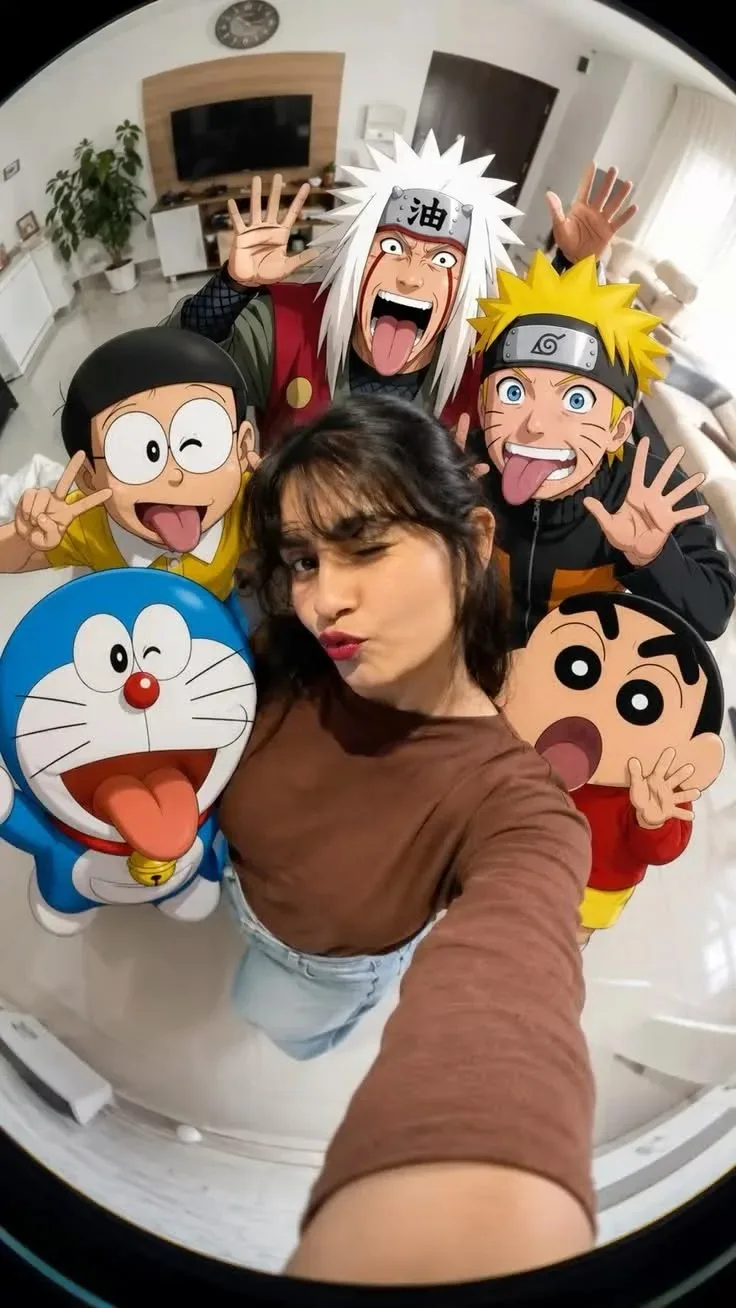
Anime Squad Selfie – Real Girl Meets Cartoon Legends πŸ“ΈπŸ”₯ β€” ChatGPT AI Photography Prompt Recipe on Faymas
Fun & Memes by Alex Rivera

Anime Squad Selfie – Real Girl Meets Cartoon Legends πŸ“ΈπŸ”₯

Exact Prompt Recipe Scroll to read more
Create a highly realistic vertical fisheye selfie photograph of a young woman standing in the center of a bright modern living room, surrounded by her favorite iconic 2D anime and cartoon characters. The girl is holding the camera with her arm extended toward the lens, creating a dramatic ultra-wide fisheye perspective. She is wearing a fitted brown long-sleeve top and light blue high-waisted jeans, with dark hair styled naturally and playful bangs. Give her a fun expression: one eye winking and lips slightly puckered, creating a cute selfie pose. Surround her closely with colorful illustrated characters: Naruto Uzumaki, Jiraiya, Doraemon, Shinchan, and Nobita, all making funny, energetic expressions and playful hand gestures. Keep the characters in their recognizable animated illustration style with clean outlines, vibrant colors, and expressive faces. Set the scene inside a bright modern white living room with a wall-mounted TV, wooden TV panel, indoor plants, furniture, clock, and natural daylight coming through the curtains. Use extreme fisheye lens distortion, wide-angle selfie perspective, realistic human skin texture, natural indoor lighting, detailed clothing, sharp foreground, slightly distorted edges, playful composition, seamless real-person + cartoon-character integration, energetic social-media aesthetic, 9:16 vertical format, high detail, photorealistic photography.
Scroll for more
App: ChatGPT Ratio: 9:16

Suggested Prompts

More in Fun & Memes →
Photo Reproduction Guide

How to Recreate This Photo in ChatGPT

Follow this quick 4-step workflow to generate an identical visual style using the exact parameters tested for Anime Squad Selfie – Real Girl Meets Cartoon Legends πŸ“ΈπŸ”₯.

1

Copy the Recipe

Click the Copy Full Prompt button above. All key descriptors, lighting commands, and lens tags are copied directly to your clipboard.

2

Open ChatGPT

Open your ChatGPT app or web interface (e.g. ChatGPT chat, Bing Image Creator prompt bar, or Midjourney Discord).

3

Set 9:16 Ratio

Set your canvas size to 9:16. This gives you the natural composition shown above.

4

Customize Subject

Want your own face or a different subject? Simply change the character description or hair/clothing while keeping the lighting and camera tokens intact!


Pro Tip: To maintain this exact lighting in ChatGPT, keep the camera, aperture, and lighting keywords unmodified.
βœ“