Back to All Prompts
ChatGPT • 2:3
18th-Century Revolutionary Portrait — ChatGPT AI Photography Prompt Recipe on Faymas
Fun & Memes by Alex Rivera

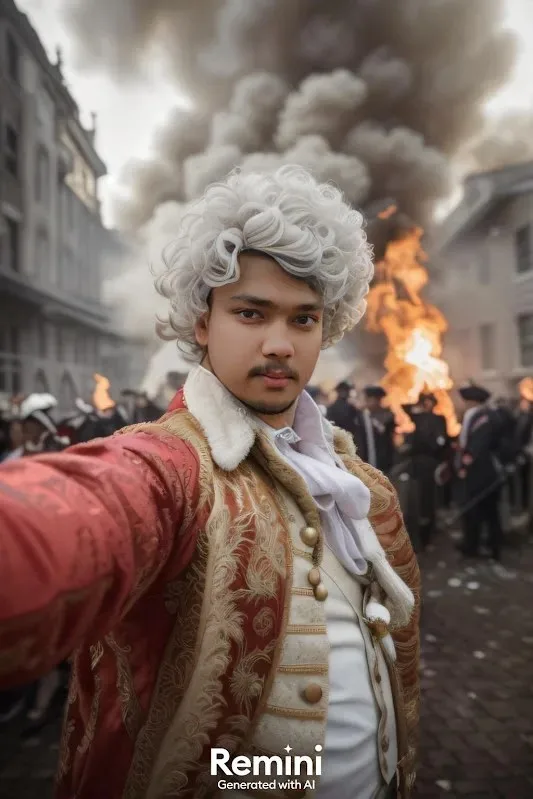
18th-Century Revolutionary Portrait

Exact Prompt Recipe Scroll to read more
Create an ultra-realistic cinematic historical portrait of the same young man from the reference image, preserving his facial identity and recognizable appearance with maximum accuracy. Keep the exact face shape, forehead, eyebrows, eyes, nose, lips, cheeks, jawline, chin, skin tone, hairline, moustache, light beard/stubble, and natural facial proportions unchanged. Depict him taking a dramatic arm-extended selfie in the middle of a chaotic 18th-century European city uprising. He wears an elaborate aristocratic period costume: ornate deep-red embroidered coat, cream-and-gold waistcoat with intricate floral detailing and decorative buttons, white ruffled shirt and neck cravat, plus a voluminous powdered white 18th-century wig. Behind him, show a historically inspired cobblestone street lined with old European stone buildings, a large raging fire, thick dark smoke filling the sky, scattered debris, and a crowd of period-dressed people moving through the unrest. The scene should feel like a dramatic historical movie still while remaining photorealistic. Natural cinematic lighting from the fire creates warm highlights and dramatic shadows across his face and clothing. Realistic fabric embroidery, authentic period textures, detailed architecture, atmospheric smoke, shallow depth of field, realistic skin texture, DSLR-quality photography, 4K detail, cinematic composition, believable historical atmosphere.
Scroll for more
Negative Prompt (Avoid)
different identity, altered face, face reshaping, beautification, modern clothing, modern buildings, plastic skin, cartoon, CGI, painting, distorted face, blurry eyes, extra fingers, extra limbs, unrealistic hands, excessive blur, watermark, logo, text.
App: ChatGPT Ratio: 2:3

Suggested Prompts

More in Fun & Memes →
Photo Reproduction Guide

How to Recreate This Photo in ChatGPT

Follow this quick 4-step workflow to generate an identical visual style using the exact parameters tested for 18th-Century Revolutionary Portrait.

1

Copy the Recipe

Click the Copy Full Prompt button above. All key descriptors, lighting commands, and lens tags are copied directly to your clipboard.

2

Open ChatGPT

Open your ChatGPT app or web interface (e.g. ChatGPT chat, Bing Image Creator prompt bar, or Midjourney Discord).

3

Set 2:3 Ratio

Set your canvas size to 2:3. This gives you the natural composition shown above.

4

Customize Subject

Want your own face or a different subject? Simply change the character description or hair/clothing while keeping the lighting and camera tokens intact!


Pro Tip: To maintain this exact lighting in ChatGPT, keep the camera, aperture, and lighting keywords unmodified.
✓