Back to All Prompts
ChatGPT • 4:5
Warm Glowing Lights Realistic Portrait | Cinematic AI Photography — ChatGPT AI Photography Prompt Recipe on Faymas
Photography by Alex Rivera

Warm Glowing Lights Realistic Portrait | Cinematic AI Photography

Exact Prompt Recipe Scroll to read more
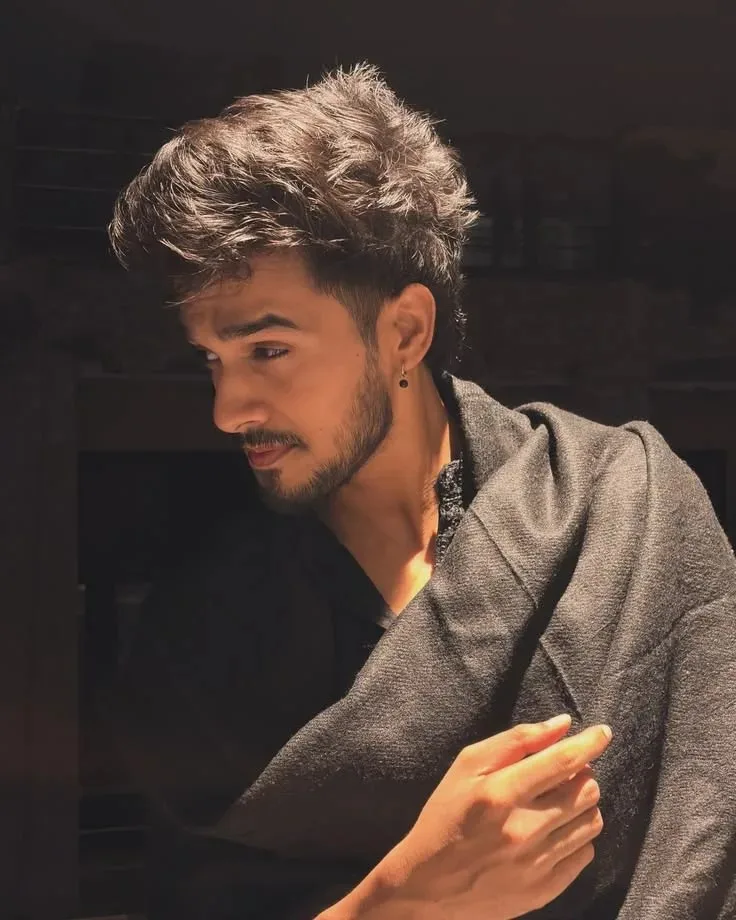
Create an ultra-realistic 8K portrait of the exact man from the uploaded reference image, preserving his original facial identity, facial features, natural skin tone, hairstyle, facial hair, and facial proportions without changing his appearance. Capture a close-up, candid side-profile portrait of the man leaning slightly forward, with his head turned toward the left side of the frame and his eyes gazing thoughtfully off-camera. He has thick, naturally tousled dark hair with textured volume, a neatly trimmed beard and mustache, and a small black stud earring. His expression is calm, confident, and subtly intense. He is wearing a simple black shirt with an open collar, layered under a charcoal-gray textured wool coat draped naturally over his shoulders. One arm is bent across his body, with his hand gently resting on the opposite sleeve, creating a relaxed and natural pose. Use a dark, understated indoor background with minimal visible details, keeping the surroundings almost black to emphasize the subject. A warm, directional light from the upper left illuminates his hair, forehead, cheekbones, nose, beard, and hands, producing soft golden highlights and deep, natural shadows across his face and clothing. Maintain realistic skin pores, individual hair strands, authentic fabric texture, natural hand proportions, and accurate facial anatomy. Use professional DSLR photography, an 85mm portrait lens, a shallow depth of field, warm cinematic color grading, and carefully balanced highlights and shadows. Compose the image in a vertical 9:16 portrait format, framed from the chest upward. The final result should look like a genuine low-light editorial fashion photograph, with natural warm lighting, a dark cinematic atmosphere, realistic details, and no artificial skin smoothing, excessive retouching, distorted hands, extra fingers, text, or watermark. Preserve the exact identity of the reference person.
Scroll for more
App: ChatGPT Ratio: 4:5

Suggested Prompts

More in Photography →
Photo Reproduction Guide

How to Recreate This Photo in ChatGPT

Follow this quick 4-step workflow to generate an identical visual style using the exact parameters tested for Warm Glowing Lights Realistic Portrait | Cinematic AI Photography.

1

Copy the Recipe

Click the Copy Full Prompt button above. All key descriptors, lighting commands, and lens tags are copied directly to your clipboard.

2

Open ChatGPT

Open your ChatGPT app or web interface (e.g. ChatGPT chat, Bing Image Creator prompt bar, or Midjourney Discord).

3

Set 4:5 Ratio

Set your canvas size to 4:5. This gives you the natural composition shown above.

4

Customize Subject

Want your own face or a different subject? Simply change the character description or hair/clothing while keeping the lighting and camera tokens intact!

Pro Tip: To maintain this exact lighting in ChatGPT, keep the camera, aperture, and lighting keywords unmodified.
✓