Back to All Prompts
ChatGPT • 4:5
Tiana — Floral Butterfly Portrait — ChatGPT AI Photography Prompt Recipe on Faymas
Poster Design by Alex Rivera

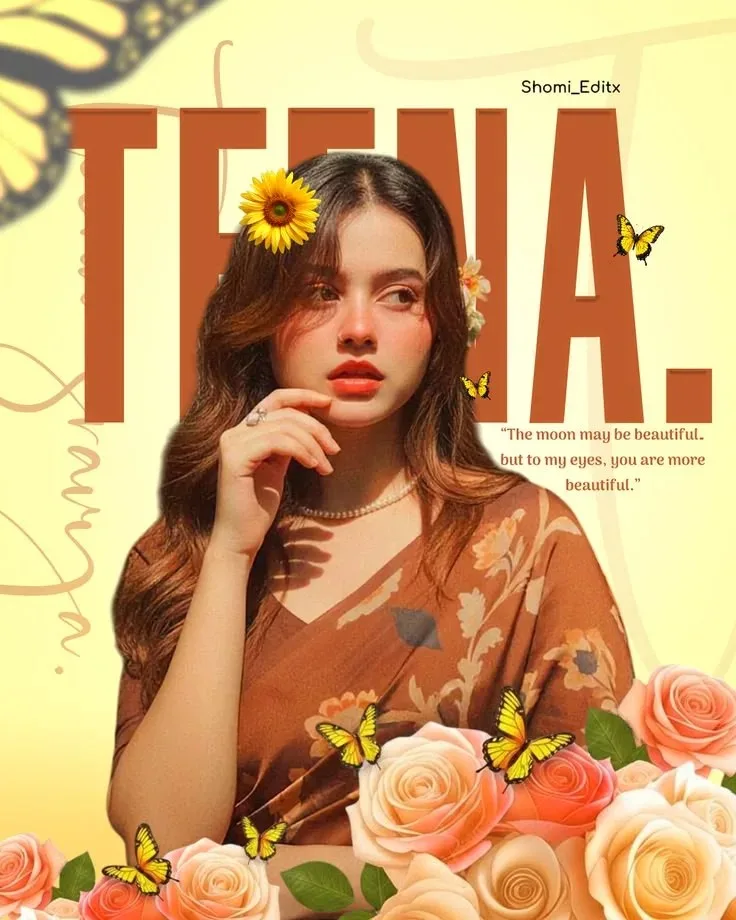
Tiana — Floral Butterfly Portrait

Exact Prompt Recipe Scroll to read more
Create a dreamy, elegant vertical fashion portrait of a beautiful young woman surrounded by warm peach and golden tones. She has long, softly wavy brown hair with delicate floral decorations, including a bright yellow sunflower tucked into her hair. She wears a graceful brown-orange floral saree with soft cream and peach flower patterns, paired with subtle jewelry including a delicate pearl necklace and rings. She poses gracefully with one hand near her face, looking slightly to the side with a soft, romantic expression. Use warm golden-hour lighting across her face, natural skin texture, soft highlights, and a gentle nostalgic editorial feel. Design the background as a sophisticated romantic poster with a pale yellow/cream backdrop and oversized terracotta-orange typography reading “TIANA.” Add delicate butterfly illustrations fluttering around the subject and a decorative arrangement of realistic peach, coral, cream, and orange roses across the bottom foreground. Include subtle botanical line-art elements and elegant ornamental curves. Add a small tasteful quote element reading: “The moon may be beautiful, but to my eyes, you are more beautiful.” High-detail fashion photography, dreamy editorial poster design, realistic floral textures, delicate butterfly wings, soft cinematic lighting, warm color palette, elegant composition, photorealistic woman, natural skin texture, shallow depth of field, premium magazine aesthetic, vertical 4:5 composition, ultra-detailed 4K, clean typography, no watermark.
Scroll for more
App: ChatGPT Ratio: 4:5

Suggested Prompts

More in Poster Design →
Photo Reproduction Guide

How to Recreate This Photo in ChatGPT

Follow this quick 4-step workflow to generate an identical visual style using the exact parameters tested for Tiana — Floral Butterfly Portrait.

1

Copy the Recipe

Click the Copy Full Prompt button above. All key descriptors, lighting commands, and lens tags are copied directly to your clipboard.

2

Open ChatGPT

Open your ChatGPT app or web interface (e.g. ChatGPT chat, Bing Image Creator prompt bar, or Midjourney Discord).

3

Set 4:5 Ratio

Set your canvas size to 4:5. This gives you the natural composition shown above.

4

Customize Subject

Want your own face or a different subject? Simply change the character description or hair/clothing while keeping the lighting and camera tokens intact!


Pro Tip: To maintain this exact lighting in ChatGPT, keep the camera, aperture, and lighting keywords unmodified.
✓