Back to All Prompts
ChatGPT • 3:2
Then & Now — Timeless Grace — ChatGPT AI Photography Prompt Recipe on Faymas
Logo & Identity by Alex Rivera

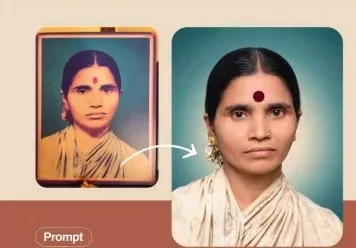
Then & Now — Timeless Grace

Exact Prompt Recipe Scroll to read more
Create a realistic “then and now” transformation portrait using the uploaded image as the visual reference. On the left, show a vintage framed childhood/younger portrait of the same Indian woman, preserving her recognizable facial identity, facial proportions, expression, hairstyle, and distinctive features from the old photograph. Give the vintage image an authentic aged-photo appearance with slightly faded colors, subtle film grain, old paper texture, and a classic studio-portrait feel. On the right, show the same woman as she appears today, with her identity clearly preserved from the vintage reference. She has neatly parted dark hair tied back, a traditional red bindi, small gold earrings, a simple nose pin, and a cream/off-white traditional saree with a matching blouse. Use natural realistic skin texture, authentic facial proportions, and a calm, dignified expression. Place both portraits side by side against a clean, softly colored background, with a subtle curved white arrow visually connecting the younger portrait to the present-day portrait. Make the transformation feel emotional, authentic, and respectful, emphasizing the continuity of the same person across time. Photorealistic, highly detailed facial features, natural skin texture, realistic lighting, documentary photography aesthetic, soft studio illumination, sharp facial focus, subtle depth of field, authentic Indian portrait styling, high-resolution 4K quality, no artificial facial changes, no exaggerated beauty enhancement, no distorted anatomy, no extra features, no watermark, no unnecessary text.
Scroll for more
App: ChatGPT Ratio: 3:2
Photo Reproduction Guide

How to Recreate This Photo in ChatGPT

Follow this quick 4-step workflow to generate an identical visual style using the exact parameters tested for Then & Now — Timeless Grace.

1

Copy the Recipe

Click the Copy Full Prompt button above. All key descriptors, lighting commands, and lens tags are copied directly to your clipboard.

2

Open ChatGPT

Open your ChatGPT app or web interface (e.g. ChatGPT chat, Bing Image Creator prompt bar, or Midjourney Discord).

3

Set 3:2 Ratio

Set your canvas size to 3:2. This gives you the natural composition shown above.

4

Customize Subject

Want your own face or a different subject? Simply change the character description or hair/clothing while keeping the lighting and camera tokens intact!


Pro Tip: To maintain this exact lighting in ChatGPT, keep the camera, aperture, and lighting keywords unmodified.
✓