Back to All Prompts
ChatGPT • 4:5
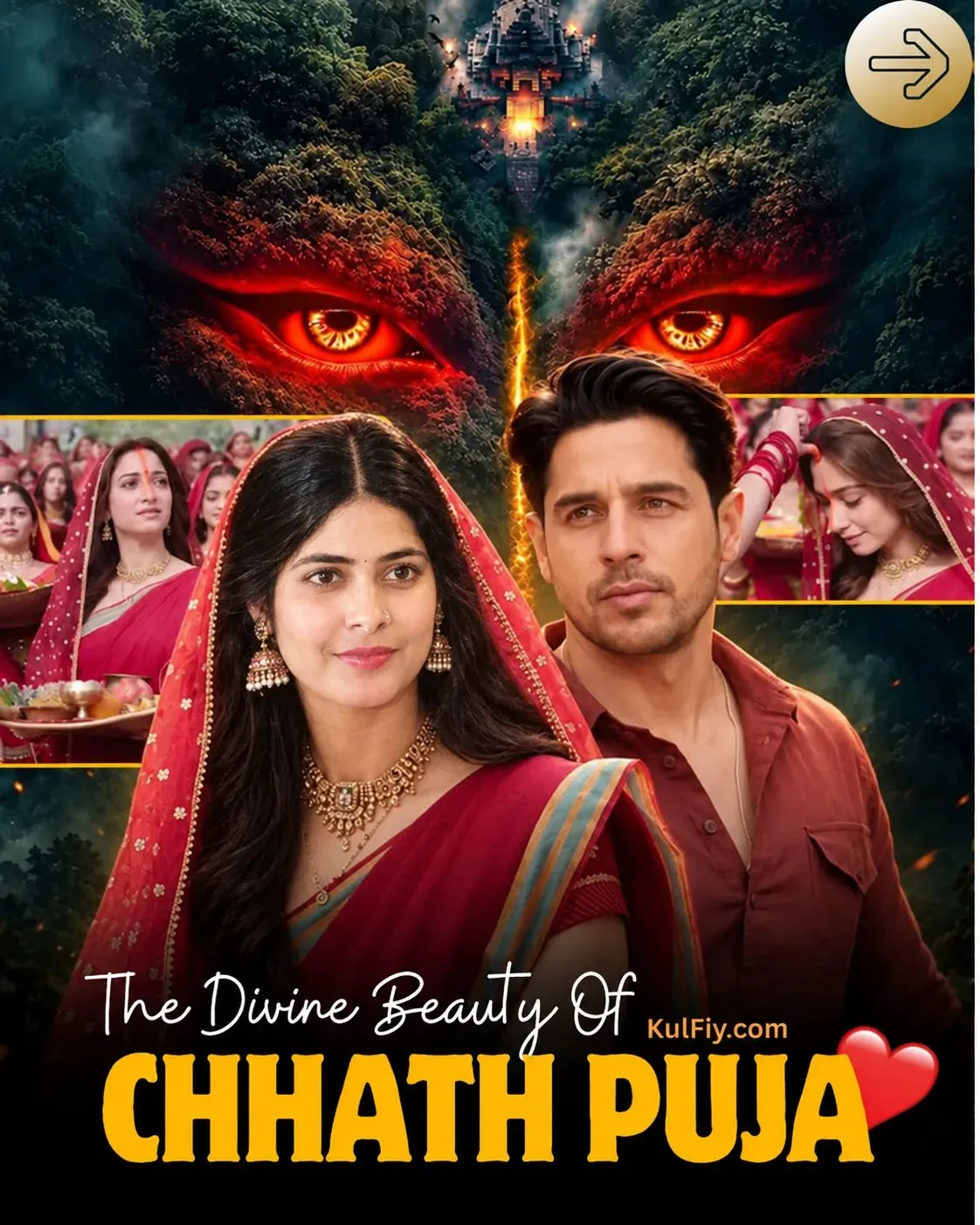
The Divine Beauty of Chhath Puja | Cinematic Festival Poster — ChatGPT AI Photography Prompt Recipe on Faymas
Product & Brand by Alex Rivera

The Divine Beauty of Chhath Puja | Cinematic Festival Poster

Exact Prompt Recipe Scroll to read more
Create a premium cinematic Indian festival movie poster based on the uploaded reference image. Preserve the same overall composition, layout, colors, characters, clothing, expressions, background, and dramatic lighting. In the foreground, show a young Indian woman wearing a rich red traditional sari with a gold-and-blue border, matching red veil, traditional necklace, earrings, and bindi. Place a young Indian man beside her wearing a rust-red shirt, with a serious cinematic expression. Behind them, create a dense mystical green forest with a dramatic ancient temple at the top center. Add enormous glowing red supernatural eyes emerging from the forest, with a fiery golden vertical glow between them. Include the smaller Chhath Puja celebration scenes on the left and right sides, with women in traditional red saris and devotional offerings. Use deep teal, forest green, crimson red, and warm golden-orange cinematic lighting. Photorealistic faces, realistic skin and fabric textures, dramatic depth, atmospheric fog, high-end Bollywood poster quality. Keep the typography at the bottom: “The Divine Beauty Of” “CHHATH PUJA” “KulFiy.com” Add the red heart graphic beside the title and the circular arrow icon at the top-right. Vertical poster, 4:5 aspect ratio, ultra-detailed, cinematic color grading, 8K, professional theatrical poster finish.
Scroll for more
App: ChatGPT Ratio: 4:5
Photo Reproduction Guide

How to Recreate This Photo in ChatGPT

Follow this quick 4-step workflow to generate an identical visual style using the exact parameters tested for The Divine Beauty of Chhath Puja | Cinematic Festival Poster.

1

Copy the Recipe

Click the Copy Full Prompt button above. All key descriptors, lighting commands, and lens tags are copied directly to your clipboard.

2

Open ChatGPT

Open your ChatGPT app or web interface (e.g. ChatGPT chat, Bing Image Creator prompt bar, or Midjourney Discord).

3

Set 4:5 Ratio

Set your canvas size to 4:5. This gives you the natural composition shown above.

4

Customize Subject

Want your own face or a different subject? Simply change the character description or hair/clothing while keeping the lighting and camera tokens intact!


Pro Tip: To maintain this exact lighting in ChatGPT, keep the camera, aperture, and lighting keywords unmodified.
✓