Back to All Prompts
ChatGPT • 9:16
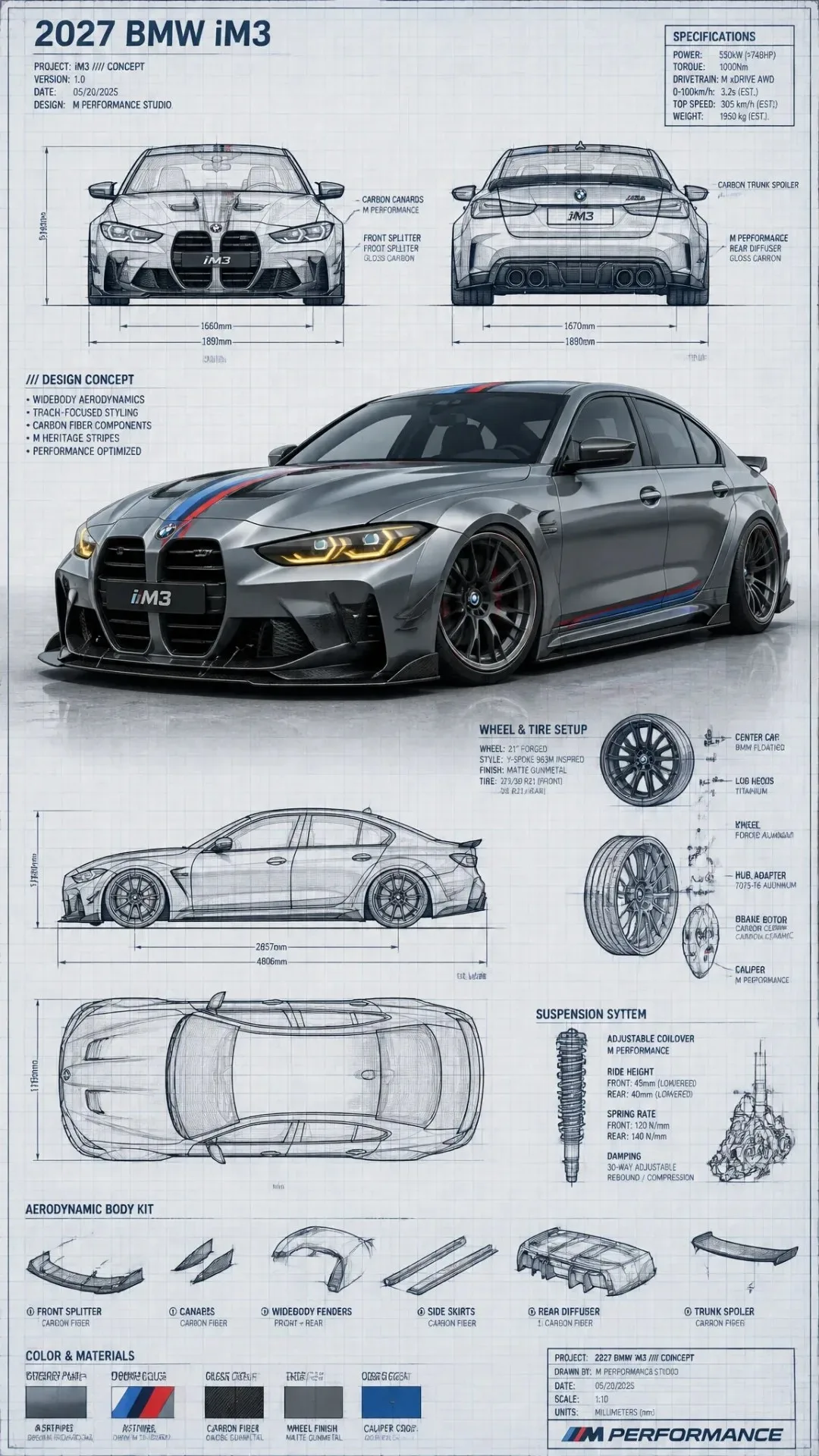
Technical Blueprint Sketch and Realistic 3D–render Fusion of a Custom Modified Car Generate an infographic prompt featur — ChatGPT AI Photography Prompt Recipe on Faymas
Product & Brand by Alex Rivera

Technical Blueprint Sketch and Realistic 3D–render Fusion of a Custom Modified Car Generate an infographic prompt featur

Exact Prompt Recipe Scroll to read more
Highly detailed technical blueprint sketch and realistic 3D–render fusion of a custom modified car 2027 BMW iM3. Transform the car into a tuned concept blueprint with an aggressive lowered stance, wide-body aesthetic (adapted to match the real car’s form), and bold racing stripe accents matching or enhancing the original photo colors. Add large aftermarket-style wheels inspired by the car in the photo (accurate spoke design & size), sharp LED-like lighting details, and sporty aerodynamic additions such as front spoiler, side skirts, rear diffuser, and small spoiler — all adjusted realistically to the BMW iM3’s geometry. Surround the main render with precise engineering-style blueprint elements: multiple orthographic views (front, rear, side, top) derived from the reference photo, construction lines, mm-dimensions, exploded-view details for wheels, suspension, and body kit components. Art style combines pencil/ink drafting with fine cross-hatching, clean annotations, and a photorealistic shaded center render. Blueprint background in soft light-blue or sepia technical-paper texture, ultra-detailed, professional automotive concept-design composition. --ar 9:16
Scroll for more
App: ChatGPT Ratio: 9:16
Photo Reproduction Guide

How to Recreate This Photo in ChatGPT

Follow this quick 4-step workflow to generate an identical visual style using the exact parameters tested for Technical Blueprint Sketch and Realistic 3D–render Fusion of a Custom Modified Car Generate an infographic prompt featur.

1

Copy the Recipe

Click the Copy Full Prompt button above. All key descriptors, lighting commands, and lens tags are copied directly to your clipboard.

2

Open ChatGPT

Open your ChatGPT app or web interface (e.g. ChatGPT chat, Bing Image Creator prompt bar, or Midjourney Discord).

3

Set 9:16 Ratio

Set your canvas size to 9:16. This gives you the natural composition shown above.

4

Customize Subject

Want your own face or a different subject? Simply change the character description or hair/clothing while keeping the lighting and camera tokens intact!

Pro Tip: To maintain this exact lighting in ChatGPT, keep the camera, aperture, and lighting keywords unmodified.
✓