Back to All Prompts
ChatGPT • 3:4
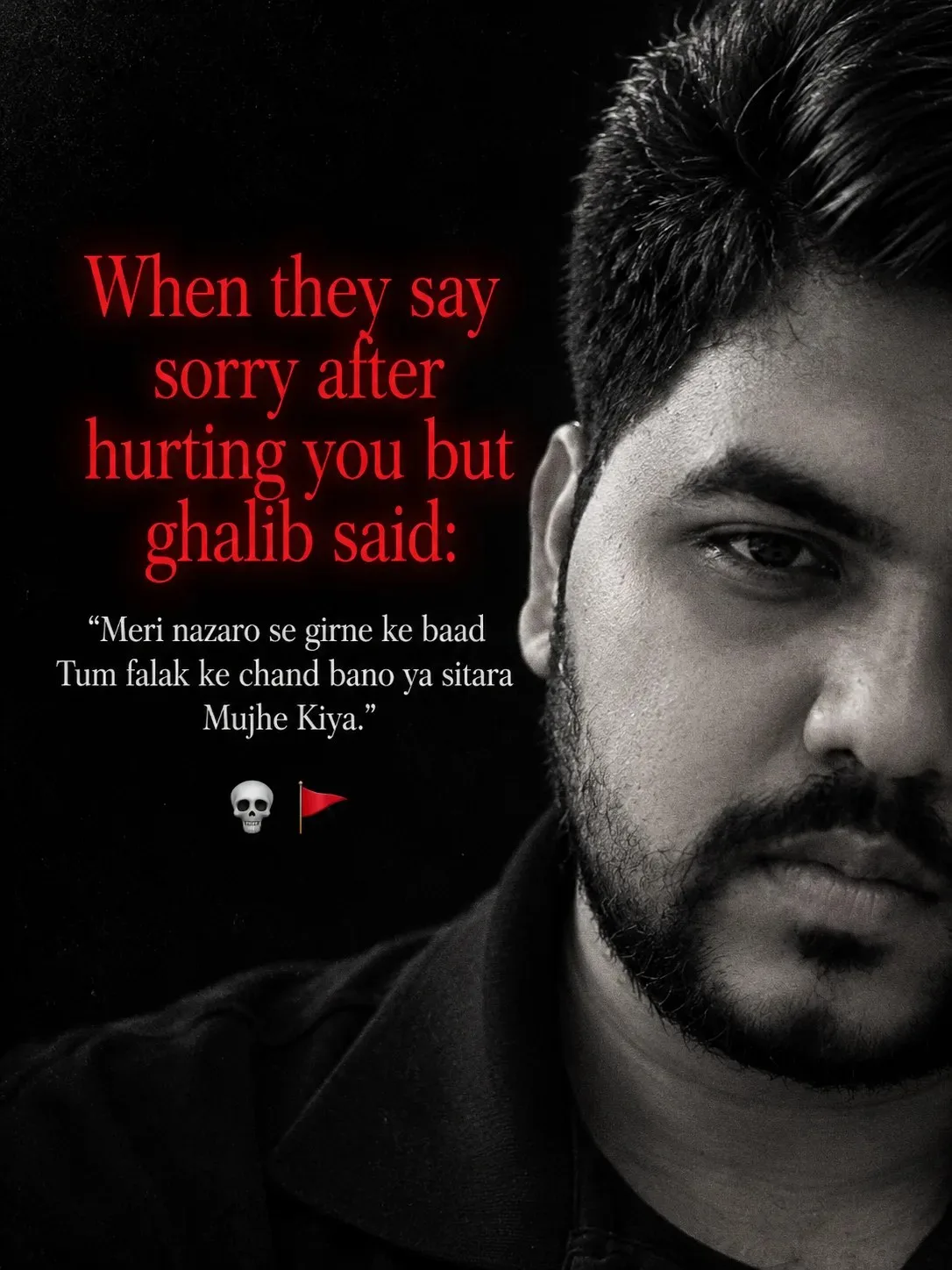
Shayar — ChatGPT AI Photography Prompt Recipe on Faymas
Photography by Alex Rivera

Shayar

Exact Prompt Recipe Scroll to read more
Make me { "project": { "title": "When They Say Sorry", "category": "Dark Emotional Poetry Poster", "style": "Dark Aesthetic, Grayscale Portrait", "aspect_ratio": "3:4", "orientation": "Vertical", "quality": "High Resolution" }, "canvas": { "background_color": "#000000", "overall_mood": "Dark, melancholic, intense, poetic", "visual_style": "Minimalist social media poetry edit", "texture": "Heavy monochrome film grain" }, "portrait": { "subject": "Young adult male face", "position": "Right side of the frame", "crop": "Extreme close-up, partially cropped face", "visible_features": [ "Forehead", "One eye area", "Nose", "Cheek", "Lips", "Partial jawline" ], "expression": "Serious, emotionally distant, introspective", "lighting": { "type": "Low-key dramatic lighting", "highlights": "Soft silver-gray highlights on the face", "shadows": "Deep black shadows", "contrast": "High" }, "color_grading": { "mode": "Black and white", "saturation": 0, "skin_tone": "Textured grayscale", "grain": "Strong visible film grain" } }, "typography": { "headline": { "text": "When they say\nsorry after\nhurting you but\nghalib said:", "position": "Upper-left to middle-left", "alignment": "Center", "font_family": "Elegant high-contrast serif", "font_style": "Regular, literary, slightly condensed", "font_size": "Large", "color": "#FF302D", "glow": "Subtle red glow", "line_spacing": "Compact", "effect": "Slightly soft, luminous red lettering" }, "poetry": { "text": ""Meri nazaro se girne ke baad\nTum falak ke chand bano ya sitara Mujhe Kiya."", "position": "Below the red headline", "alignment": "Center", "font_family": "Classic serif", "font_size": "Small to medium", "color": "#F2F2F2", "weight": "Regular", "line_spacing": "Moderate", "style": "Elegant literary quotation" } }, "decorative_elements": { "emojis": [ { "symbol": "💀", "position": "Bottom center-left", "size": "Small" }, { "symbol": "🚩", "position": "Immediately right of skull", "size": "Small" } ], "additional_graphics": false, "watermark": false, "border": false }, "layout": { "left_column": "Text and poetry", "right_column": "Large grayscale face", "negative_space": "Extensive pure black space", "text_overlap": "Minimal overlap with portrait", "visual_balance": "Asymmetric editorial composition", "reading_order": [ "Red headline", "White poetry quotation", "Skull and red flag", "Grayscale portrait" ] }, "editing": { "black_background": true, "grayscale_portrait": true, "high_contrast": true, "film_grain": true, "subtle_red_glow": true, "preserve_facial_texture": true, "preserve_text_alignment": true, "avoid_colorful_backgrounds": true, "avoid_excessive_blur": true, "avoid_extra_text": true }, "negative_prompt": [ "Bright colorful background", "Full color portrait", "Cartoon face", "Smooth plastic skin", "Oversaturated red", "Decorative fonts", "Incorrect spelling", "Misaligned typography", "Unnecessary objects", "Watermarks", "Logos", "Low contrast text" ], "output": { "format": "PNG", "resolution": "High resolution", "platform": "Instagram, WhatsApp status, poetry edits", "finish": "Dark cinematic typography poster" } }
Scroll for more
App: ChatGPT Ratio: 3:4

Suggested Prompts

More in Photography →
Photo Reproduction Guide

How to Recreate This Photo in ChatGPT

Follow this quick 4-step workflow to generate an identical visual style using the exact parameters tested for Shayar.

1

Copy the Recipe

Click the Copy Full Prompt button above. All key descriptors, lighting commands, and lens tags are copied directly to your clipboard.

2

Open ChatGPT

Open your ChatGPT app or web interface (e.g. ChatGPT chat, Bing Image Creator prompt bar, or Midjourney Discord).

3

Set 3:4 Ratio

Set your canvas size to 3:4. This gives you the natural composition shown above.

4

Customize Subject

Want your own face or a different subject? Simply change the character description or hair/clothing while keeping the lighting and camera tokens intact!

Pro Tip: To maintain this exact lighting in ChatGPT, keep the camera, aperture, and lighting keywords unmodified.
✓