Back to All Prompts
ChatGPT • 3:4
Pretty Girl & Cute Kitty – Besties Forever 🩷🐱 — ChatGPT AI Photography Prompt Recipe on Faymas
Poster Design by Alex Rivera

Pretty Girl & Cute Kitty – Besties Forever 🩷🐱

Exact Prompt Recipe Scroll to read more
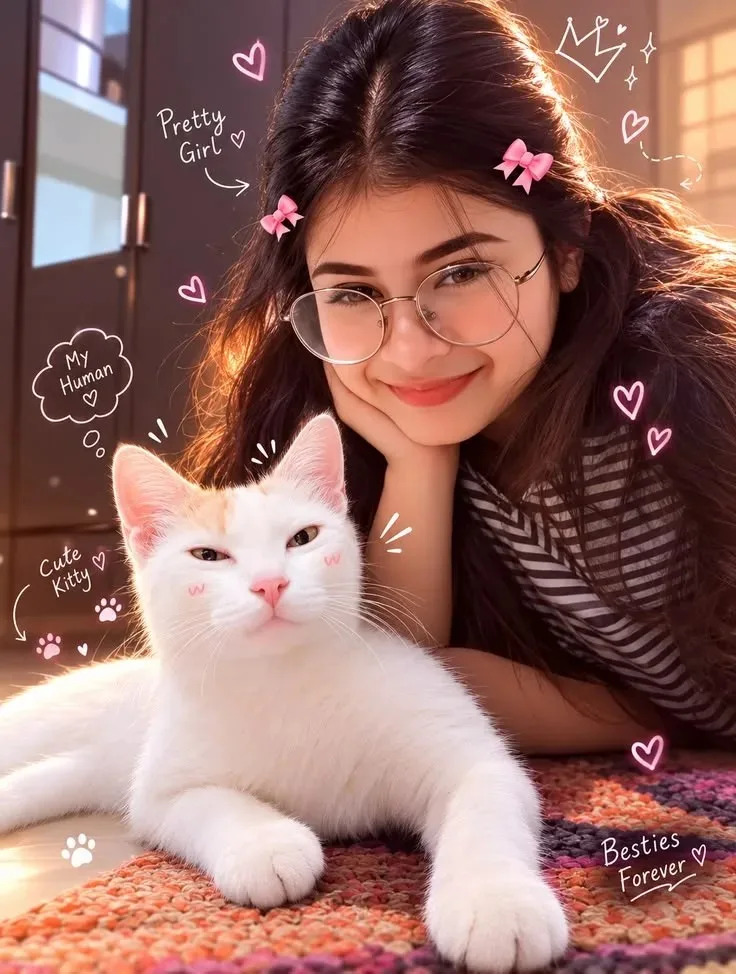
Create an ultra-realistic, warm and adorable vertical portrait of a young girl posing affectionately with a cute white kitten. The girl has long, naturally flowing dark hair with soft volume, wears stylish transparent round glasses and a casual black-and-white striped top, with small pink bow hair clips on both sides. She rests her cheek gently on one hand and smiles sweetly toward the camera. Place a fluffy white kitten prominently in the foreground, lying comfortably on a colorful textured knitted rug, looking directly toward the camera with an innocent, cute expression. Use warm golden-hour indoor lighting with beautiful sunlight streaming from the side, creating a soft rim light around the girl's hair and the kitten's fur. Create a cozy home interior in the background with subtle depth of field, warm tones, soft shadows, realistic skin texture, detailed hair strands, highly detailed kitten fur, natural facial features, realistic glasses reflections, cinematic photography, shallow depth of field, soft bokeh, cozy aesthetic, premium social-media portrait, photorealistic, ultra-detailed, high resolution, vertical 4:5 composition. Add cute hand-drawn pink-and-white doodles around the subjects, including hearts, sparkles, a small crown, paw prints, and playful handwritten phrases such as “Pretty Girl,” “My Human,” “Cute Kitty,” and “Besties Forever.” Keep the overall mood sweet, playful, youthful, cozy, and heartwarming.
Scroll for more
App: ChatGPT Ratio: 3:4

Suggested Prompts

More in Poster Design →
Photo Reproduction Guide

How to Recreate This Photo in ChatGPT

Follow this quick 4-step workflow to generate an identical visual style using the exact parameters tested for Pretty Girl & Cute Kitty – Besties Forever 🩷🐱.

1

Copy the Recipe

Click the Copy Full Prompt button above. All key descriptors, lighting commands, and lens tags are copied directly to your clipboard.

2

Open ChatGPT

Open your ChatGPT app or web interface (e.g. ChatGPT chat, Bing Image Creator prompt bar, or Midjourney Discord).

3

Set 3:4 Ratio

Set your canvas size to 3:4. This gives you the natural composition shown above.

4

Customize Subject

Want your own face or a different subject? Simply change the character description or hair/clothing while keeping the lighting and camera tokens intact!

Pro Tip: To maintain this exact lighting in ChatGPT, keep the camera, aperture, and lighting keywords unmodified.
✓