Back to All Prompts
ChatGPT • 4:5
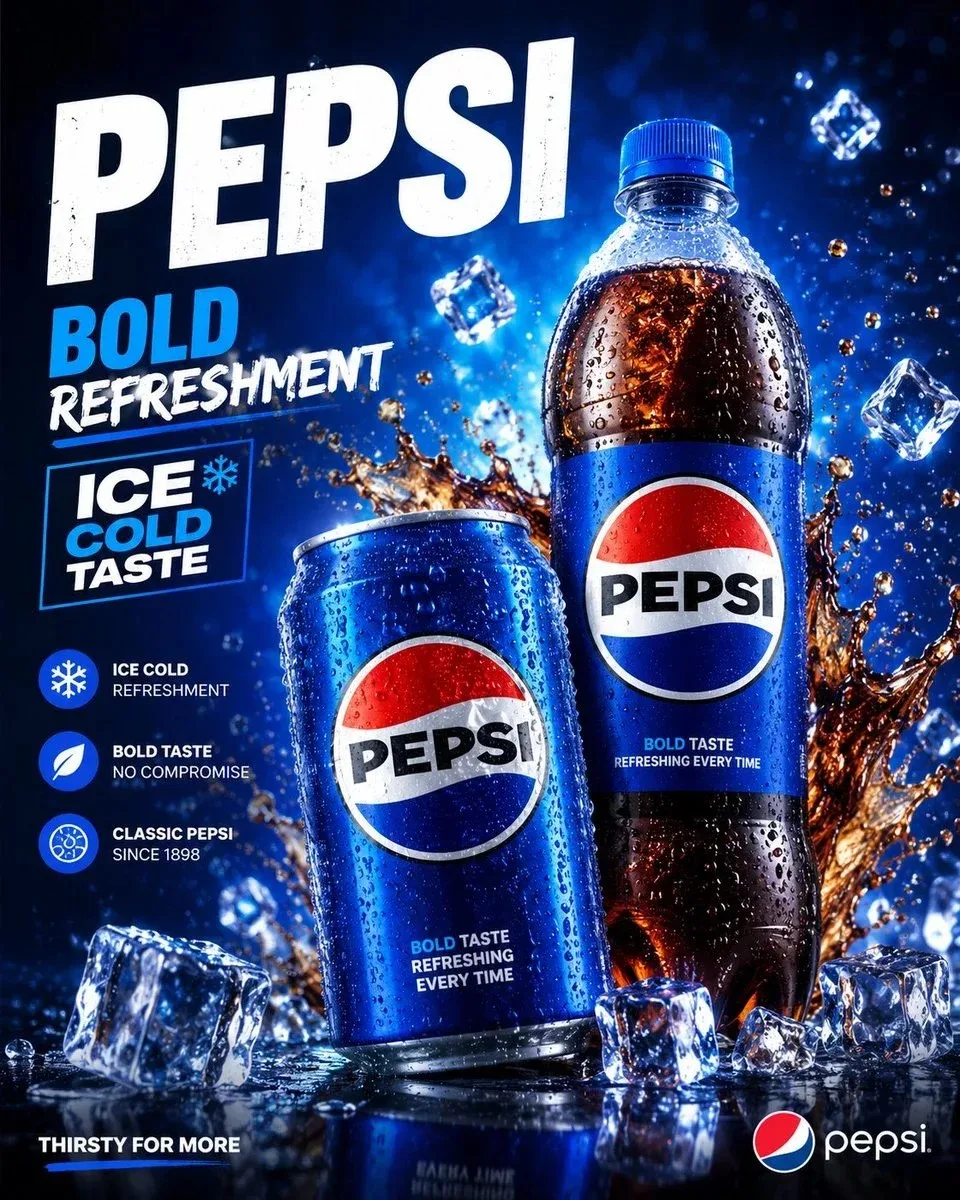
Premium Pepsi Drinks Packaging Advertisement Poster with a Bold, Refreshing, Create a premium Pepsi drinks packaging adv — ChatGPT AI Photography Prompt Recipe on Faymas
Product & Brand by Alex Rivera

Premium Pepsi Drinks Packaging Advertisement Poster with a Bold, Refreshing, Create a premium Pepsi drinks packaging adv

Exact Prompt Recipe Scroll to read more
Create a premium Pepsi drinks packaging advertisement poster with a bold, refreshing, and high-end commercial style. Place a chilled Pepsi can and a sleek Pepsi bottle in the center as the main products, both covered with realistic water droplets and cold condensation. Use a dramatic deep-blue background with glowing light effects, floating ice cubes, cola splash effects, sparkling bubbles, and glossy reflections. Make the packaging look clean, attractive, and professional, with clear Pepsi branding, sharp label details, and a realistic product finish. Add modern advertising typography with text like: [PEPSI] Bold Refreshment Ice Cold Taste Thirsty for More Include small feature badges such as “Ice Cold Refreshment,” “Bold Taste,” and “Classic Pepsi.” The overall design should feel energetic, refreshing, realistic, polished, and suitable for a social media or print beverage campaign. Style: photorealistic product mockup, premium beverage ad, glossy commercial lighting, blue color theme, ice cold effect, cola splash, modern typography, 4:5 aspect ratio.
Scroll for more
App: ChatGPT Ratio: 4:5
Photo Reproduction Guide

How to Recreate This Photo in ChatGPT

Follow this quick 4-step workflow to generate an identical visual style using the exact parameters tested for Premium Pepsi Drinks Packaging Advertisement Poster with a Bold, Refreshing, Create a premium Pepsi drinks packaging adv.

1

Copy the Recipe

Click the Copy Full Prompt button above. All key descriptors, lighting commands, and lens tags are copied directly to your clipboard.

2

Open ChatGPT

Open your ChatGPT app or web interface (e.g. ChatGPT chat, Bing Image Creator prompt bar, or Midjourney Discord).

3

Set 4:5 Ratio

Set your canvas size to 4:5. This gives you the natural composition shown above.

4

Customize Subject

Want your own face or a different subject? Simply change the character description or hair/clothing while keeping the lighting and camera tokens intact!
Pro Tip: To maintain this exact lighting in ChatGPT, keep the camera, aperture, and lighting keywords unmodified.
✓