Back to All Prompts
ChatGPT • 9:16
Photorealistic Luxury Café Fashion Shoot — ChatGPT AI Photography Prompt Recipe on Faymas
Wallpapers by Alex Rivera

Photorealistic Luxury Café Fashion Shoot

Exact Prompt Recipe Scroll to read more
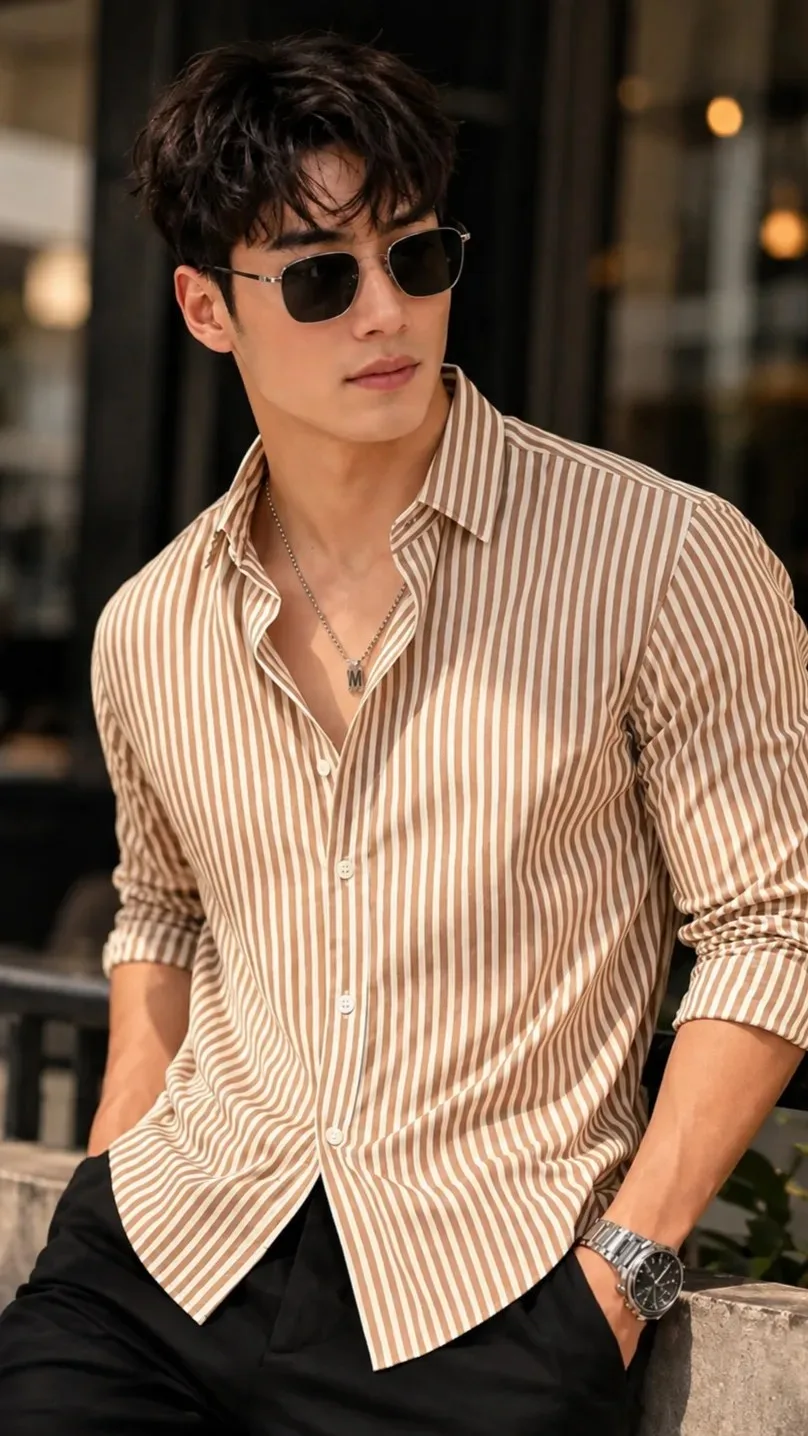
Create an ultra-realistic luxury fashion editorial portrait using the uploaded image as the ONLY face and identity reference. Preserve the person's exact facial identity, facial structure, eyes, eyebrows, nose, lips, jawline, skin tone, hairstyle, hairline, expression, age, and all unique facial features exactly as they appear in the uploaded image. Do not beautify, alter, replace, or stylize the face in any way. The subject is leaning casually against a modern concrete railing outside a luxury café. He is wearing a beige and white vertically striped slim-fit button-up shirt with the sleeves rolled up to the forearms and the top three buttons left open, paired with tailored black trousers. He wears black rectangular metal-frame sunglasses, a thin silver chain necklace with a small pendant, and a premium stainless steel luxury wristwatch. One hand is inside his trouser pocket while the other rests naturally. His body is turned slightly to the side while his head is turned away from the camera, creating a relaxed, confident editorial pose. His hair is naturally messy and textured with soft volume. The background features a blurred modern luxury café with elegant architecture and creamy bokeh. Warm golden-hour sunlight illuminates the scene with soft natural shadows, creating a premium lifestyle atmosphere. Luxury street fashion aesthetic, Vogue editorial photography, premium men's fashion magazine cover, ultra-realistic skin texture, detailed fabric folds, cinematic HDR lighting, realistic reflections on sunglasses and watch, shallow depth of field, DSLR photography, Canon EOS R5, RF 85mm f/1.8 lens, f/1.8 aperture, ISO 100, masterpiece composition, ultra-sharp focus on the face and clothing, natural color grading, 8K, HDR, photorealistic, hyper-detailed, award-winning fashion photography.
Scroll for more
App: ChatGPT Ratio: 9:16

Suggested Prompts

More in Wallpapers →
Photo Reproduction Guide

How to Recreate This Photo in ChatGPT

Follow this quick 4-step workflow to generate an identical visual style using the exact parameters tested for Photorealistic Luxury Café Fashion Shoot.

1

Copy the Recipe

Click the Copy Full Prompt button above. All key descriptors, lighting commands, and lens tags are copied directly to your clipboard.

2

Open ChatGPT

Open your ChatGPT app or web interface (e.g. ChatGPT chat, Bing Image Creator prompt bar, or Midjourney Discord).

3

Set 9:16 Ratio

Set your canvas size to 9:16. This gives you the natural composition shown above.

4

Customize Subject

Want your own face or a different subject? Simply change the character description or hair/clothing while keeping the lighting and camera tokens intact!

Pro Tip: To maintain this exact lighting in ChatGPT, keep the camera, aperture, and lighting keywords unmodified.
✓