Back to All Prompts
ChatGPT • 2:3
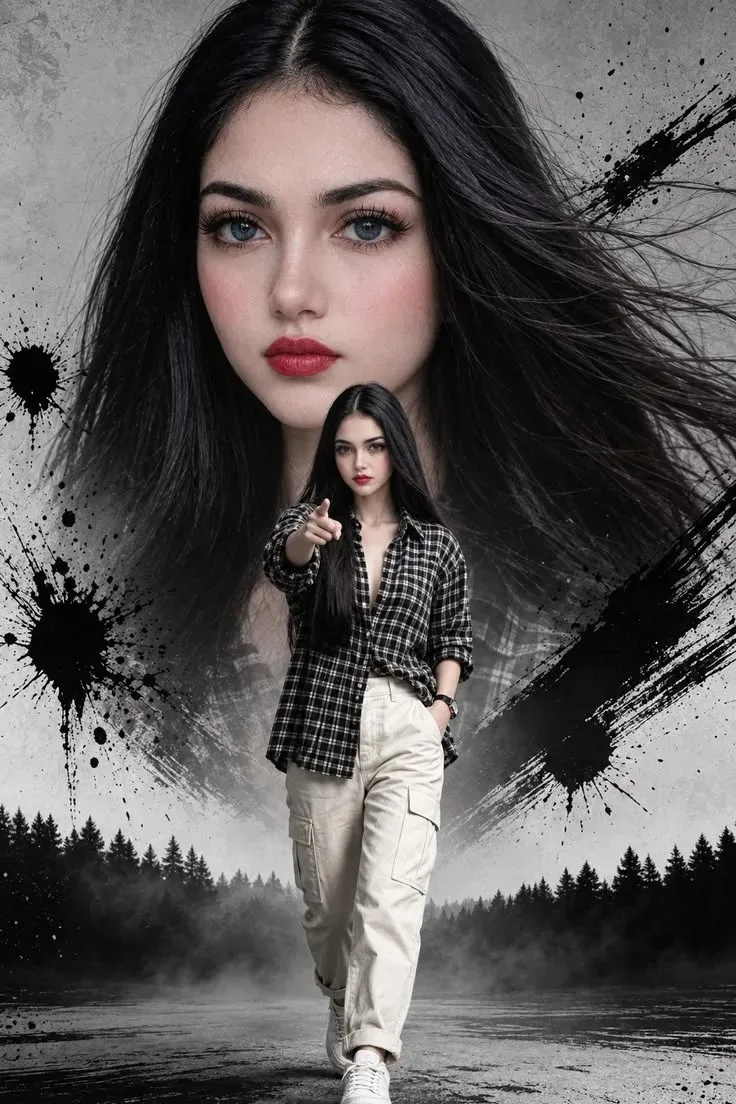
Monochrome Rebel — ChatGPT AI Photography Prompt Recipe on Faymas
Presentation by Alex Rivera

Monochrome Rebel

Exact Prompt Recipe Scroll to read more
Create a dramatic, highly detailed vertical fashion poster featuring a young woman in a powerful editorial composition. A huge close-up portrait of her face dominates the upper background, with long flowing black hair sweeping dramatically across the frame. She has striking light-colored eyes, defined eyebrows, long eyelashes, subtle rosy cheeks, and bold deep-red lipstick, with a confident intense gaze directly toward the camera. In the foreground, show the same woman walking confidently toward the viewer. She wears an oversized black-and-white checkered shirt, loose cream-colored cargo pants, white sneakers, and a simple wristwatch. One hand is casually placed in her pocket while the other points directly toward the camera. Long straight black hair flows naturally around her. Use a monochrome gray textured background with dramatic black ink splashes and paint-brush strokes surrounding the composition. Add a misty forest landscape and wet reflective ground at the bottom, creating a cinematic atmospheric effect. Strong contrast, fashion-magazine poster aesthetic, dramatic lighting, realistic facial details, natural skin texture, sharp clothing texture, dynamic hair movement, sophisticated editorial photography, photorealistic, ultra-detailed, cinematic composition, vertical 9:16.
Scroll for more
App: ChatGPT Ratio: 2:3

Suggested Prompts

More in Presentation →
Photo Reproduction Guide

How to Recreate This Photo in ChatGPT

Follow this quick 4-step workflow to generate an identical visual style using the exact parameters tested for Monochrome Rebel.

1

Copy the Recipe

Click the Copy Full Prompt button above. All key descriptors, lighting commands, and lens tags are copied directly to your clipboard.

2

Open ChatGPT

Open your ChatGPT app or web interface (e.g. ChatGPT chat, Bing Image Creator prompt bar, or Midjourney Discord).

3

Set 2:3 Ratio

Set your canvas size to 2:3. This gives you the natural composition shown above.

4

Customize Subject

Want your own face or a different subject? Simply change the character description or hair/clothing while keeping the lighting and camera tokens intact!

Pro Tip: To maintain this exact lighting in ChatGPT, keep the camera, aperture, and lighting keywords unmodified.
✓