Back to All Prompts
ChatGPT • 9:16
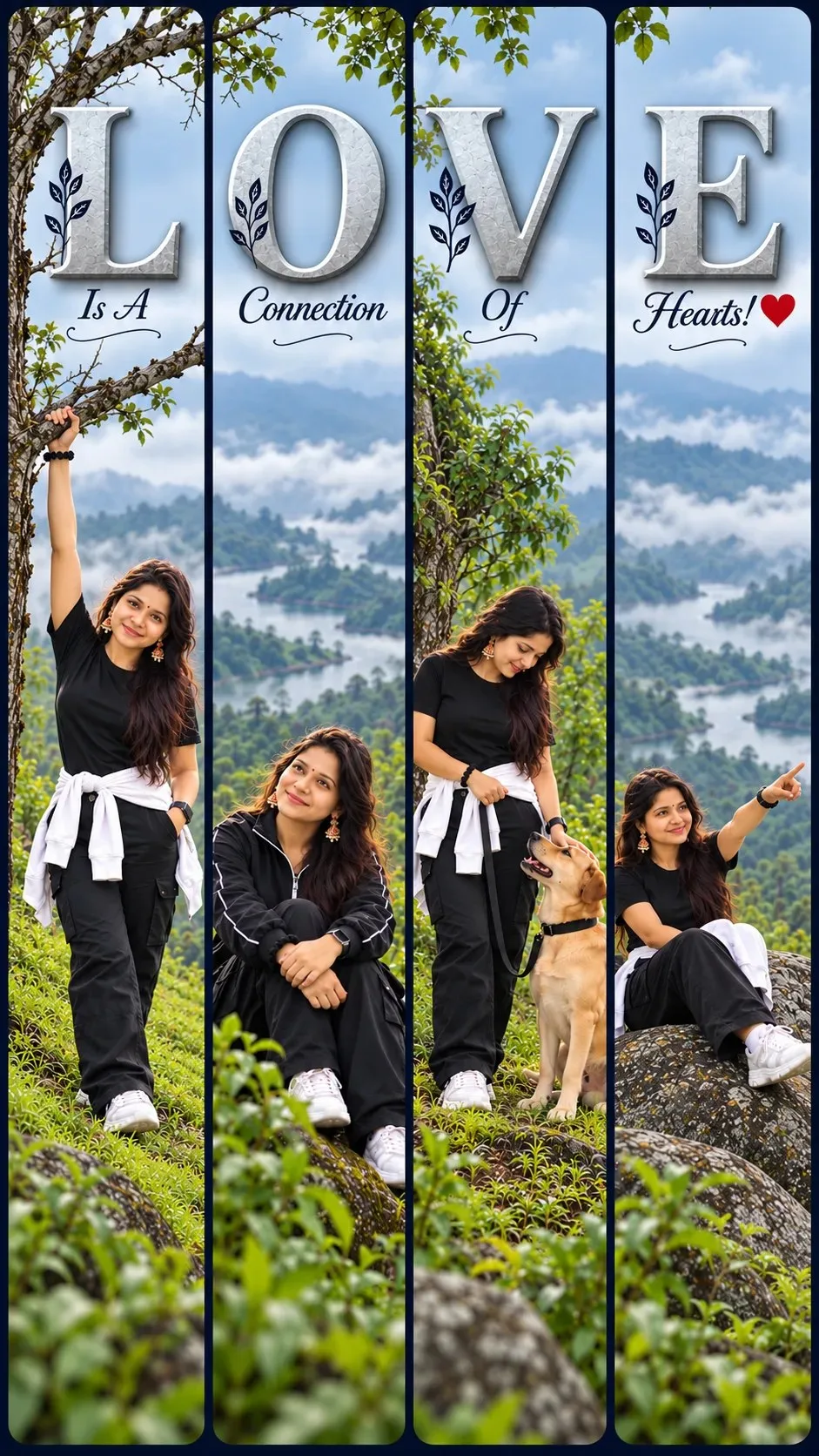
.L.O.V.E. — ChatGPT AI Photography Prompt Recipe on Faymas
Poster Design by Alex Rivera

.L.O.V.E.

Exact Prompt Recipe Scroll to read more
Vertical 9:16 social media story collage made of four tall, narrow rounded-rectangle panels side by side, separated by thin dark navy gaps inside a deep navy-blue frame. One continuous misty monsoon hillside scene runs across all four panels, with the same person in a different pose in each. Top of each panel: one giant 3D embossed frosted-grey letter, spelling L, O, V, E, with a soft drop shadow. Below each letter, small elegant calligraphic serif text in dark navy: "Is A", "Connection", "Of", "Hearts! ❤" Panel 1: person standing on a grassy slope, one arm raised gripping a bare tree branch, backward black cap, black t-shirt, white jacket tied around person waist, black pants. Fog behind person. Panel 2: same person sitting on a mossy rock in a black zip-up jacket with white piping, looking up at the sky, backward cap, lush green leafy plants in the foreground. Panel 3: same person standing beside a leafy tree, looking down at a tan dog with a collar and leash gazing up at person, white jacket tied at the waist. Panel 4: same person sitting on a large grey boulder, one arm extended pointing into the distance, black top, white jacket across person lap. Style: cinematic travel photography, overcast diffused light, thick fog, muted teal-green color grade, soft pale-blue sky gradient at the top, lush green foreground, shallow depth of field, clean modern Instagram aesthetic, sharp details, 4K. Face and body exactly 100% same as uploaded images
Scroll for more
App: ChatGPT Ratio: 9:16

Suggested Prompts

More in Poster Design →
Photo Reproduction Guide

How to Recreate This Photo in ChatGPT

Follow this quick 4-step workflow to generate an identical visual style using the exact parameters tested for .L.O.V.E..

1

Copy the Recipe

Click the Copy Full Prompt button above. All key descriptors, lighting commands, and lens tags are copied directly to your clipboard.

2

Open ChatGPT

Open your ChatGPT app or web interface (e.g. ChatGPT chat, Bing Image Creator prompt bar, or Midjourney Discord).

3

Set 9:16 Ratio

Set your canvas size to 9:16. This gives you the natural composition shown above.

4

Customize Subject

Want your own face or a different subject? Simply change the character description or hair/clothing while keeping the lighting and camera tokens intact!

Pro Tip: To maintain this exact lighting in ChatGPT, keep the camera, aperture, and lighting keywords unmodified.
✓