Back to All Prompts
Gemini • 3:4
Kuldeep Meena — Gemini AI Photography Prompt Recipe on Faymas
Logo & Identity by Alex Rivera

Kuldeep Meena

Exact Prompt Recipe Scroll to read more
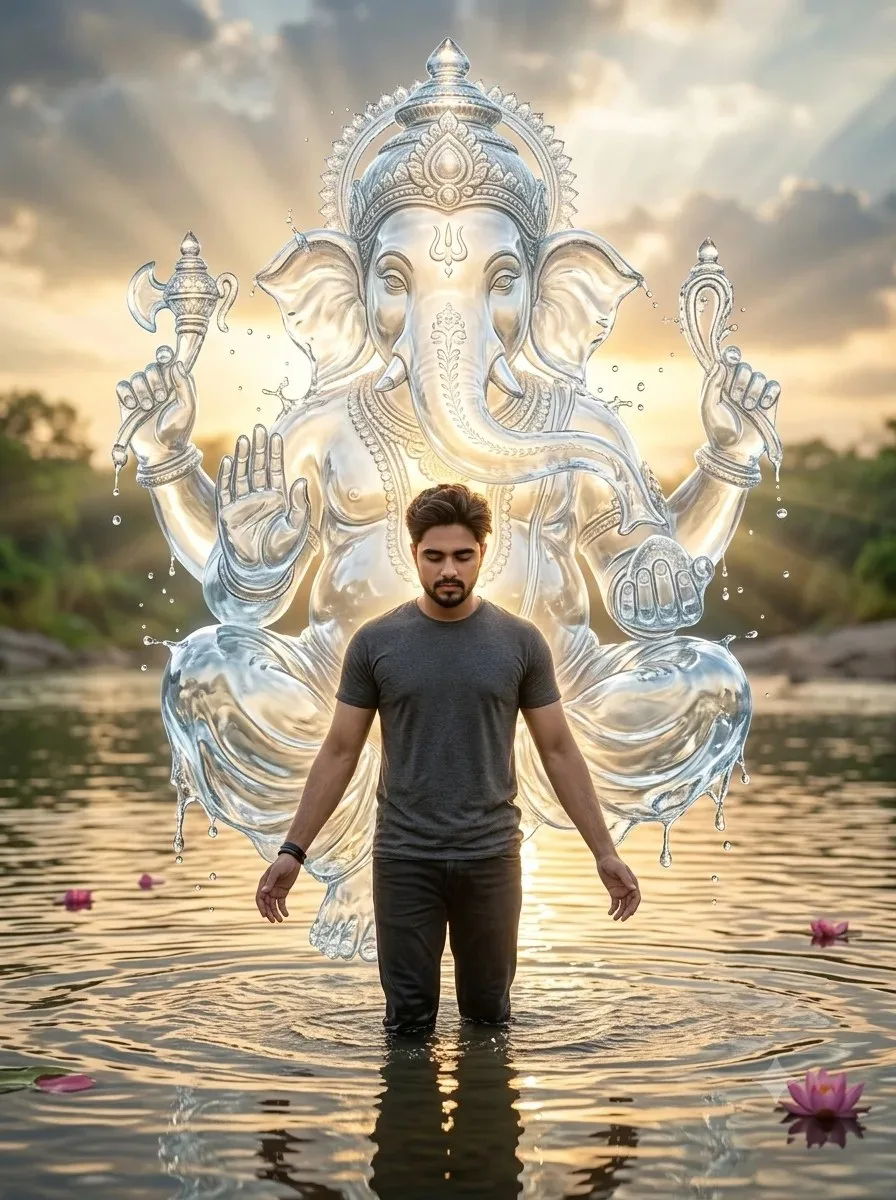
Transform my uploaded photo into a highly realistic, cinematic devotional scene. Keep the person in my original photo exactly recognizable, preserving their face, hairstyle, body proportions, clothing details, and natural appearance. Place the person standing in shallow water, with water ripples and realistic reflections around their feet. Their head should be slightly bowed downward and their arms extended outward in a peaceful, devotional pose. Behind the person, create a massive divine Lord Ganesha formed entirely from crystal-clear flowing water, appearing like a majestic water sculpture or spiritual aura. Ganesha should be positioned directly behind and slightly above the person, towering over them while remaining clearly visible. The water should form detailed facial features, trunk, ears, crown, hands, and ornaments, with sparkling droplets and flowing streams around the entire figure. Give Ganesha a soft divine golden-white glow, subtle blue-white water tones, luminous edges, and an ethereal spiritual aura. Add a dramatic sunset sky with warm golden sunlight breaking through clouds, creating beautiful backlighting around the water Ganesha. Include a natural river or lake extending into the background, distant greenery along the shore, realistic atmospheric perspective, and reflections of the sunlight on the water. Add a few pink flower petals floating naturally on the water and drifting through the air, but keep them subtle and realistic. Make the entire composition look like a professionally photographed real scene rather than an illustration. Photorealistic, ultra-detailed, cinematic lighting, realistic water physics, natural reflections, volumetric sunlight, realistic skin and texture, depth of field, HDR, dramatic but peaceful devotional atmosphere, high resolution. Do not change the person's identity or facial features. For an even stronger result, add this at the end: “Make the water-formed Ganesha look physically integrated into the environment, with transparent water, individual droplets, splashes, reflections, and realistic interaction with the surrounding atmosphere. Avoid cartoon, CGI-looking, plastic, or artificial appearance.” Photo size Instagram 3:4 ratio.
Scroll for more
App: Gemini Ratio: 3:4
Photo Reproduction Guide

How to Recreate This Photo in Gemini

Follow this quick 4-step workflow to generate an identical visual style using the exact parameters tested for Kuldeep Meena.

1

Copy the Recipe

Click the Copy Full Prompt button above. All key descriptors, lighting commands, and lens tags are copied directly to your clipboard.

2

Open Gemini

Open your Gemini app or web interface (e.g. ChatGPT chat, Bing Image Creator prompt bar, or Midjourney Discord).

3

Set 3:4 Ratio

Set your canvas size to 3:4. This gives you the natural composition shown above.

4

Customize Subject

Want your own face or a different subject? Simply change the character description or hair/clothing while keeping the lighting and camera tokens intact!


Pro Tip: To maintain this exact lighting in Gemini, keep the camera, aperture, and lighting keywords unmodified.
✓