Back to All Prompts
ChatGPT • 9:16
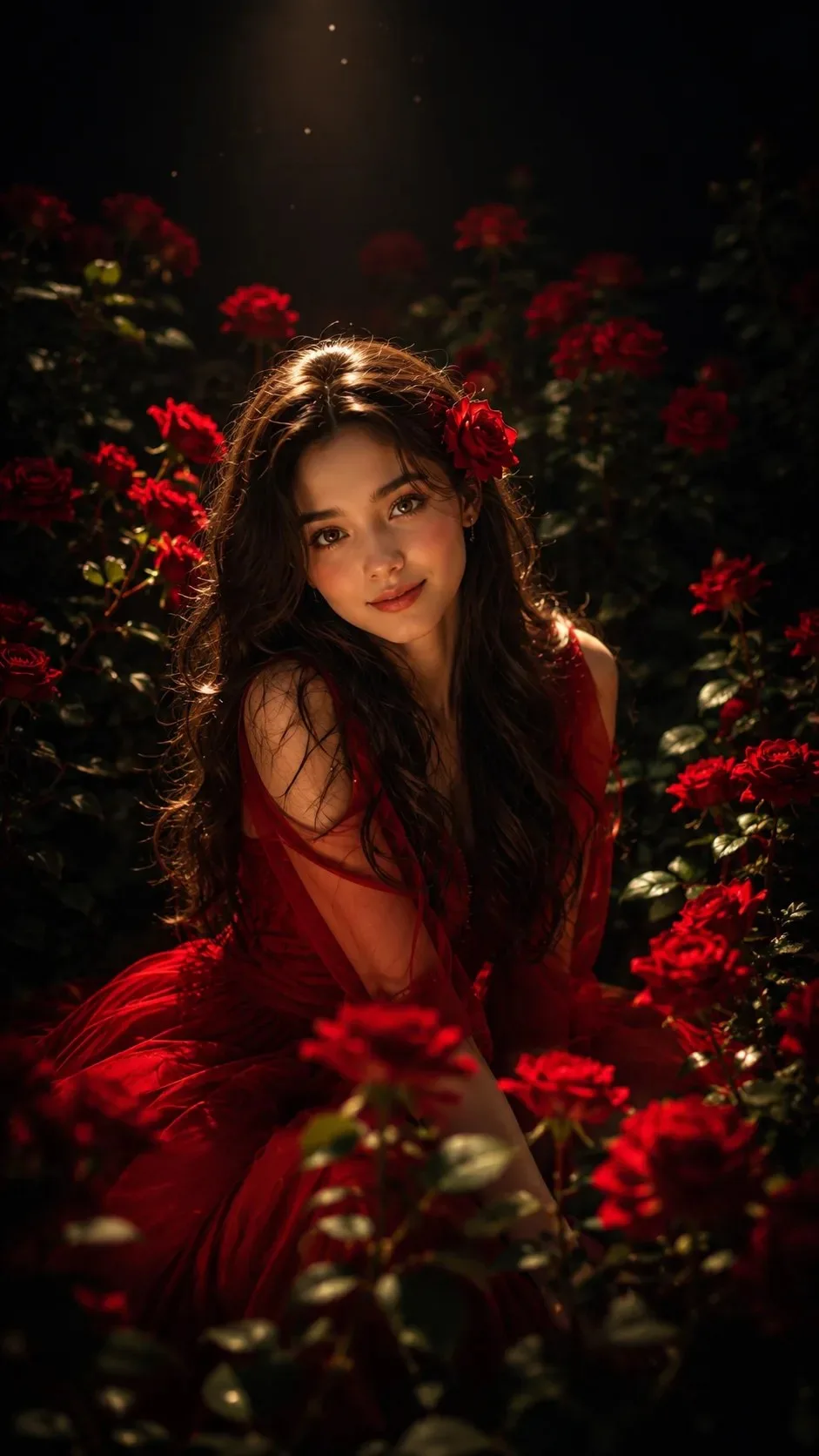
🌹 Enchanted Roses garden and midnight — ChatGPT AI Photography Prompt Recipe on Faymas
Wallpapers by Alex Rivera

🌹 Enchanted Roses garden and midnight

Exact Prompt Recipe Scroll to read more
A breathtaking cinematic portrait of a beautiful young woman sitting gracefully in a luxurious red rose garden at night. She has long, silky, wavy dark brown hair, glowing hazel eyes, soft rosy cheeks, flawless skin, and a gentle, captivating smile while looking directly at the camera. She wears an elegant flowing deep red gown made of soft chiffon with delicate lace details. A fresh red rose is tucked behind one ear. The background is almost completely dark, creating a dramatic, moody atmosphere. A single warm golden spotlight shines from above, illuminating only the woman and the surrounding blooming red roses, while the rest of the garden fades into deep black shadows. Rich crimson roses surround her from every direction with lush green leaves. Tiny floating dust particles sparkle in the warm light, adding a magical touch. Ultra-realistic skin texture, cinematic lighting, dramatic chiaroscuro, soft rim light, volumetric light rays, shallow depth of field, dreamy bokeh, luxury edit
Scroll for more
App: ChatGPT Ratio: 9:16

Suggested Prompts

More in Wallpapers →
Photo Reproduction Guide

How to Recreate This Photo in ChatGPT

Follow this quick 4-step workflow to generate an identical visual style using the exact parameters tested for 🌹 Enchanted Roses garden and midnight.

1

Copy the Recipe

Click the Copy Full Prompt button above. All key descriptors, lighting commands, and lens tags are copied directly to your clipboard.

2

Open ChatGPT

Open your ChatGPT app or web interface (e.g. ChatGPT chat, Bing Image Creator prompt bar, or Midjourney Discord).

3

Set 9:16 Ratio

Set your canvas size to 9:16. This gives you the natural composition shown above.

4

Customize Subject

Want your own face or a different subject? Simply change the character description or hair/clothing while keeping the lighting and camera tokens intact!

Pro Tip: To maintain this exact lighting in ChatGPT, keep the camera, aperture, and lighting keywords unmodified.
âś“