Back to All Prompts
ChatGPT • 3:4
Elegant Dinner at a Luxury Restaurant — ChatGPT AI Photography Prompt Recipe on Faymas
Food & Drink by Alex Rivera

Elegant Dinner at a Luxury Restaurant

Exact Prompt Recipe Scroll to read more
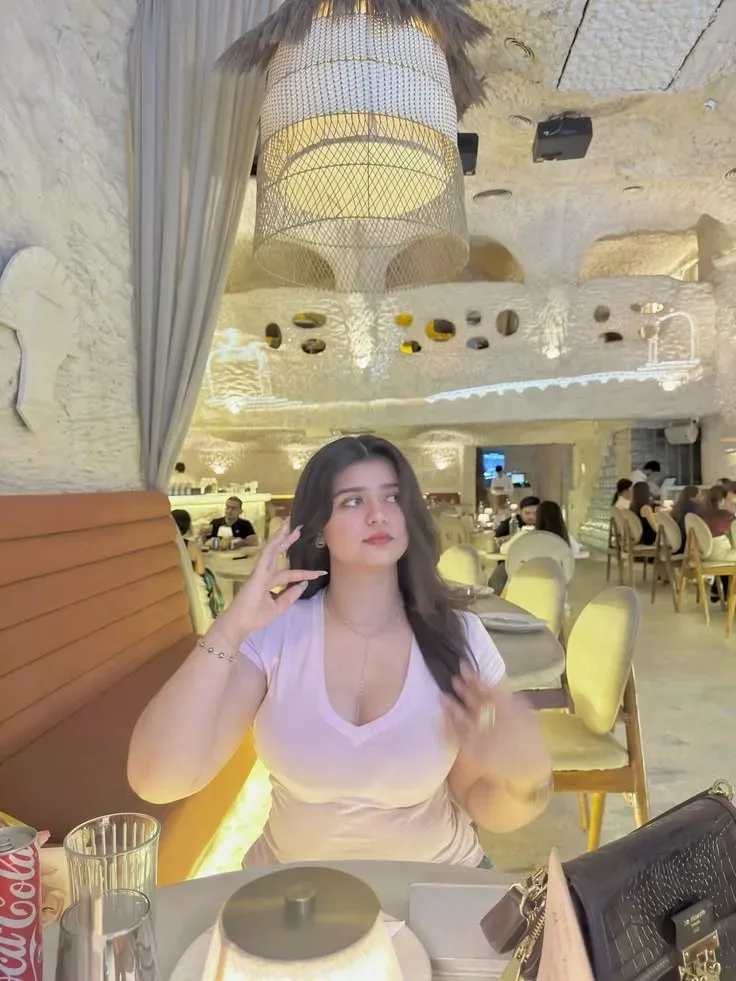
Create an ultra-realistic cinematic vertical portrait of a young woman seated comfortably at a table inside a luxurious, artistic restaurant. She has long, naturally wavy dark-brown hair and wears a fitted soft lavender/pale pink V-neck top, delicate layered necklaces, a bracelet, and elegant rings. She is seated in a plush tan upholstered booth, with one hand raised naturally near her hair and her other hand resting near the table, creating a relaxed candid pose. Her gaze is directed slightly to the side with a calm, natural expression. The restaurant features a distinctive white textured stone interior, elegant arched architectural details, large decorative pendant lighting with warm golden illumination, cream-colored dining chairs, and softly glowing ambient lights. Other diners appear naturally in the background with realistic depth and subtle blur. In the foreground, include a partially visible dessert plate/cake, glassware, soft drink, and a stylish black handbag on the table, maintaining the authentic restaurant atmosphere. Photography: photorealistic DSLR photography, natural skin texture, realistic facial details, candid lifestyle photography, warm ambient lighting, soft highlights, shallow depth of field, realistic restaurant background, balanced exposure, subtle cinematic color grading, detailed fabric and jewelry, natural proportions, high detail, 8K UHD, vertical composition, 9:16 aspect ratio.
Scroll for more
App: ChatGPT Ratio: 3:4

Suggested Prompts

More in Food & Drink →
Photo Reproduction Guide

How to Recreate This Photo in ChatGPT

Follow this quick 4-step workflow to generate an identical visual style using the exact parameters tested for Elegant Dinner at a Luxury Restaurant.

1

Copy the Recipe

Click the Copy Full Prompt button above. All key descriptors, lighting commands, and lens tags are copied directly to your clipboard.

2

Open ChatGPT

Open your ChatGPT app or web interface (e.g. ChatGPT chat, Bing Image Creator prompt bar, or Midjourney Discord).

3

Set 3:4 Ratio

Set your canvas size to 3:4. This gives you the natural composition shown above.

4

Customize Subject

Want your own face or a different subject? Simply change the character description or hair/clothing while keeping the lighting and camera tokens intact!

Pro Tip: To maintain this exact lighting in ChatGPT, keep the camera, aperture, and lighting keywords unmodified.
✓