Back to All Prompts
ChatGPT • 9:16
Elegant 5th Birthday Photo Collage – Ponnu — ChatGPT AI Photography Prompt Recipe on Faymas
Poster Design by Alex Rivera

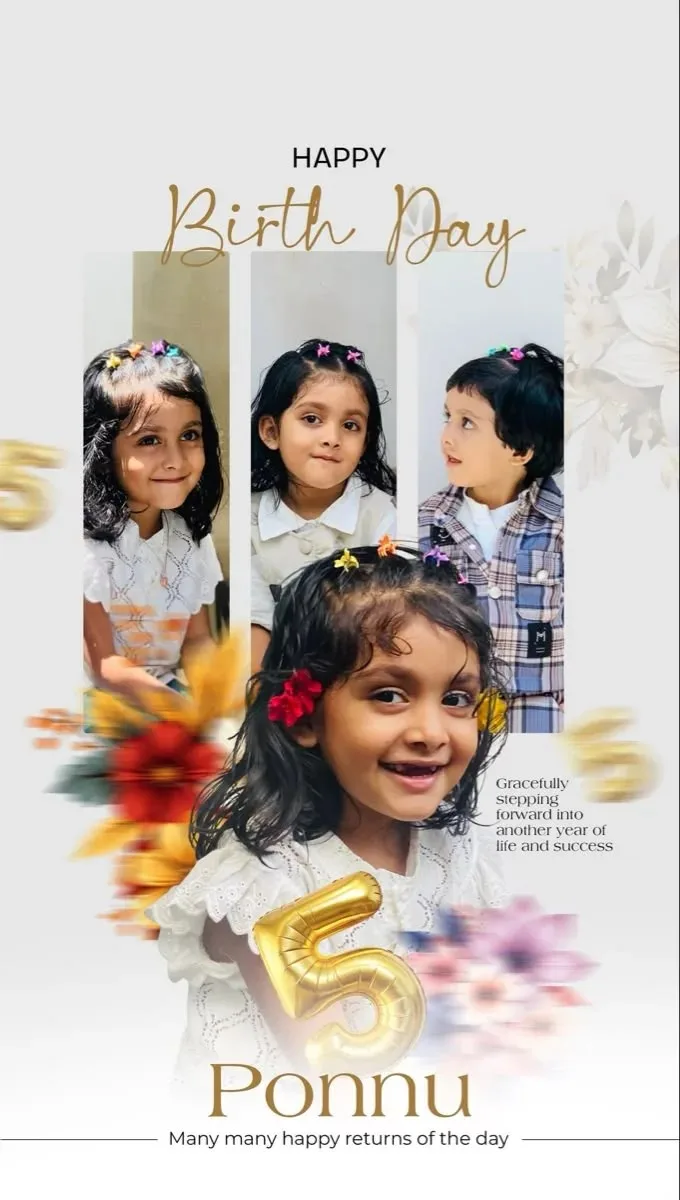
Elegant 5th Birthday Photo Collage – Ponnu

Exact Prompt Recipe Scroll to read more
Create a beautiful, elegant 5th birthday photo collage for a little girl named “Ponnu”. Use the uploaded image as the visual reference for the overall composition and layout. Create a vertical birthday poster with a soft light-gray/white background, elegant typography, delicate floral elements, and a premium family-photo aesthetic. Place three smaller childhood portraits across the upper section, arranged in tall vertical rectangular frames. Feature the main birthday girl prominently in the center/lower portion with a large joyful portrait, smiling naturally and wearing a beautiful white lace-style dress decorated with colorful flowers in her hair. Add a large metallic-gold 3D number “5” near the lower center, surrounded by soft colorful flowers and subtle motion-blur floral accents. Typography: • “HAPPY” in clean uppercase black lettering at the top. • “Birth Day” in elegant gold handwritten/script typography beneath it. • “Ponnu” in large refined gold serif typography near the bottom. • Add a small elegant birthday message: “Many many happy returns of the day”. • Include a subtle celebratory message such as “Gracefully stepping forward into another year of life and success.” Maintain a sophisticated pastel palette of white, ivory, soft gray, muted gold, peach, pink, orange and subtle green. Use soft studio lighting, realistic photographs, delicate shadows, premium typography, balanced spacing, refined floral decoration, and a polished professional birthday-card design. Make the children's faces natural, realistic and recognizable from the provided reference photographs. Avoid excessive skin smoothing or artificial facial changes. High-resolution, photorealistic portraits, elegant Indian birthday celebration aesthetic, premium graphic design, clean composition, no watermark.
Scroll for more
App: ChatGPT Ratio: 9:16

Suggested Prompts

More in Poster Design →
Photo Reproduction Guide

How to Recreate This Photo in ChatGPT

Follow this quick 4-step workflow to generate an identical visual style using the exact parameters tested for Elegant 5th Birthday Photo Collage – Ponnu.

1

Copy the Recipe

Click the Copy Full Prompt button above. All key descriptors, lighting commands, and lens tags are copied directly to your clipboard.

2

Open ChatGPT

Open your ChatGPT app or web interface (e.g. ChatGPT chat, Bing Image Creator prompt bar, or Midjourney Discord).

3

Set 9:16 Ratio

Set your canvas size to 9:16. This gives you the natural composition shown above.

4

Customize Subject

Want your own face or a different subject? Simply change the character description or hair/clothing while keeping the lighting and camera tokens intact!

Pro Tip: To maintain this exact lighting in ChatGPT, keep the camera, aperture, and lighting keywords unmodified.
✓