Back to All Prompts
ChatGPT • 4:5
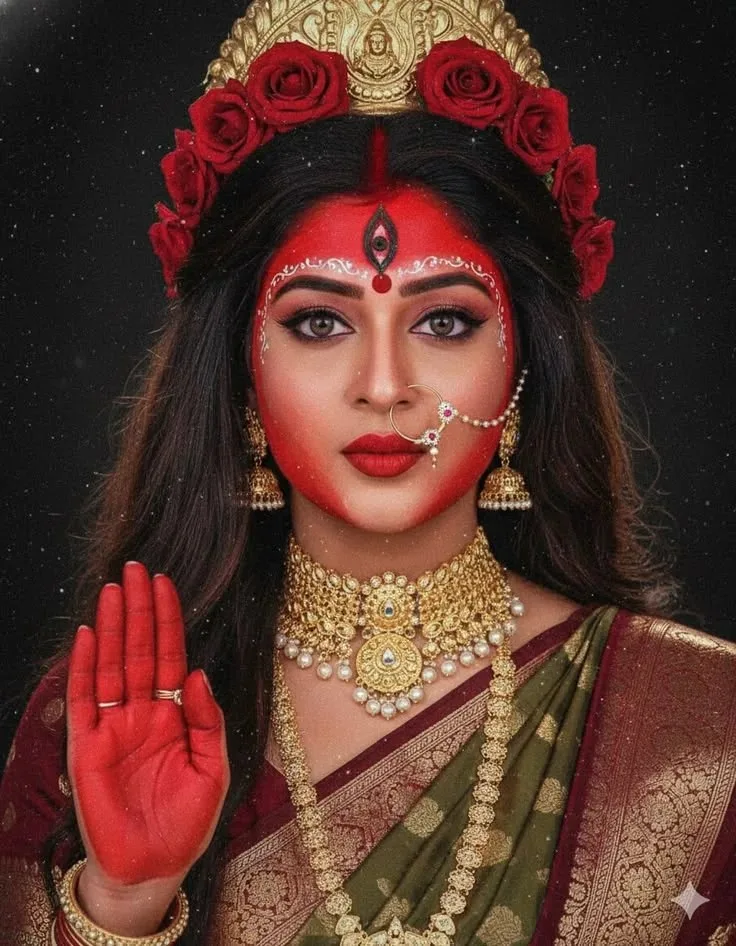
Divine Shakti 🌹✨ — ChatGPT AI Photography Prompt Recipe on Faymas
Logo & Identity by Alex Rivera

Divine Shakti 🌹✨

Exact Prompt Recipe Scroll to read more
Create a high-resolution vertical 4:5 cinematic devotional portrait inspired by the reference image. Show an adult Indian woman styled in a powerful Goddess Durga-inspired traditional look, facing the camera in a symmetrical close-up portrait. She wears a rich olive-green and deep maroon silk saree with intricate antique-gold zari patterns. Adorn her with an elaborate gold temple-jewelry set, including a heavy choker with pearl details, layered necklaces, ornate jhumka earrings, bangles, and a traditional large nath nose ring. Her long dark hair is styled elegantly and topped with an ornate golden mukut/crown surrounded by deep red roses. Add a prominent red bindi, traditional white decorative forehead patterns, dramatic kajal-lined eyes, and rich red lipstick. Her face should have a subtle red ceremonial tint. Raise one hand beside her face in a traditional abhaya mudra/blessing gesture, with the palm decorated in vivid red ceremonial color and delicate gold rings. Background: deep matte black, with subtle floating dust/sparkle particles and a faint atmospheric glow, keeping all attention on the subject. Style: photorealistic Indian devotional fine-art portrait, divine feminine aesthetic, dramatic studio lighting, rich red-gold-green palette, intricate jewelry detail, realistic skin texture, highly detailed silk fabric, symmetrical composition, soft cinematic glow, sacred and majestic atmosphere, premium photography, sharp facial details, vertical 4:5 composition.
Scroll for more
App: ChatGPT Ratio: 4:5
Photo Reproduction Guide

How to Recreate This Photo in ChatGPT

Follow this quick 4-step workflow to generate an identical visual style using the exact parameters tested for Divine Shakti 🌹✨.

1

Copy the Recipe

Click the Copy Full Prompt button above. All key descriptors, lighting commands, and lens tags are copied directly to your clipboard.

2

Open ChatGPT

Open your ChatGPT app or web interface (e.g. ChatGPT chat, Bing Image Creator prompt bar, or Midjourney Discord).

3

Set 4:5 Ratio

Set your canvas size to 4:5. This gives you the natural composition shown above.

4

Customize Subject

Want your own face or a different subject? Simply change the character description or hair/clothing while keeping the lighting and camera tokens intact!


Pro Tip: To maintain this exact lighting in ChatGPT, keep the camera, aperture, and lighting keywords unmodified.
âś“