DARK SHINOBI WARRIOR — REAL FACE IDENTITY LOCK
REFERENCE IMAGE RULES
Use my uploaded personal photograph as the ONLY reference for my facial identity. Use the supplied anime image only as a reference for the character's pose, sword position, black-and-red cloak, hairstyle inspiration, dramatic lighting, dark atmosphere, and cinematic composition.
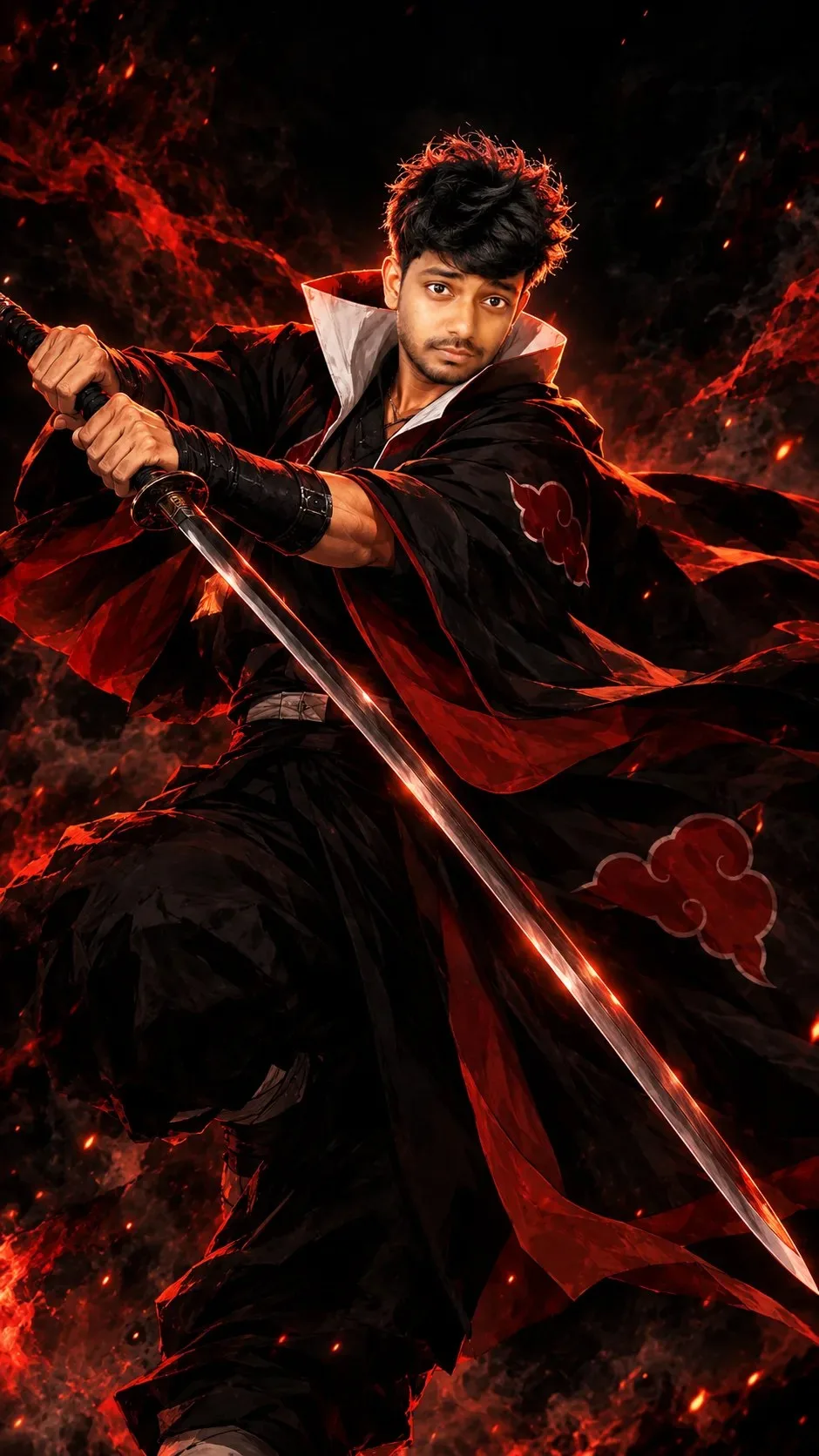
Create an ultra-detailed, cinematic anime warrior portrait featuring ME as a mysterious, powerful shinobi swordsman.
1. FACE IDENTITY — ABSOLUTE PRIORITY
Preserve my real face as closely as possible to my original photograph. My identity must remain recognizable.
Keep my original:
- Forehead shape, hairline, and head proportions.
- Natural eyebrows, eye shape, eyelids, and distance between the eyes.
- Nose bridge, nose width, tip, and nostrils.
- Lips, mouth shape, jawline, chin, and cheekbones.
- Original skin tone, ears, facial hair, and distinctive features.
- Natural facial asymmetry and realistic facial proportions.
Do not replace my face with a generic anime character. Do not change my nose, reshape my jaw, enlarge my eyes, or excessively beautify my face.
Use a semi-realistic anime rendering technique while retaining the underlying structure of my real face. Keep my face clearly recognizable beneath the dramatic shadows.
2. HAIRSTYLE AND EXPRESSION
Adapt my natural black hair into a slightly longer, layered, windswept anime hairstyle. Add sharp individual strands, textured bangs sweeping across part of the forehead, and subtle red-orange highlights along the edges.
Keep my original hair color and recognizable hairline.
Give me a calm, serious, fearless warrior expression, with a focused gaze directed toward the viewer's left. Keep my actual eye spacing and natural facial proportions.
3. WARRIOR OUTFIT
Dress me in a flowing black shinobi cloak inspired by dark fantasy anime.
Include:
- A dramatic, high, white inner collar framing the neck and jaw.
- A black outer cloak with deep red-orange lining.
- Subtle red cloud-like embroidered symbols on the cloak.
- Dark fitted clothing underneath.
- Black wrist guards and understated shinobi accessories.
The fabric should have realistic folds and dynamic movement, with the cloak billowing dramatically to the right side of the frame.
4. SWORD AND HAND POSITION
Place a long, elegant katana diagonally across the foreground, extending from the lower-right area toward the upper-left.
Both hands grip the sword's handle firmly and naturally, following the reference composition. Use correct finger placement, believable wrist angles, and anatomically accurate hands.
Show a polished dark-steel blade with a narrow silver edge reflecting the red-orange light.
Keep the sword visually prominent without covering my face.
5. POSE AND CAMERA
Recreate the reference's dramatic, low-angle action composition.
Position my upper body slightly turned, with my shoulders angled toward the camera. Extend my arms forward while holding the katana in a defensive combat stance.
Let the cloak sweep outward in a large, flowing arc behind and around my body. Use a slightly off-center composition with the face in the upper-middle portion of the image.
Create a powerful silhouette that communicates discipline, confidence, mystery, and strength.
6. LIGHTING AND ATMOSPHERE
Use a nearly black background with deep shadows and selective cinematic illumination.
Add intense red-orange rim lighting along the edges of my hair, cheek, shoulders, forearms, sword, and flowing cloak.
Use soft, controlled facial illumination to preserve my real facial features. Add subtle highlights to the eyes and nose, realistic skin shading, and deep shadows beneath the hair.
Let the red glow illuminate the cloak's inner lining while the rest of the scene remains predominantly black.
7. BACKGROUND AND COLOR PALETTE
Create a minimal, dark fantasy background with drifting smoke, faint red embers, and subtle atmospheric haze.
Use a restricted palette of pure black, charcoal gray, crimson red, burnt orange, and metallic silver.
Avoid bright scenery or distracting background objects. The face, sword, and flowing cloak should remain the main visual elements.
8. ART STYLE AND IMAGE QUALITY
Premium cinematic anime illustration, semi-realistic facial anatomy, intricate hand-drawn linework, detailed black fabric, realistic sword reflections, dramatic chiaroscuro lighting, flowing cloth simulation, finely rendered hair strands, rich shadows, subtle film grain, polished theatrical anime-poster aesthetic.
Vertical 9:16 smartphone wallpaper, high resolution, sharp facial details, dynamic composition, professional color grading.
NEGATIVE PROMPT
Different person, generic anime face, identity replacement, altered nose, changed jawline, different eye spacing, changed skin tone, excessive beautification, oversized anime eyes, plastic skin, blurry face, distorted hands, extra fingers, extra limbs, broken sword, incorrectly held weapon, duplicated arms, malformed anatomy, cropped head, flat lighting, colorful background, excessive glow, text, watermark, logo, low resolution.
FINAL INSTRUCTION
My personal photograph determines my facial identity. The supplied anime image determines the pose, sword placement, cloak design, lighting, composition, and dark fantasy atmosphere.
Prioritize my real facial proportions and recognizable features over exaggerated anime stylization. Transform me into the shinobi warrior without substituting another character's face.
 ChatGPT
 ChatGPT
 ChatGPT
 ChatGPT
 ChatGPT
