Back to All Prompts
ChatGPT • 9:16
Create an ultra-realistic, professional Instagram portrait — ChatGPT AI Photography Prompt Recipe on Faymas
Social Media by Alex Rivera

Create an ultra-realistic, professional Instagram portrait

Exact Prompt Recipe Scroll to read more
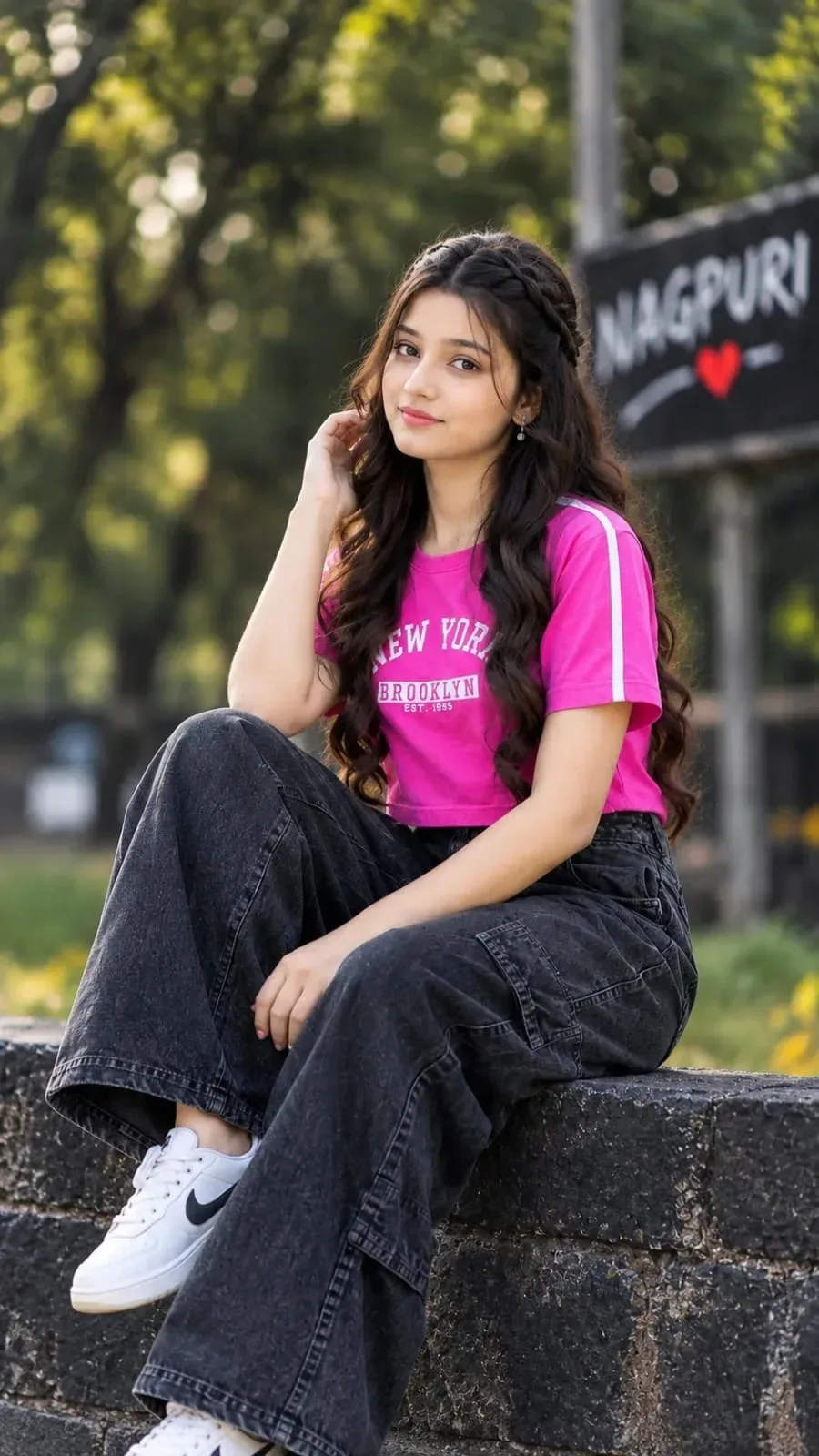
Create an ultra-realistic, professional Instagram portrait using my uploaded photo as the exact face and identity reference. IMPORTANT — FACE IDENTITY LOCK: Keep the girl's face exactly the same as in my uploaded reference photo. Preserve her original facial features, eyes, eyebrows, nose, lips, cheeks, jawline, skin tone, and natural face shape. Do not generate a different girl or change her identity. Keep her original natural makeup and facial proportions. The final result must look like the same person in my reference photo. Outfit: A bright pink cropped T-shirt with white sporty stripes on the sleeves and a subtle “NEW YORK BROOKLYN” graphic on the front, paired with loose-fitting black washed-denim cargo jeans and clean white sneakers. Hairstyle: Long, voluminous, naturally wavy brown hair with a small braid across the top of the head, flowing over the shoulders. Natural makeup, soft pink lipstick, and a gentle, confident smile. Pose: The girl is sitting casually on a dark stone ledge outdoors, with one knee raised and the other leg relaxed. One hand is gently touching her hair near her ear, while the other rests naturally on her leg. Her face is turned directly toward the camera, head straight, eyes clearly visible, and expression relaxed. Background: A beautiful outdoor park with lush green trees, soft sunlight, blurred foliage, and a dark signboard in the distance. Professional DSLR photography with a soft bokeh effect, natural lighting, realistic skin texture, sharp facial details, and cinematic color grading. Composition: Full-body vertical portrait, natural body proportions, both shoes visible, centered subject, 9:16 aspect ratio, Full HD 1080 × 1920 resolution, ultra-realistic, high detail, Instagram viral aesthetic. STRICT INSTRUCTIONS: Preserve the exact face and identity from my uploaded reference photo. Change only the outfit, pose, and background as described. No face distortion, no artificial skin smoothing, no extra fingers, no text overlays, no watermark, no social media interface, and no collage.
Scroll for more
App: ChatGPT Ratio: 9:16

Suggested Prompts

More in Social Media →
Photo Reproduction Guide

How to Recreate This Photo in ChatGPT

Follow this quick 4-step workflow to generate an identical visual style using the exact parameters tested for Create an ultra-realistic, professional Instagram portrait.

1

Copy the Recipe

Click the Copy Full Prompt button above. All key descriptors, lighting commands, and lens tags are copied directly to your clipboard.

2

Open ChatGPT

Open your ChatGPT app or web interface (e.g. ChatGPT chat, Bing Image Creator prompt bar, or Midjourney Discord).

3

Set 9:16 Ratio

Set your canvas size to 9:16. This gives you the natural composition shown above.

4

Customize Subject

Want your own face or a different subject? Simply change the character description or hair/clothing while keeping the lighting and camera tokens intact!

Pro Tip: To maintain this exact lighting in ChatGPT, keep the camera, aperture, and lighting keywords unmodified.
✓