Back to All Prompts
ChatGPT • 9:16
Coca-Cola Champion – Luxury Refreshment Advertising Portrait — ChatGPT AI Photography Prompt Recipe on Faymas
Product & Brand by Alex Rivera

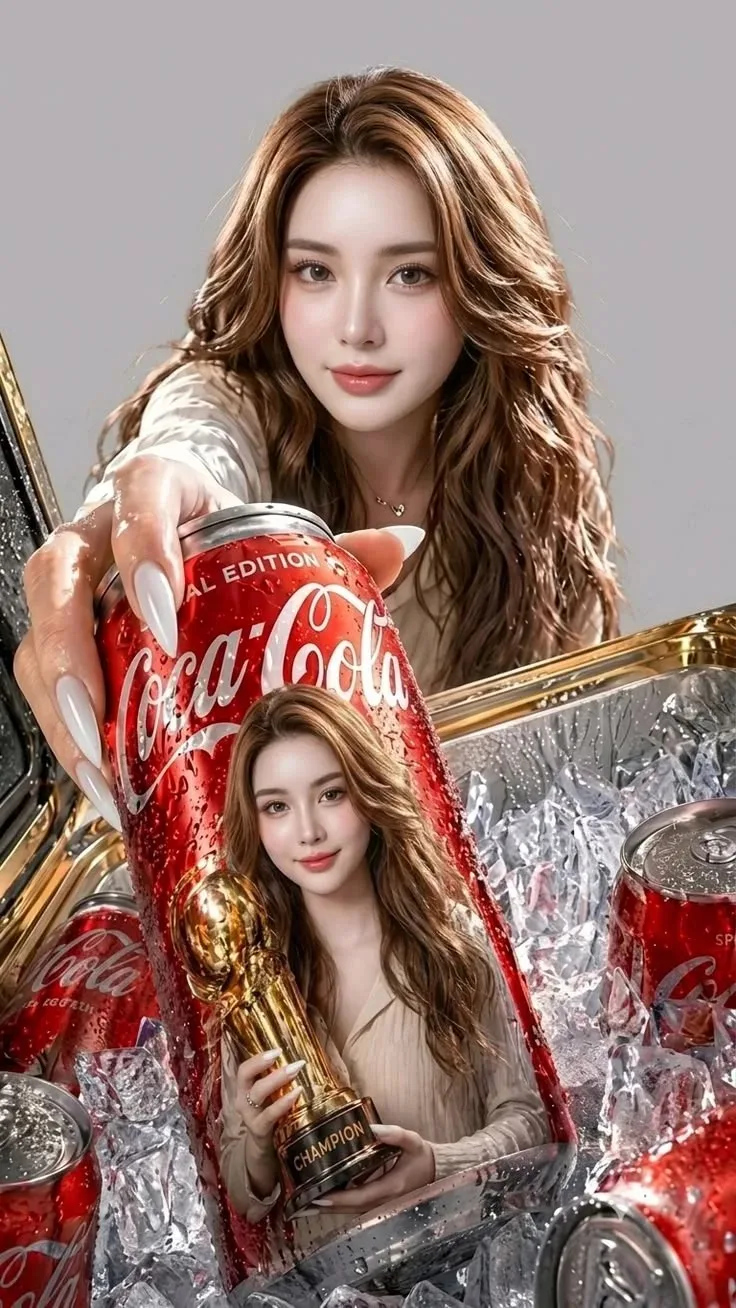
Coca-Cola Champion – Luxury Refreshment Advertising Portrait

Exact Prompt Recipe Scroll to read more
Create a high-end photorealistic commercial advertising portrait inspired by the reference image. A beautiful young woman with long, voluminous wavy light-brown hair, flawless natural makeup, soft pink lips, elegant features, and long glossy white almond-shaped nails is holding a large ice-cold Coca-Cola can toward the camera. The can is covered with realistic condensation droplets and has a premium red Coca-Cola design. In the foreground, the Coca-Cola can features a creative printed image of the same woman holding a golden championship trophy, creating a striking product-within-product visual effect. Surround the scene with multiple Coca-Cola cans partially buried in sparkling transparent ice cubes, with dramatic reflections and realistic water droplets. Use luxury commercial photography, cinematic studio lighting, crisp product details, glossy highlights, realistic skin texture, shallow depth of field, premium red-and-gold color palette, dramatic close-up perspective, highly detailed ice, realistic metallic reflections, sophisticated advertising aesthetic, 8K ultra-realistic quality, sharp focus, professional beverage campaign photography. Composition: vertical 9:16, woman centered in the background, oversized Coca-Cola can dominating the foreground, strong depth and perspective, clean neutral background, premium global-brand advertisement look.
Scroll for more
App: ChatGPT Ratio: 9:16
Photo Reproduction Guide

How to Recreate This Photo in ChatGPT

Follow this quick 4-step workflow to generate an identical visual style using the exact parameters tested for Coca-Cola Champion – Luxury Refreshment Advertising Portrait.

1

Copy the Recipe

Click the Copy Full Prompt button above. All key descriptors, lighting commands, and lens tags are copied directly to your clipboard.

2

Open ChatGPT

Open your ChatGPT app or web interface (e.g. ChatGPT chat, Bing Image Creator prompt bar, or Midjourney Discord).

3

Set 9:16 Ratio

Set your canvas size to 9:16. This gives you the natural composition shown above.

4

Customize Subject

Want your own face or a different subject? Simply change the character description or hair/clothing while keeping the lighting and camera tokens intact!

Pro Tip: To maintain this exact lighting in ChatGPT, keep the camera, aperture, and lighting keywords unmodified.
✓