Back to All Prompts
ChatGPT • 1:1
Breaking Through the Social Media Screen — ChatGPT AI Photography Prompt Recipe on Faymas
Social Media by Alex Rivera

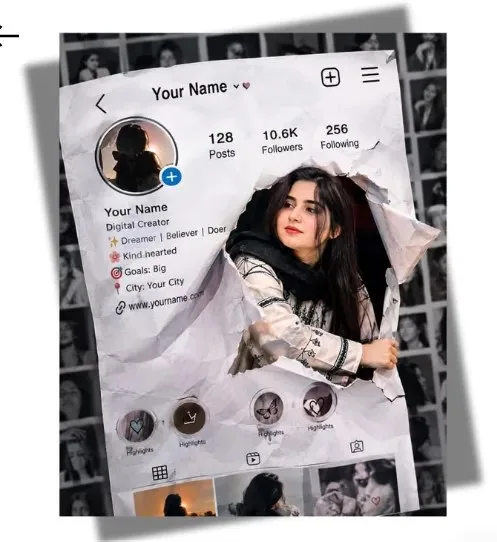
Breaking Through the Social Media Screen

Exact Prompt Recipe Scroll to read more
Create a creative, ultra-realistic 3D social-media illusion portrait inspired by the uploaded reference image. Show a realistic smartphone/social-media profile interface appearing as a large crumpled paper screen, with the subject dramatically breaking through the screen from inside the profile page. Preserve the subject’s facial features, hairstyle, skin texture, expression, and overall identity accurately. The subject should emerge naturally through a torn and wrinkled section of the paper interface, with one arm and upper body extending outside the screen, creating a convincing 3D pop-out effect. Keep the profile layout visually recognizable, including a profile photo area, follower/following statistics, bio section, highlight circles, and post thumbnails, but use generic fictional profile information. Place the main screen slightly tilted in perspective against a black-and-white collage background filled with blurred portrait photographs. Use realistic paper wrinkles, torn edges, shadows, depth, screen reflections, detailed facial texture, cinematic studio lighting, subtle highlights, realistic hands and clothing, strong foreground/background separation, premium digital-art photography, 8K photorealistic quality, vertical composition.
Scroll for more
Negative Prompt (Avoid)
distorted face, altered identity, extra fingers, extra limbs, deformed hands, unrealistic paper, flat 2D effect, blurry subject, plastic skin, cartoon, anime, low resolution, excessive saturation, readable brand logos, real social-media logos, watermark.
App: ChatGPT Ratio: 1:1

Suggested Prompts

More in Social Media →
Photo Reproduction Guide

How to Recreate This Photo in ChatGPT

Follow this quick 4-step workflow to generate an identical visual style using the exact parameters tested for Breaking Through the Social Media Screen.

1

Copy the Recipe

Click the Copy Full Prompt button above. All key descriptors, lighting commands, and lens tags are copied directly to your clipboard.

2

Open ChatGPT

Open your ChatGPT app or web interface (e.g. ChatGPT chat, Bing Image Creator prompt bar, or Midjourney Discord).

3

Set 1:1 Ratio

Set your canvas size to 1:1. This gives you the natural composition shown above.

4

Customize Subject

Want your own face or a different subject? Simply change the character description or hair/clothing while keeping the lighting and camera tokens intact!

Pro Tip: To maintain this exact lighting in ChatGPT, keep the camera, aperture, and lighting keywords unmodified.
✓