Back to All Prompts
ChatGPT • 2:3
Be Your Own Star ⭐ — ChatGPT AI Photography Prompt Recipe on Faymas
UI & Graphic by Alex Rivera

Be Your Own Star ⭐

Exact Prompt Recipe Scroll to read more
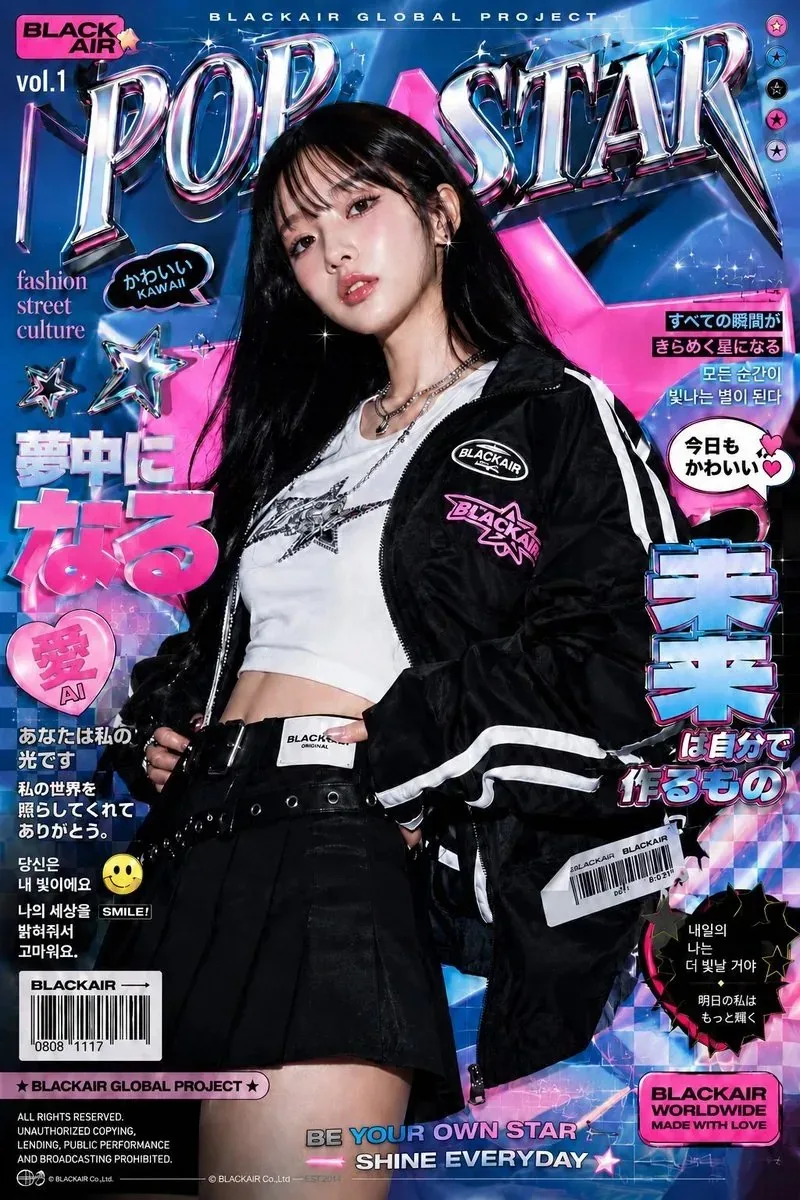
Create a high-resolution vertical 4:5 futuristic Japanese/Korean street-fashion magazine cover inspired by the reference image. Feature a confident young woman with long straight black hair and soft bangs, wearing a black oversized sporty track jacket with bold white racing stripes, a fitted white graphic crop top, black pleated mini skirt, wide black belt, layered silver necklaces, and a small futuristic crossbody/accessory detail. Use a vibrant electric blue, hot pink, chrome silver, and black color palette. Create a dynamic Y2K cyber-pop background with metallic 3D typography, glowing stars, chrome reflections, geometric shapes, neon grids, sparkles, stickers, speech bubbles, barcode graphics, Japanese and Korean-inspired editorial text elements, and glossy magazine-print effects. Main masthead at the top: “POP STAR” in huge reflective chrome 3D letters with pink and blue highlights. Add small header text such as “BLACKAIR GLOBAL PROJECT” and “vol.1”. Add bold Japanese-style headline graphics, small editorial captions, playful stickers, stars, hearts, arrows, barcodes, and futuristic labels around the subject without covering her face. Bottom headline: “BE YOUR OWN STAR” with a smaller line “SHINE EVERYDAY”. Style: premium K-pop/J-pop fashion magazine cover, Y2K cyber aesthetic, futuristic streetwear, glossy editorial photography, dramatic studio lighting, chrome typography, neon glow, sharp details, high contrast, energetic youthful design, realistic skin and fabric texture, professional magazine composition.
Scroll for more
App: ChatGPT Ratio: 2:3

Suggested Prompts

More in UI & Graphic →
Photo Reproduction Guide

How to Recreate This Photo in ChatGPT

Follow this quick 4-step workflow to generate an identical visual style using the exact parameters tested for Be Your Own Star ⭐.

1

Copy the Recipe

Click the Copy Full Prompt button above. All key descriptors, lighting commands, and lens tags are copied directly to your clipboard.

2

Open ChatGPT

Open your ChatGPT app or web interface (e.g. ChatGPT chat, Bing Image Creator prompt bar, or Midjourney Discord).

3

Set 2:3 Ratio

Set your canvas size to 2:3. This gives you the natural composition shown above.

4

Customize Subject

Want your own face or a different subject? Simply change the character description or hair/clothing while keeping the lighting and camera tokens intact!

Pro Tip: To maintain this exact lighting in ChatGPT, keep the camera, aperture, and lighting keywords unmodified.
✓