Back to All Prompts
ChatGPT • 9:16
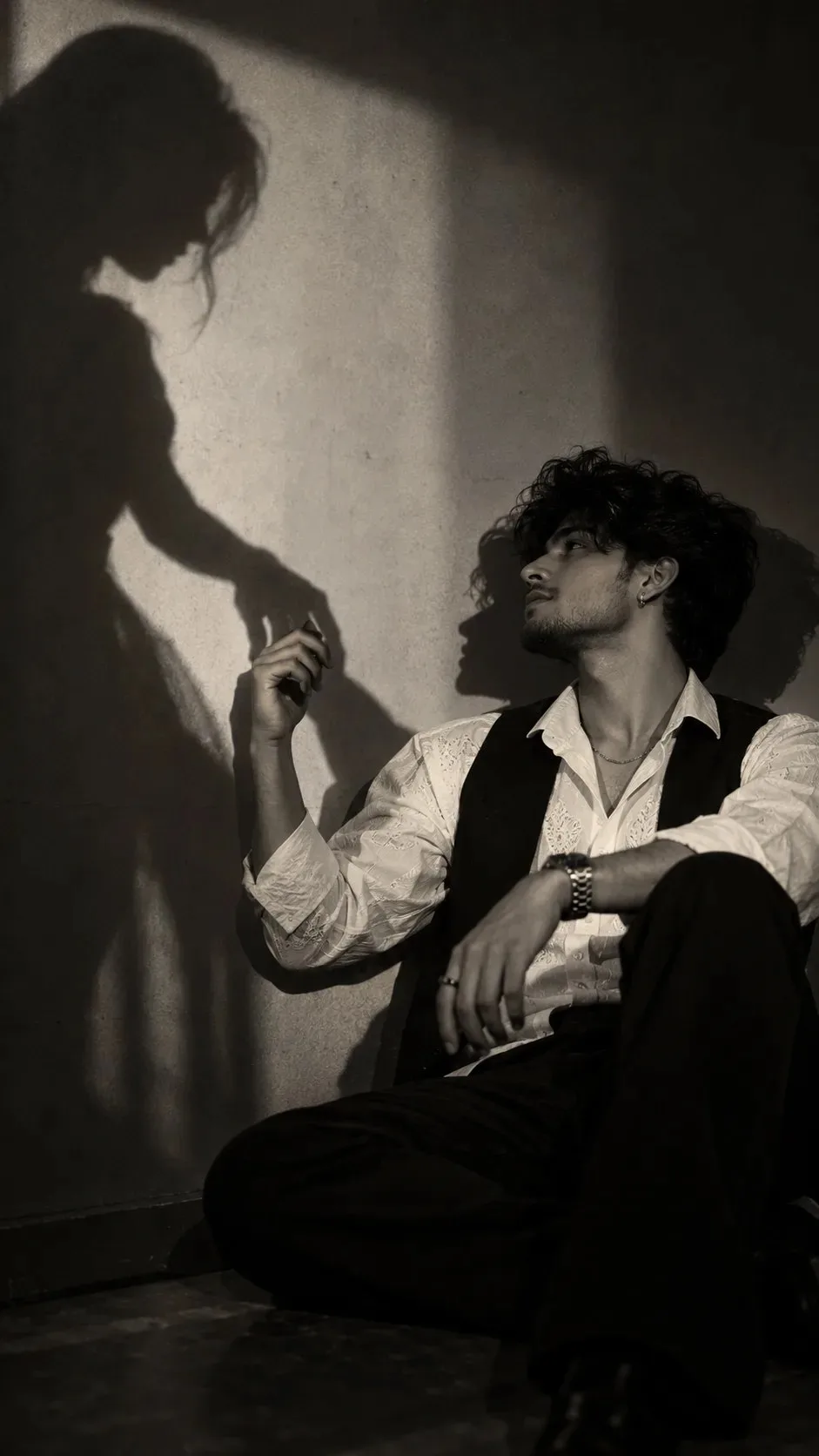
A Love Only Shadows Remember 🖤 — ChatGPT AI Photography Prompt Recipe on Faymas
Photography by Alex Rivera

A Love Only Shadows Remember 🖤

Exact Prompt Recipe Scroll to read more
A cinematic, moody black-and-white editorial photograph of the SAME boy from the uploaded reference image. Preserve the face with 100% identity accuracy—keep the exact facial structure, eyes, eyebrows, nose, lips, jawline, skin tone, hairstyle, expression, beard (if any), and natural features unchanged. Do not beautify, reshape, or reinterpret the face in any way. He has neatly styled dark hair with a soft textured finish and a few natural strands falling across the forehead. He is wearing a crisp white shirt with subtle embroidery, a tailored black waistcoat, black trousers, and a classic silver wristwatch, along with a thin silver chain and a simple silver ring. The scene features dramatic high-contrast lighting with a soft ethereal glow and delicate halation around the highlights, creating a luxurious 90s fashion editorial and film noir aesthetic. Behind him, a large silhouette of a woman is projected onto the wall. The woman’s shadow reaches out and gently holds his hand. The boy is looking at her shadow emotionally with a calm, natural expression, conveying love, longing, and deep connection. The atmosphere is mysterious, artistic, and cinematic, with soft focus, subtle film grain, rich monochrome tones, shallow depth of field, DSLR quality, ultra-realistic skin texture, premium fashion magazine styling, and an emotionally powerful composition. The final image should feel timeless, elegant, and deeply cinematic while keeping the boy’s face 100% identical to the uploaded reference image.
Scroll for more
App: ChatGPT Ratio: 9:16

Suggested Prompts

More in Photography →
Photo Reproduction Guide

How to Recreate This Photo in ChatGPT

Follow this quick 4-step workflow to generate an identical visual style using the exact parameters tested for A Love Only Shadows Remember 🖤.

1

Copy the Recipe

Click the Copy Full Prompt button above. All key descriptors, lighting commands, and lens tags are copied directly to your clipboard.

2

Open ChatGPT

Open your ChatGPT app or web interface (e.g. ChatGPT chat, Bing Image Creator prompt bar, or Midjourney Discord).

3

Set 9:16 Ratio

Set your canvas size to 9:16. This gives you the natural composition shown above.

4

Customize Subject

Want your own face or a different subject? Simply change the character description or hair/clothing while keeping the lighting and camera tokens intact!

Pro Tip: To maintain this exact lighting in ChatGPT, keep the camera, aperture, and lighting keywords unmodified.
✓